A workable work-lunch budget starts with what you actually spend, then turns that amount into a limit you can use on each workday. Add up the lunches you buy, decide which of those meals you want to keep buying, and set a monthly amount that fits after your bills and other priorities. The numbers below are examples, not a national average.
Start with the lunches you already pay for
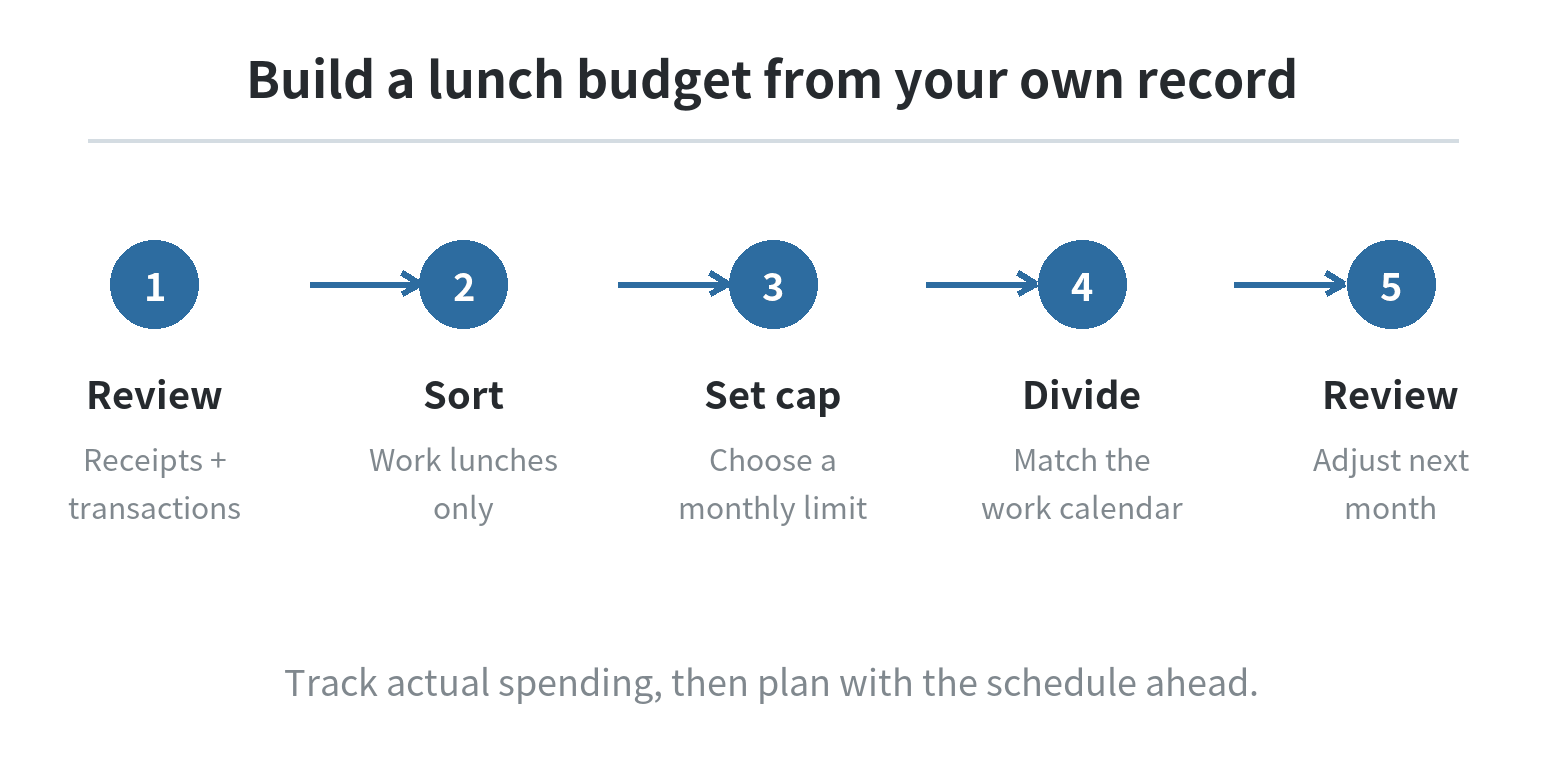
For a clear starting point, review your card and bank transactions and save any paper receipts that are missing from them. Include restaurant meals, takeout, cafeteria purchases, delivery fees, drinks, snacks, and tax or tip when those costs belong to lunch. Keep work lunches separate from groceries and dinners out so the line answers one question: what did lunch during workdays cost?
The CFPB recommends tracking spending to understand where money goes before building a budget. Its spending tracker suggests recording purchases for at least two weeks or a month; the FDIC Money Smart guide also uses a spending log and a planned monthly amount. Use those records as evidence for your own starting point, not someone else’s average.
If you work a changing schedule, count the workdays in the period instead of assuming every week looks alike. Mark days you brought food, bought a meal, worked from home, traveled, or attended a work event. A lunch covered by an employer should not be counted as your personal spending unless you paid for it yourself.
Turn the record into a monthly cap
Separate the total into lunches you want to keep buying and purchases you would be comfortable changing. A coffee bought with lunch can belong in the lunch line if that is how you want to manage it; consistency matters more than a perfect category label. Put meals for a client or team in another work-expense line if your employer reimburses them.
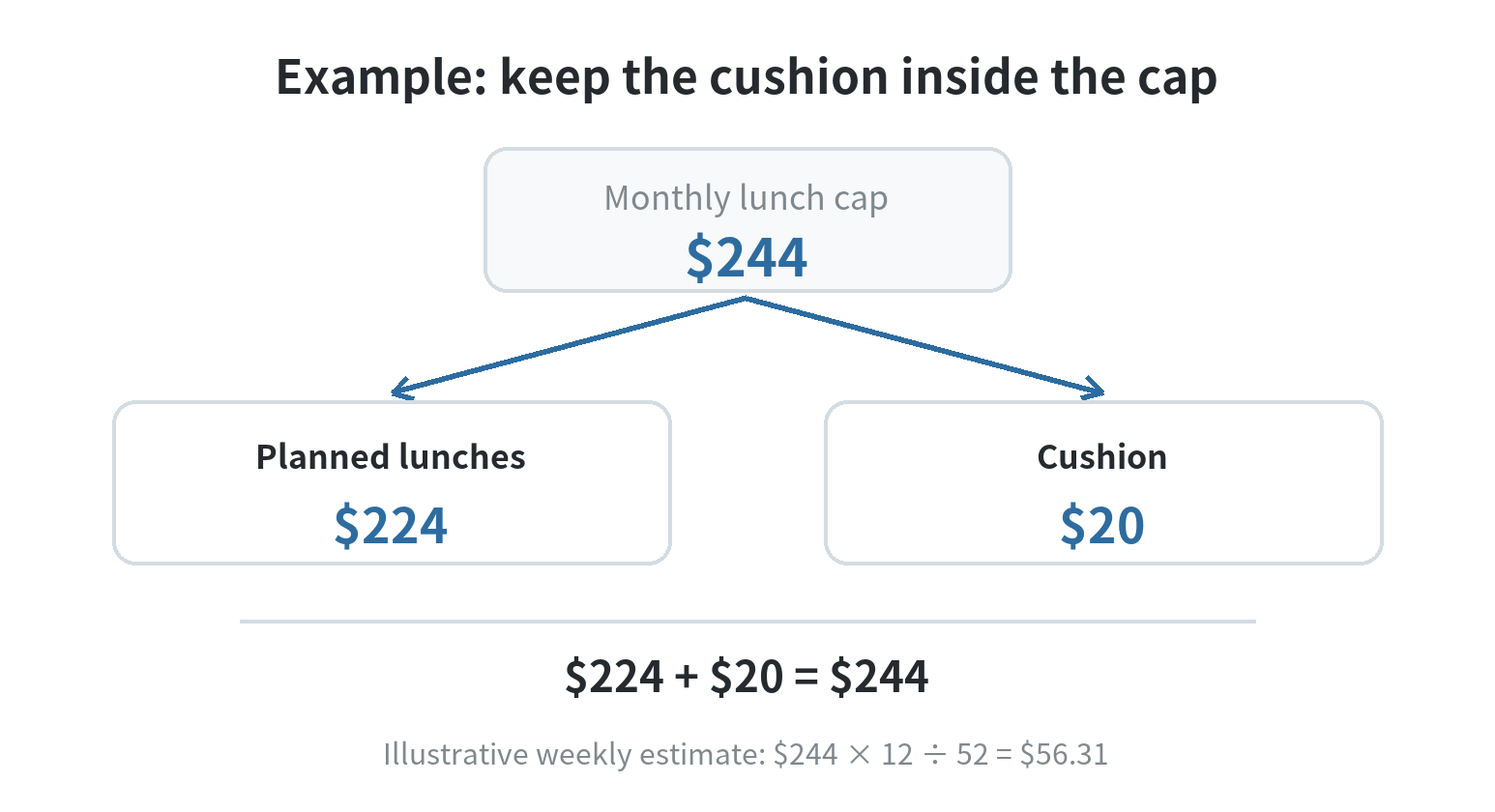
Suppose your records show 12 purchased lunches at $14 each and 4 at $19 each during a four-week stretch. That sample totals $244. If you want to plan for the same pattern next month, $244 is a starting cap; if you want to bring lunch on two of those days, subtract the amount you expect to spend on those meals at home only if you are separately tracking the food cost. Do not count a saving twice.
Next, compare the lunch amount with your take-home income and other planned costs. The CFPB monthly budget worksheet and FDIC spending plan both frame a budget around income, expenses, and the difference between them. If your planned spending already uses the money available, set a lower lunch cap only after identifying what you will change; a limit that ignores your actual schedule or needs will not help you decide at lunchtime.
Make the limit usable during the week
A monthly cap is easy to lose track of when every decision happens at noon. Convert it to a weekly pool by multiplying the monthly amount by 12 and dividing by 52, or use the exact number of weeks you are planning for. The FDIC’s Money Smart guide gives the same annual-to-weekly conversion for estimating a weekly spending amount.
For a $244 monthly lunch cap, the weekly estimate is about $56.31 using that conversion. If you have five office days in the week, that is an average of about $11.26 per office day, but it does not mean each meal must cost that amount. You could spend more on a day with a team lunch and less on another day, as long as the weekly total stays within the pool.
To make the plan less rigid, choose a cushion before the month starts. For example, hold $20 of the sample $244 aside for a week with an extra office day or a meal you already know you want to buy. That leaves $224 for planned lunches. Keep the cushion inside the cap instead of treating it as extra money.
If your pay arrives twice a month, you can split the monthly cap between pay periods. With the sample $244 limit, that is $122 per half-month. If workdays are uneven across the two periods, shift the amount to match the calendar. The total still has to remain inside the monthly cap.
For a month with a conference, a temporary shift, or planned overtime, estimate the number of days you expect to buy lunch before assigning the pool. Use the prices from your own recent receipts for those specific days, then leave the rest of the month’s allowance available for ordinary workdays. If the event meal is reimbursed, remove the expected reimbursement from your personal estimate only when you have a clear record of what will be repaid.
Choose what to adjust when the total runs high
If your lunch spending is above the plan, look at the transactions rather than cutting every meal by the same amount. Separate a higher-priced meal you chose in advance from small add-ons that appeared on several receipts. You might keep a weekly restaurant lunch and change the drink or side on other days; or use a packed meal on the days when your schedule makes that easiest.
Check the full transaction, not just the menu price. A delivery order may include charges beyond the food itself, while a cafeteria purchase can combine lunch with a snack for later. Put each cost in the category you have chosen and apply that rule consistently. If a work event is reimbursed later, record the purchase and reimbursement clearly so it does not distort the amount you spend out of pocket.
When the plan is tight, protect the amount you already assigned to bills and other essential costs. Adjust the lunch plan by changing a specific choice, reducing the number of paid lunches, or moving money from a category you deliberately decide to reduce. If there is no flexible money left, a smaller number on the lunch line will not create room by itself.
Review the plan against the next calendar
At the end of the week, compare your receipts with the weekly pool and note why the actual total differed. An extra office day, a business meeting, travel, or a forgotten snack can explain the gap. Use the next week’s known schedule to adjust the pool; do not rewrite the whole month based on one unusual day.
At month-end, compare the plan with the completed transactions. If the same planned amount repeatedly misses your actual work pattern, change the next month’s cap or the choices behind it. The FDIC guide recommends comparing planned and past monthly amounts and revising the plan when needed; the CFPB advises using tracked spending to build a realistic budget.
Before the new month begins, write down the cap, the weekly pool, and the cushion in one place you will see before ordering or paying. A note on paper, a spreadsheet, or a budgeting tool can all do the job. What matters is that the remaining lunch amount is visible when you choose, and that the total comes from your own records. If you prefer logging purchases on a phone, see our guides to budgeting apps and a smartphone budgeting system.
FAQ
Should I include coffee and snacks in my work-lunch budget?
Include them if you want the budget to cover the full cost of your midday routine. Use the same rule each month, and separate items you buy for another purpose.
How should I budget lunches when my work schedule changes?
Base the plan on the office days shown on your upcoming calendar. Keep a small cushion inside the monthly cap for added workdays, then update the weekly pool when the schedule changes.
What if my employer reimburses a work lunch?
Record the purchase and reimbursement separately so you can see what left your account and what was repaid. Keep reimbursable business meals apart from your personal lunch line.
Can I set a weekly lunch budget instead of a monthly one?
Yes. A weekly pool can be easier to check during the workweek; make sure the weekly amounts add up to the monthly limit you chose.
Last updated: 2026-09