Choose a well pressure tank by usable drawdown, not the large gallon number on its label.
Match that drawdown to the pump’s flow and required run time.
Set precharge from the switch’s cut-in pressure.
Keep three numbers separate: total tank capacity, water delivered between cycles, and switch settings.
Use the manuals for the installed pump, switch, and tank to confirm the model and settings.
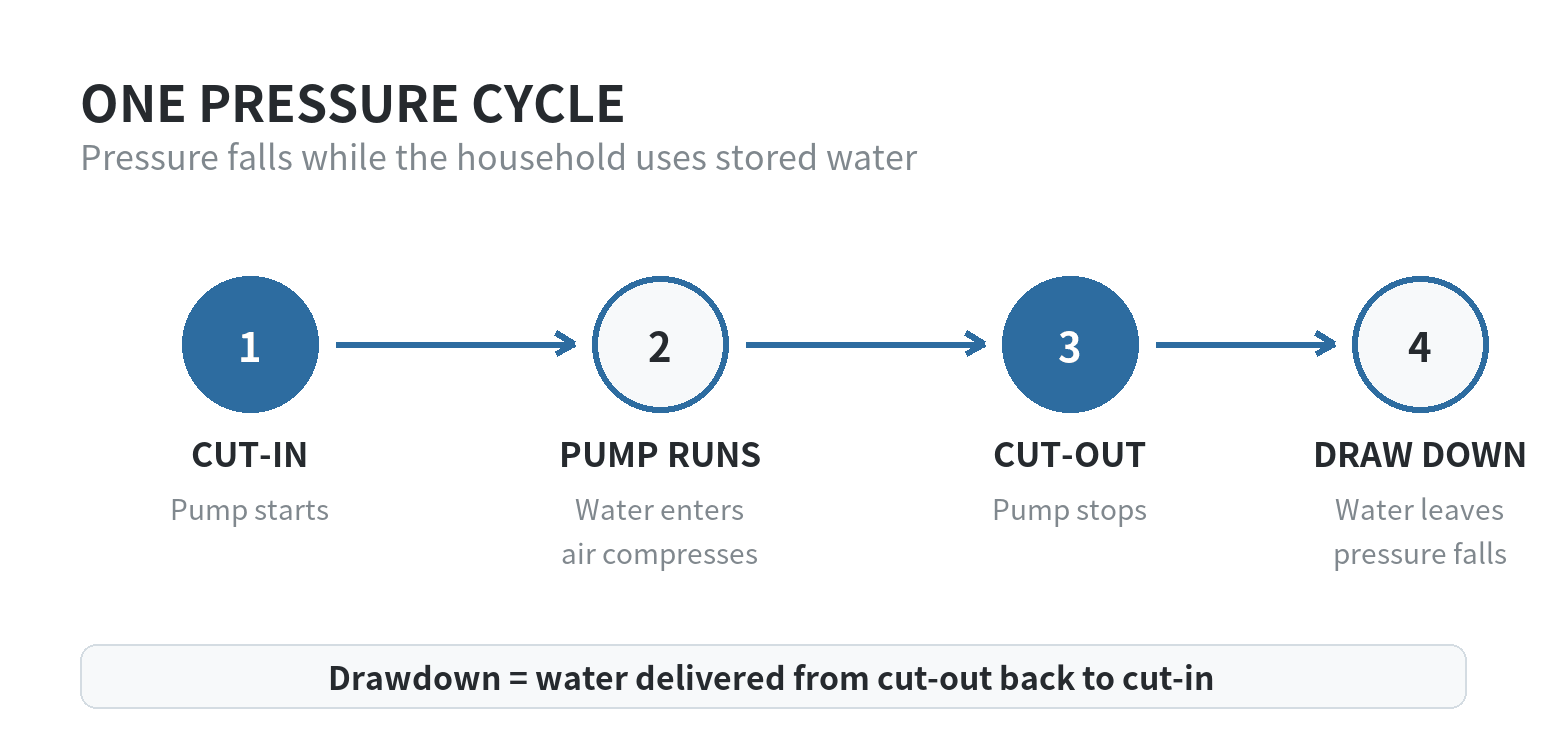
Drawdown is the water available between pump cycles
A precharged tank holds air and water in separate chambers.
Incoming water compresses the air.
The pump stops at cut-out pressure.
As the household uses water, pressure falls.
The cut-in point starts the pump again.
Water supplied during that pressure drop is drawdown.
Amtrol’s Well-X-Trol manual describes this cycle and gives a 40/60 PSI example.
The pump starts at 40 PSI and stops at 60 PSI.
A tank labeled with a total volume does not provide that full amount as drawdown.
The air cushion takes up space throughout the cycle.
Start with pump flow and the manufacturer’s run-time table
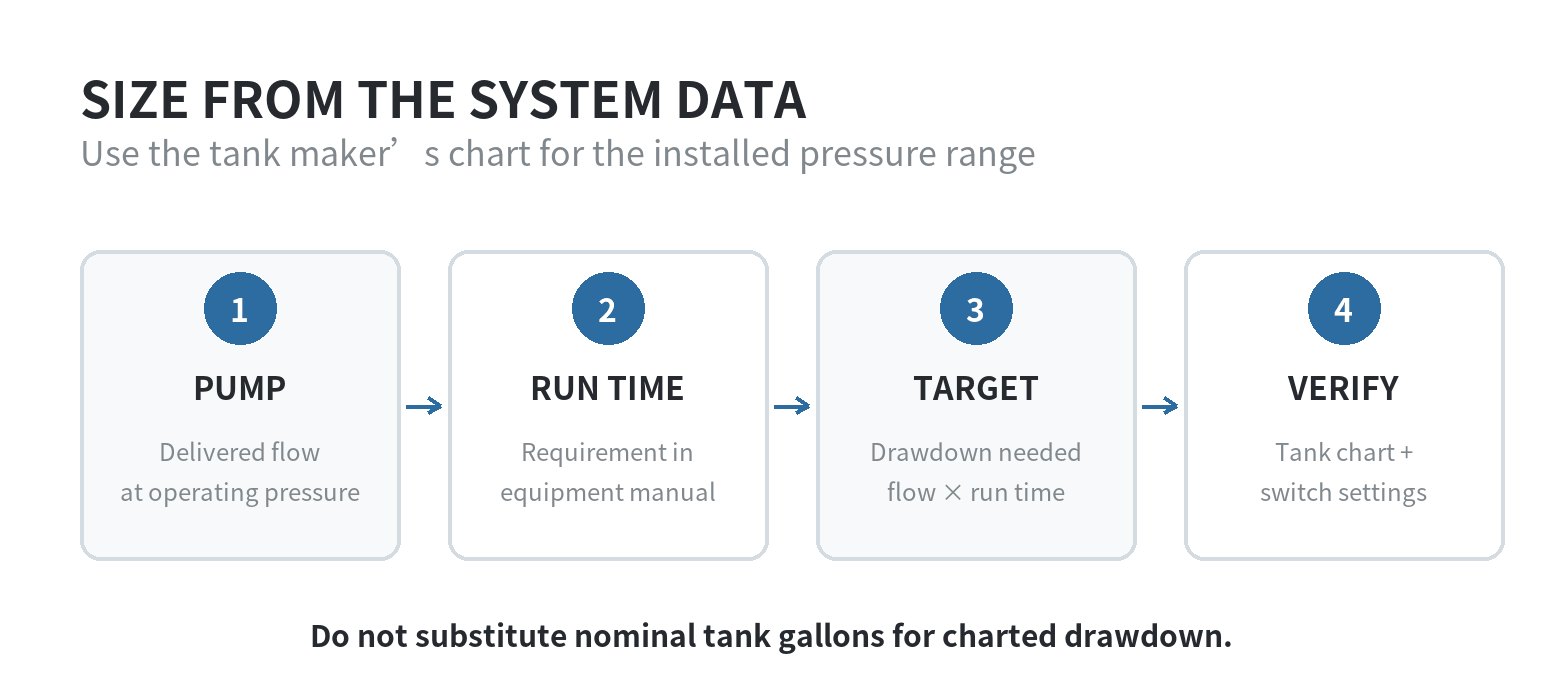
Find the pump’s delivered flow at operating pressure from its performance chart or service records.
Its advertised maximum flow may describe a different operating point.
Record the motor rating and pressure-switch pair too.
A tank sizing chart may use all three inputs.
Tank makers publish charts matching pump flow and switch settings to a tank or tank combination.
Amtrol’s Quick Sizing Table separates systems by horsepower, run time, and pressure pair.
At 10 GPM and 40/60 PSI, Amtrol lists different selections for its one- and two-minute columns.
Use the current chart for the tank family you are considering.
Its model names and rows are manufacturer-specific.
Pentair’s WellMate catalog gives an example using an 8 GPM pump, a one-minute minimum run time, and a 30/50 PSI range.
Multiplying flow by run time gives an 8-gallon drawdown target.
The catalog’s 0.30 pressure factor gives a 26.7-gallon minimum tank volume (8 ÷ 0.30).
This shows why usable drawdown and total capacity are different values.
The 0.30 factor belongs to Pentair’s table.
Do not carry it into another maker’s chart.
Identify pump flow and required run time, then find the drawdown factor for your switch range in the tank instructions.
Use that chart or formula.
Pentair’s catalog says to use a larger water-volume need when household storage demand exceeds the pump-based target.
Use the flow figure named by the sizing chart.
One may say “pump discharge rate”; another may specify average delivery rate or rated pump GPM.
A package’s maximum rating may describe a different point from the flow delivered at your home’s pressure and lift.
Check the pump curve or service record.
If those records lack the figure the chart requires, ask the pump installer to establish it.
Read the tank chart at your switch setting
Drawdown changes with the pressure range.
A 30/50 PSI chart is not interchangeable with a 40/60 or 50/70 chart.
Check the exact cut-in and cut-out columns.
Select a listed capacity that meets the chart’s requirement for your pump and motor.
If several tanks will provide the drawdown, confirm that the maker permits that arrangement and that they share the system correctly.
Amtrol’s current chart has columns for one- and two-minute run times.
At 10 GPM and 40/60 PSI, the listed selection changes between those columns.
Reading only the pressure pair or pump GPM is not enough.
Each input points to a different part of the chart.
For two installed tanks, use their combined listed drawdown at the system pressure.
Do not add their nominal gallon labels instead.
Pentair’s Pro-Source manual says matching precharged tanks can be connected to increase usable drawdown.
Check the maker’s sizing instructions for the number and models being combined.
Do not substitute total tank gallons for the chart’s drawdown figure.
Equal-capacity tanks can provide different drawdown at different pressure ranges.
For a constant-pressure or variable-speed system, use its own tank instructions.
A conventional pressure-switch chart may not apply.
Check the switch location and the pressure it actually sees
The tank and pressure switch need to read the same system pressure.
Amtrol recommends placing its well tank close to the switch to reduce friction-loss and elevation differences between them.
If the tank sits at the end of a long pipe run, Amtrol says the switch should be moved near the tank or adjusted to account for line pressure drop.
That matters when a gauge near the tank and a switch farther away appear to show different pressures.
Record where the switch, tank, and gauge sit before selecting a replacement.
Readings can differ across separated components.
Long piping or a change in elevation affects what each point shows.
Do not raise the cut-out setting just to chase a pressure reading at a distant faucet.
The pump still has to reach that cut-out pressure, and the pump and tank must remain within their manuals’ operating limits.
Use symptoms as a reason to check, not as a tank-size measurement
A pump that starts and stops quickly can point to a tank or pressure-control problem, but it does not tell you which tank size to install.
Amtrol’s support page lists rapid cycling as a tank-related symptom and directs owners to check precharge with the water pressure drained.
Look at the service records before using the symptom to choose a larger tank.
A change in precharge, a failing tank bladder, or a switch issue can alter how the system cycles.
Use the manufacturer’s troubleshooting instructions to check the cause.
If pressure falls or rapid cycles continue after those checks, ask a well-pump technician to inspect the tank, switch, gauge, and pump together.
The distinction also helps when replacing a tank that appears to have a large label capacity.
Compare its listed drawdown at your switch range with the target from the pump and run-time calculation.
A large nominal gallon number alone cannot show whether the system has enough usable water per cycle.
Set precharge from cut-in, with the tank empty
For the tanks covered by its instructions, Amtrol sets precharge 2 PSI below switch cut-in.
Pentair’s pressure-tank manual gives the same rule.
At 40/60 PSI, the example precharge is 38 PSI.
At 30/50 PSI, it is 28 PSI.
Measure precharge only when the tank contains no water pressure.
Amtrol’s instructions say to drain the tank before checking or changing the setting.
Use a gauge at the tank’s air valve, replace the valve cap, and follow that tank’s manual.
A pressurized water side does not give an empty-tank reading.
Keep cut-in and cut-out values separate from precharge in your notes.
For a 40/60 cycle, the precharge target uses the 40 PSI start point.
Changing the switch range changes the sizing-chart column too.
Recheck tank drawdown and pump limits before changing a setting.
The switch setting is a separate adjustment.
Raising cut-out pressure does not make a small tank larger.
It can also move the pump beyond its rated range.
Ask a well-pump professional to check the pump curve, switch, tank, relief protection, and plumbing before a pressure change.
Bring these records before choosing a replacement
- Tank label or model, including its drawdown chart or manual.
- Pressure-switch cut-in and cut-out readings, not just the switch label.
- Pump model, motor rating, and delivered flow at the system’s operating pressure.
- Current empty-tank precharge and any service notes about cycling or pressure changes.
Before taking the information to a tank chart, write down which figures are measured and which came from a label or manual.
Include the switch location and tank model alongside the pressure pair.
If equipment has changed since the old tank was installed, do not assume the old chart selection still fits.
Confirm pump flow, motor details, pressure range, and tank instructions as one system before choosing.
If the pump model or flow is unknown, identify it before comparing tank sizes.
Our well pump selection guide explains which records establish the operating point.
For household pressure checks, see our guide to tracking down weak water pressure.
FAQ
Will a larger tank increase the pressure at my faucet?
No.
Tank size changes water available between cycles.
Cut-in and cut-out settings control the pressure range.
A pump, plumbing restriction, or pressure-control issue may need separate diagnosis.
Can I use a constant-pressure tank chart with a standard pressure switch?
No.
Use a chart made for the well’s control system.
Variable-speed and constant-pressure systems can have different sizing and precharge instructions.
Why does the tank gauge read differently from the pressure switch label?
The label describes the intended switch range; the gauge shows pressure at its location.
Gauge accuracy and switch condition can affect readings.
Compare readings during a pump cycle.
Have a technician verify the controls if they disagree.