Choose a robotic lawn mower by mapping the grass it must cover, measuring the steepest slopes, and checking whether its boundary system fits the yard.
The advertised lawn area is only a starting point: a divided lawn, tight passage, or incline can change which model works. Before comparing products,
sketch the mowing area and check the exact model’s manual for separate limits inside the lawn and at its edge.
Measure usable grass, not the whole lot
Start with the turf the mower can actually reach. Exclude the house, driveway, deck, planting beds, pool surround,
and any area that must remain untouched. A property listing’s lot size includes buildings and non-lawn space,
so it is not a useful substitute for mowing area.
For a simple rectangular lawn, multiply length by width. For an L-shaped yard, split it into rectangles, calculate each one, then add them.
As a made-up example, a 60-by-40-foot grass rectangle is 2,400 square feet; a separate 20-by-15-foot patch adds 300 square feet,
for 2,700 square feet total. Subtract beds or other exclusions that sit inside those shapes.
Next, look at how that area is connected. A narrow neck between front and back grass, a gate,
or a path with a sharp turn can matter as much as total square footage. A product’s rated capacity may refer to a simple open layout;
use the manufacturer’s stated area capacity and note whether it is based on systematic or irregular mowing. One U.S. manufacturer product page,
for example, distinguishes 1 acre of systematic capacity from 0.5 acre of irregular capacity (Husqvarna, checked October 22, 2026).
Those figures describe that model only, not a category-wide standard.
Measure the steepest section in percent
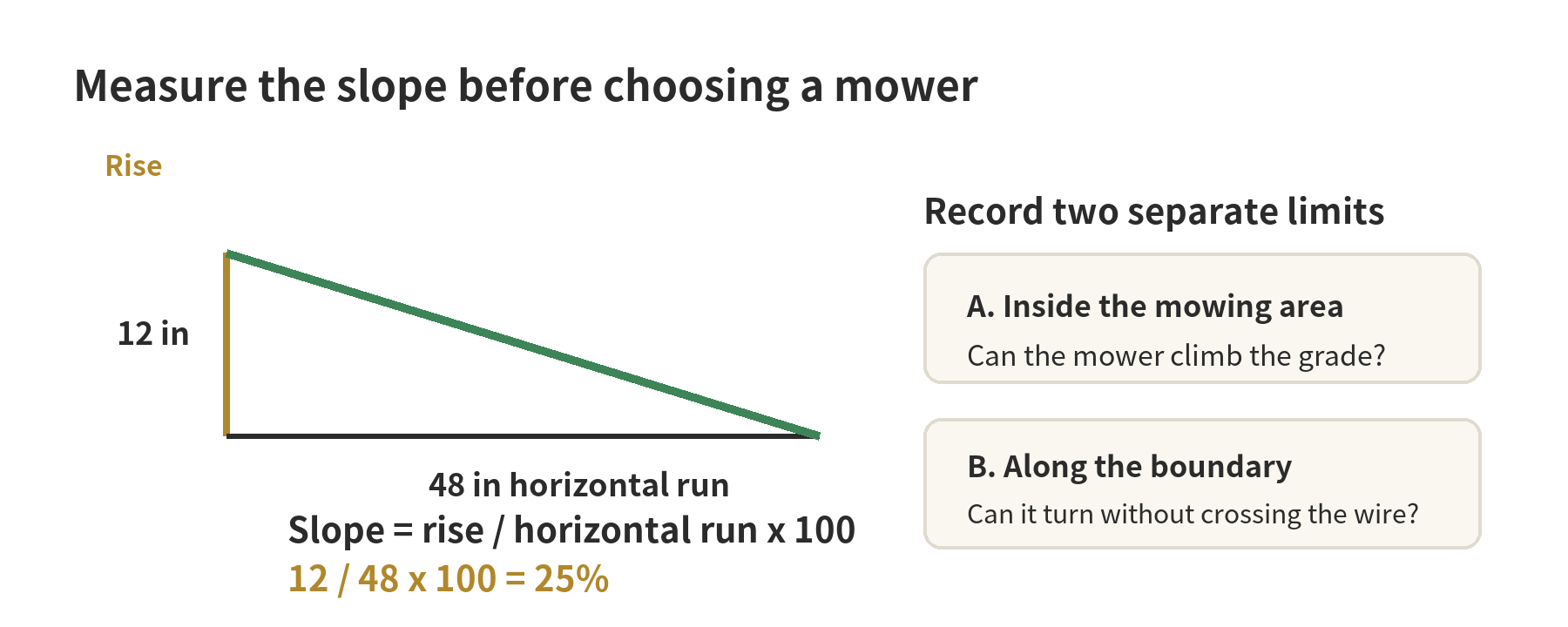
Do not judge a slope by appearance alone. Measure its vertical rise and horizontal run, then calculate: rise divided by run, multiplied by 100.
If a 48-inch horizontal span rises 12 inches, the grade is 25%.
Husqvarna’s slope guide uses the same percentage formula and warns that allowed grades differ by model (checked October 22, 2026).
Check two specifications in the manual: the maximum slope within the working area and the maximum slope beside the boundary.
These are separate limits. A mower may climb a steeper hill in the middle than it can handle while turning near a perimeter wire.
Do not use one number to represent both situations.
Measure the steepest short run, including the transition where a flat lawn meets a hill. Note wet spots, loose soil, roots,
and obstacles that would force a turn on the incline. The manufacturer’s limits apply to its specified conditions;
an obstacle can require a tighter turn, and Husqvarna’s installation guidance says to isolate slopes beyond the selected model’s limit.
If the measured grade exceeds either listed limit, plan that section as a no-mow area rather than assuming the mower will manage it.
Decide whether a physical boundary wire fits the layout
A boundary wire marks the area the mower may enter. On wire-based systems,
it forms a loop around the lawn and may also route the mower back toward its charging station.
Some models use guide wires for narrow passages or remote sections. Other systems define boundaries virtually,
so check the installation method before assuming a product needs perimeter cable.
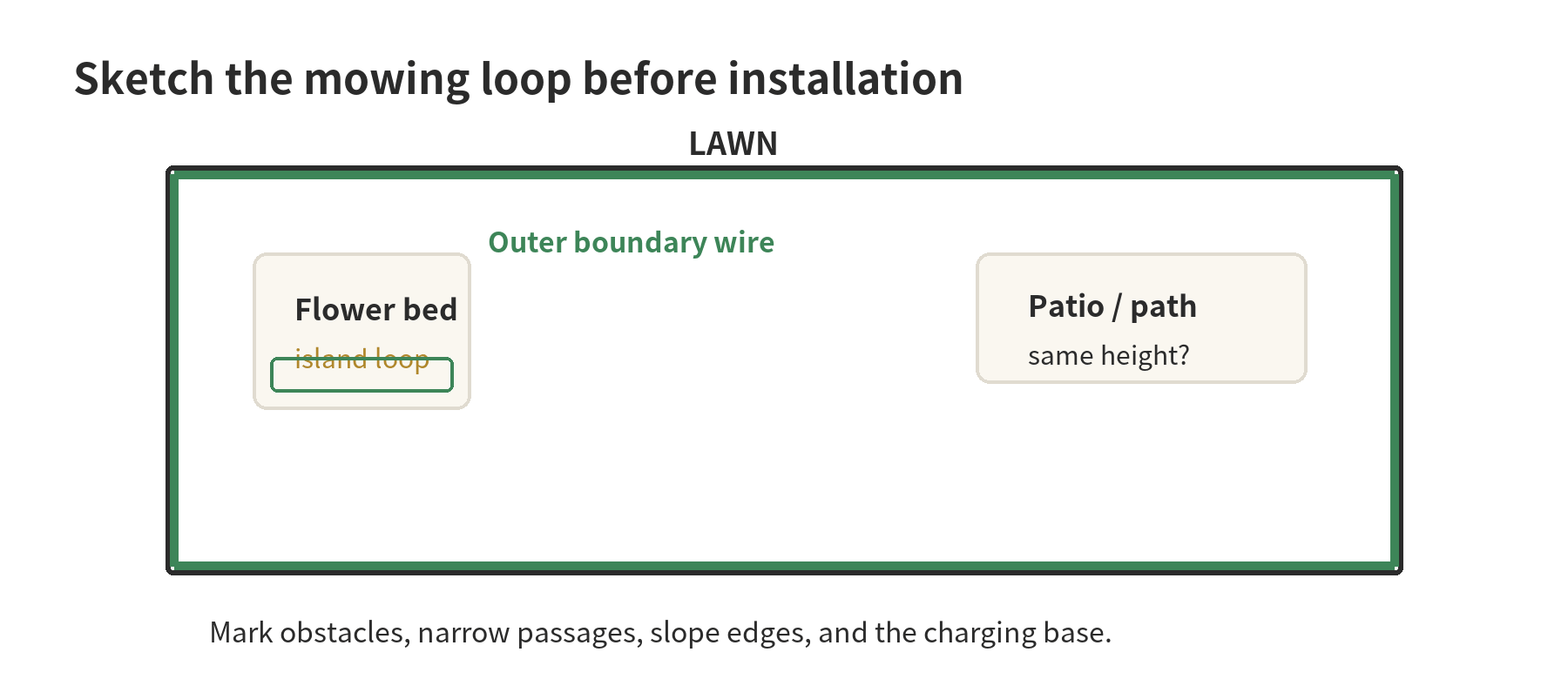
Draw the outside perimeter first, then add islands around ponds, flower beds, exposed roots, or other areas the mower must avoid.
Mark the charging base, outlet, gates, paths, and any disconnected lawn sections. Manufacturer instructions set different wire distances for a step,
gravel, a flush path, or a pool edge. For example,
the Landroid Classic installation plan specifies 26 cm (about 10 inches) from a step or gravel and 10 cm (about 4 inches) from a same-height path;
those instructions apply to that system and should not be copied to another model (Worx, checked October 22, 2026).
On the sketch, use a different mark for the perimeter loop and each obstacle island so the route stays readable.
Trace a proposed wire around the edge, then follow it back to the charging station; mark places where the route would cross a gate, walkway, or slope.
Compare each edge type with the manual’s installation drawing. One yard can have a retaining step on one side and level pavers on another,
so the setback may differ along the perimeter.
Write down each surface and whether it is level before applying the model’s measurement for that segment.
Test the route on paper before setting stakes. A line around a flower bed that returns beside the outgoing wire can make a clean loop,
while an extra bend that does not serve a mowing boundary can complicate installation planning. Use the guide’s examples for corner turns, islands,
and return connections, then check the actual lawn walk-through for obstacles the top-down sketch missed.
Where two lawn sections connect through a narrow passage, verify the mower’s minimum passage width and whether it needs a guide wire.
Also check how its instructions handle separate work areas that cannot be reached through a mowable route.
A second zone in an app does not necessarily mean the mower can physically travel to it.
Walk the route before selecting a model
Walk the full mowing route with the sketch in hand. Compare each gate, corner,
and narrow link with the model manual’s passage and turning requirements. A route that looks open from above may narrow beside a post or hedge.
Mark changes in surface, such as lawn meeting gravel, paving, or a raised edge.
Note where wheels could lose traction or the deck could touch the ground.
The installation drawing for the exact mower determines the wire setback at each transition.
Check the charging location for a level approach, a reachable power connection, and room for the mower to enter and leave.
Trace the return route on the plan as carefully as the mowing loop. Keep the base away from a spot where routine yard work blocks its approach.
For a divided lawn, trace the complete path between sections. Record the narrowest clear width and every turn along it.
If the mower cannot travel between zones, confirm whether its manual describes a separate area that must be started or moved by hand.
Repeat the walk after marking obstacles on the sketch. A tree trunk, low branch, garden edging, or hose may not appear in a property plan.
Mark anything that can obstruct travel, then check whether the manual calls for an island, a clearance, or removal from the mowing area.
Keep observations separate from measurements. Write the slope reading, passage width, edge surface,
and obstacle beside the relevant part of the drawing.
This gives you a consistent list to compare against each candidate’s manual instead of relying on memory.
Before installation, compare the marked plan with the manufacturer’s full setup sequence. Check how the guide handles islands, the charging base,
wire joins, and the route back to the base. Resolve an unclear crossing or disconnected section with the manufacturer before fixing the wire in place.
Use a short preselection checklist
- Area: Write down the measured grass total and keep the shape of each section on the sketch.
- Grade: Record the steepest slope percentage inside the lawn and at the perimeter separately.
- Connections: Measure narrow passages and note steps, gravel, gates, and paths.
- Exclusions: Mark beds, water features, steep areas, and obstacles that need a wire island or a supported virtual zone.
- Installation: Confirm whether the exact model uses perimeter wire, guide wire, virtual mapping, or a combination.
- Materials: Check what installation materials are included.
- Capacity: Match the model’s stated area limit to your usable turf, and check how the maker defines that capacity.
Keep the sketch and measurements beside the model’s official specification page and manual. If one required figure is missing,
ask the manufacturer to identify the limit for that exact model and installation type before treating the yard as a fit.
FAQ
Can one robotic mower handle a front yard and a backyard?
It depends on whether the two grass areas are connected by a route the mower can use. Check the manual for secondary-area setup, passage requirements,
and whether the mower must be carried between sections.
Does a larger advertised lawn capacity mean it will handle a steep yard?
No. Area capacity and slope capability are separate specifications. Compare usable grass area with the capacity figure,
then check both the inside-slope and boundary-slope limits for the exact model.
Can I bury a boundary wire immediately?
Follow the installation instructions for that mower.
Worx’s Landroid Classic guide says to lay the wire on the surface and test it before burying it a few centimeters deep if needed;
other model instructions may differ (checked October 22, 2026).
What if my slope is within the limit but the mower slips?
Recheck the grade and installation against the manual, including where the wire crosses the incline. If the lawn is wet, rough,
or interrupted by obstacles, contact the manufacturer for model-specific guidance and consider excluding that section.
Last updated: 2026-10