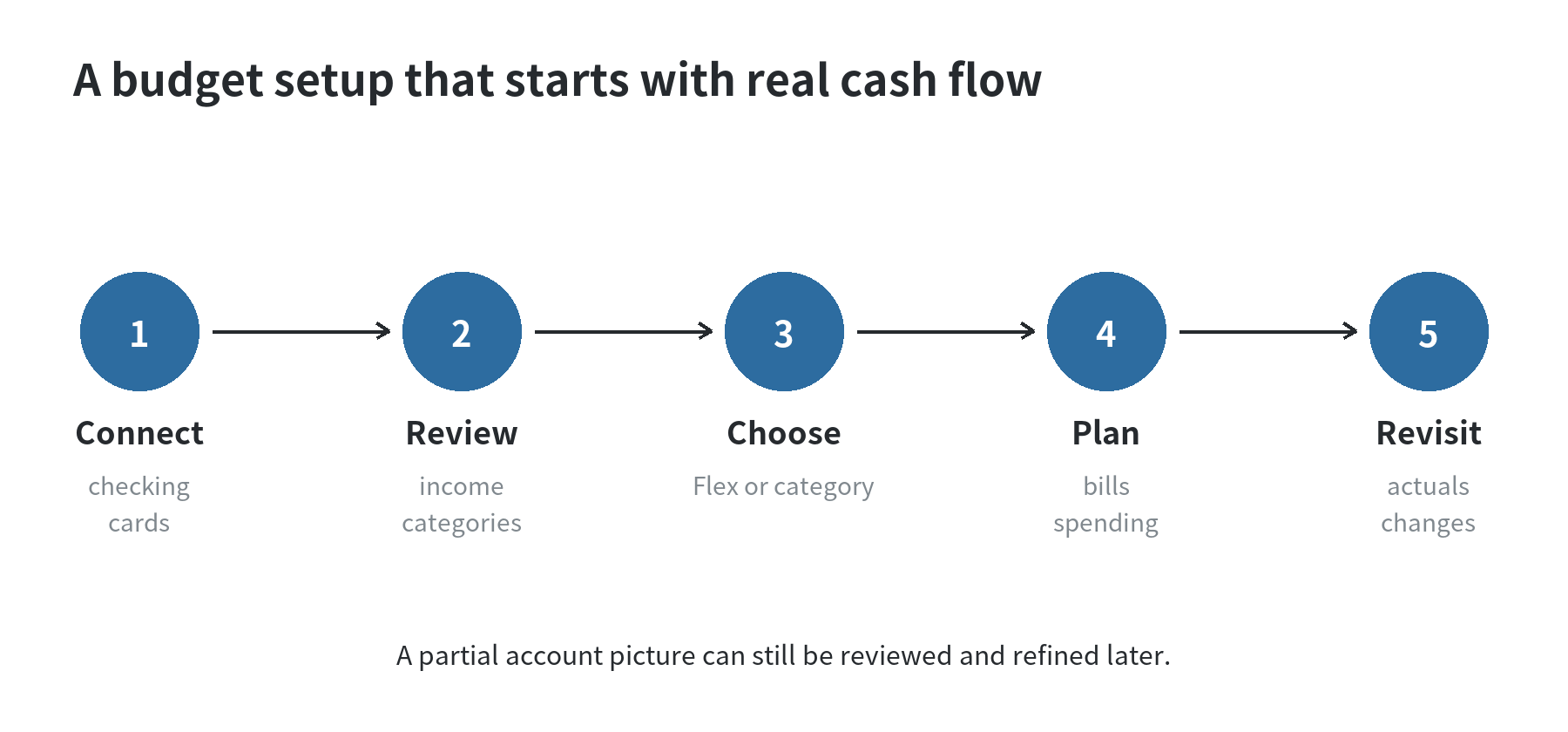
To budget with Monarch Money, connect your main spending accounts, correct imported transactions, then choose Flex or category budgeting.
Start with take-home income and known bills; adjust uncertain spending after reviewing the month.
Connect the accounts that explain your monthly cash flow
Begin with the checking account where pay arrives, the savings account you use for planned transfers, and the cards that carry regular purchases.
Monarch’s Getting Started guide says accounts can be added later, so an account that will not connect does not need to hold up the first draft.
The same guide describes account connections as read-only and says money cannot be moved through Monarch.
(Monarch Help Center, checked September 30, 2026.)
Include the accounts that affect this month’s spending.
A card account shows purchases when they post; paying the card is a transfer, not a second purchase.
Monarch says transfers and card payment categories are excluded from budget and cash-flow totals.
Check the category if a payment appears as an expense.
(Monarch Help Center, checked September 30, 2026.)
You can still make a first pass if a savings account, loan, or another card is missing.
Note what is absent, build the visible portion of the budget, and return to the account list when access is restored.
A budget based on incomplete transactions needs review; it should not be treated as a full household ledger.
For a separate phone-based tracking routine, see our guide to building a simple budget tracker on your smartphone.
Correct the transaction list before trusting category totals
Check income entries first.
Monarch’s budget uses expected monthly income, so a paycheck assigned to an expense category can distort the amount available.
Confirm paychecks are recorded as income.
Identify refunds, transfers, and card payments before using the totals.
Monarch’s Getting Started guide and budget help page both put income categorization before budget setup.
(Monarch Help Center, checked September 30, 2026.)
Scan recent transactions for labels that do not match what you bought.
Monarch’s Getting Started guide recommends reviewing about three months of history.
The budget page initially suggests category amounts using average spending over the last six months.
These are app guidance and a starting calculation, not a required waiting period.
Edit an amount if the history includes a one-time purchase or partial month.
(Monarch Help Center, checked September 30, 2026.)
Keep categories that answer a question you ask: separate groceries and restaurants if you track them differently.
Monarch lets you disable, rename, or create categories.
Transaction rules can rename merchants, recategorize activity, or add tags.
Review a rule’s preview so a broad match does not hide a purchase you meant to track.
(Monarch Help Center, checked September 30, 2026.)
Choose a view that matches how closely you want to track spending
Monarch offers Flex and category budgeting.
Flex groups less predictable spending into a flexible amount; category budgeting sets individual amounts for groceries, restaurants, or clothing.
Choose the broader view for a simpler check-in, or use category limits to see which kind of purchase uses the room.
Monarch’s help pages describe switching styles in Budget settings.
(Monarch Help Center, checked September 30, 2026.)
Choose the view you will check and understand.
A single $500 flexible-spending amount may be easier to use than many small categories.
If dining out and groceries compete for the same dollars, separate amounts make that tradeoff visible.
Revise the categories or budget style after seeing the first month; default amounts are editable estimates.
Give the month’s take-home pay a job
Use money expected to arrive during the month, then account for planned expenses and savings.
This matches Monarch’s monthly cash-flow approach: expected income is the starting total, and planned expenses and savings are subtracted to balance the month.
Do not enter gross salary if taxes and payroll deductions never reach the accounts you are budgeting from.
(Monarch Help Center, checked September 30, 2026.)
Here is a made-up example you can replace with your own numbers.
Suppose the household expects $4,800 in take-home income.
A first draft might reserve $1,600 for rent and $250 for utilities.
It could also plan $600 for groceries, $300 for transportation, $400 for debt payments, $700 for savings, and $950 for flexible purchases.
Those lines total $4,800.
The figures are only a worked arithmetic example; use your own bills, due dates, and priorities rather than treating these amounts as a benchmark.
If rent is due before the next paycheck arrives, write the deposit date beside the planned amount in your calendar.
A monthly total tells you whether the plan balances; the date check helps you see whether cash arrives before the bill is due.
Enter fixed bills first.
For variable costs, use recent statements and flag any unusual month.
If planned spending exceeds income, adjust a category or a non-urgent goal contribution.
If money is unassigned, give it a purpose such as savings, debt payments, or flexible spending.
For a broader tracking routine, see our monthly budget walkthrough for phone users.
Use rollovers for expenses that cross month boundaries
A monthly reset can make an irregular expense look misleading.
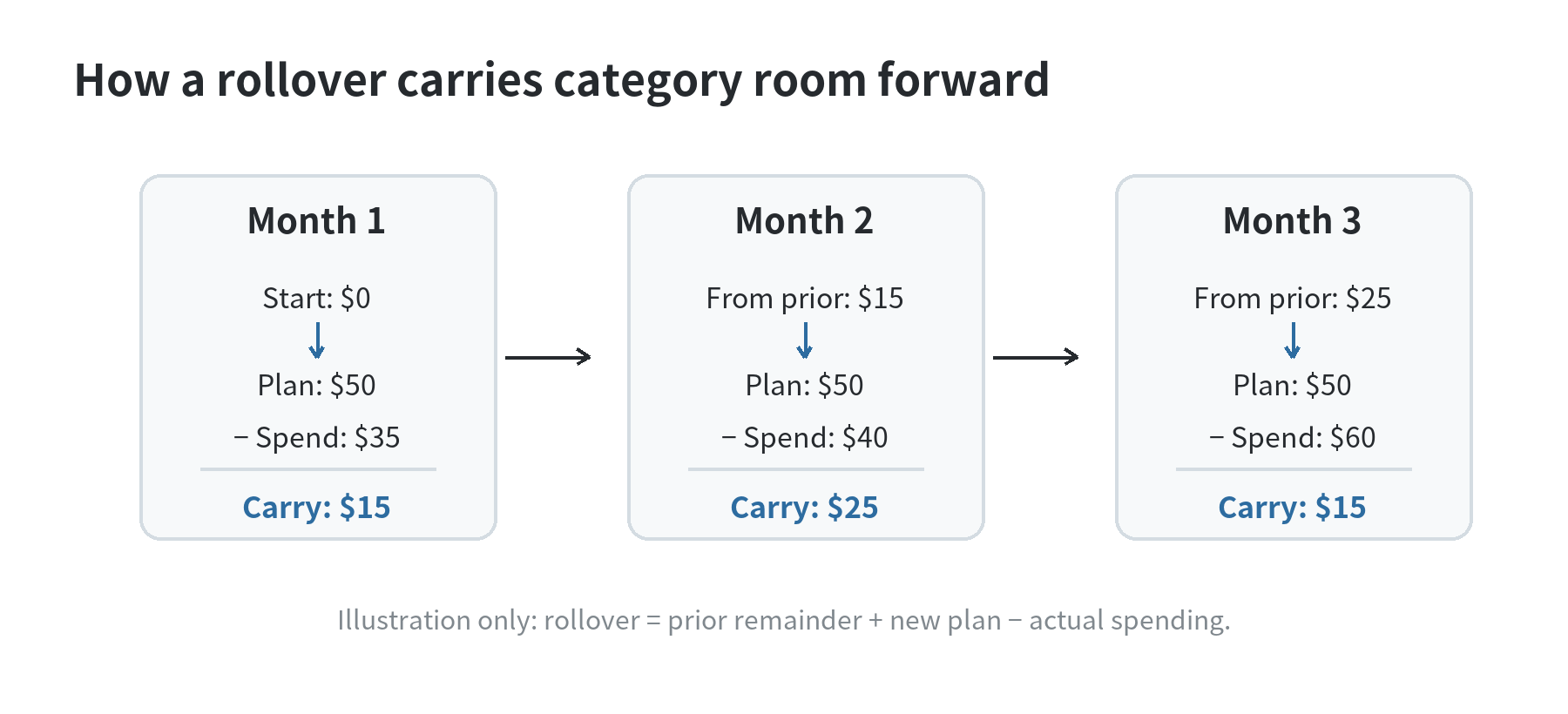
If you set aside money for car registration, gifts, or clothing, a rollover can carry a category’s unspent balance forward.
Monarch explains that a rollover uses the previous remainder plus this month’s planned amount minus actual spending.
An overspend carries forward as a negative remainder, so the next month begins with less room in that category.
(Monarch Help Center, checked September 30, 2026.)
For example, a category with $15 left over, a new $50 plan, and $40 of actual spending ends with $25 to carry forward.
If a category does not need a running balance, leave rollover off and let its plan reset.
You can set a starting balance when you want a rollover category to begin with an amount already set aside.
Monarch’s support page describes this setting for web and mobile.
(Monarch Help Center, checked September 30, 2026.)
Review the plan against actual spending, not just the opening estimate
Check transactions during the month and compare planned, actual, and remaining amounts.
Monarch’s budget page describes those three values, while its mobile view lets you switch between actual and remaining.
When a category runs low, look at the pending bills and the rest of the month before moving its limit.
If you reallocate money, adjust the category receiving it too, so the total plan still reflects the same income.
At month-end, identify why each amount missed: incomplete data, a one-time bill, or a choice to spend differently.
Use the explanation to adjust the next plan.
A transaction rule can label a recurring merchant, but it cannot choose a useful category amount for you.
Monarch’s official pricing page listed Core at $99.99 per year and Plus at $199.99 per year when checked September 30, 2026.
A U.S. mobile app marketplace listing showed matching annual amounts and a $14.99 monthly subscription.
Core includes budgeting, net worth tracking, reports, and savings or debt goals.
Monarch’s pricing page says Plus adds retirement forecasting and business-income tools.
Check the current billing terms and plan comparison before adding a subscription to your own budget.
(Monarch pricing page and a U.S. mobile app marketplace listing, checked September 30, 2026.)
FAQ
Can you make a Monarch budget without connecting every account?
Yes.
Monarch’s Getting Started guide says you can add accounts later and continue with partial data.
Mark what is missing and review the budget again when the account activity becomes available.
(Monarch Help Center, checked September 30, 2026.)
Can you switch from Flex budgeting to category budgeting later?
Yes.
Monarch’s Getting Started guide says the budget style can be changed from Budget settings.
Review the categories and amounts after switching so the new view still matches the way you plan spending.
(Monarch Help Center, checked September 30, 2026.)
Does Monarch move money between your bank accounts?
No.
Monarch’s Getting Started guide describes connected accounts as read-only and says money cannot be moved into or out of bank accounts from the app.
(Monarch Help Center, checked September 30, 2026.)
What should you do when an account will not sync?
Continue with the accounts that work, then check Monarch’s connection status information or add the account manually if that fits your records.
The help center also lists changing data providers and contacting support as troubleshooting paths.
(Monarch Help Center, checked September 30, 2026.)
Last updated: 2026-09