A whole-house surge protector is a permanently connected device installed at or near a home’s service equipment. To choose one, match its UL 1449 type and electrical ratings to your panel and installation location, then have a qualified electrician confirm the fit. The type label tells you where the device is intended to connect; it does not promise that every appliance or every kind of surge will be protected.
Start with the breaker panel already in your home, not the largest number printed on a product box. A Type 1 or Type 2 unit may be described as a whole-house device, but the two types have different permitted locations. Type 3 products are point-of-use devices and serve a different role.
Read the type label as an installation clue
UL Solutions lists permanently connected surge protective devices (SPDs) in Types 1, 2, and 3, while Schneider Electric explains that Types 1 and 2 chiefly distinguish where the SPD connects in the electrical distribution system (checked October 2026). Treat the marking as a placement category, not a score from low to high.
| Marking | Placement described by the sources | What to check |
|---|---|---|
| Type 1 | May be listed for a service-transformer or service-equipment line-side position; permitted applications depend on the listing. | Ask the electrician whether the proposed connection point matches the unit’s marking and instructions. |
| Type 2 | Typically connects on the load side of service equipment, often at a panel or branch panel. | Confirm the required breaker or other overcurrent protection and panel connection in the product instructions. |
| Type 3 | Point-of-use protection, such as a receptacle or cord-connected unit. | Consider it as an added layer for selected electronics, not a substitute for a service-panel SPD where one is required. |
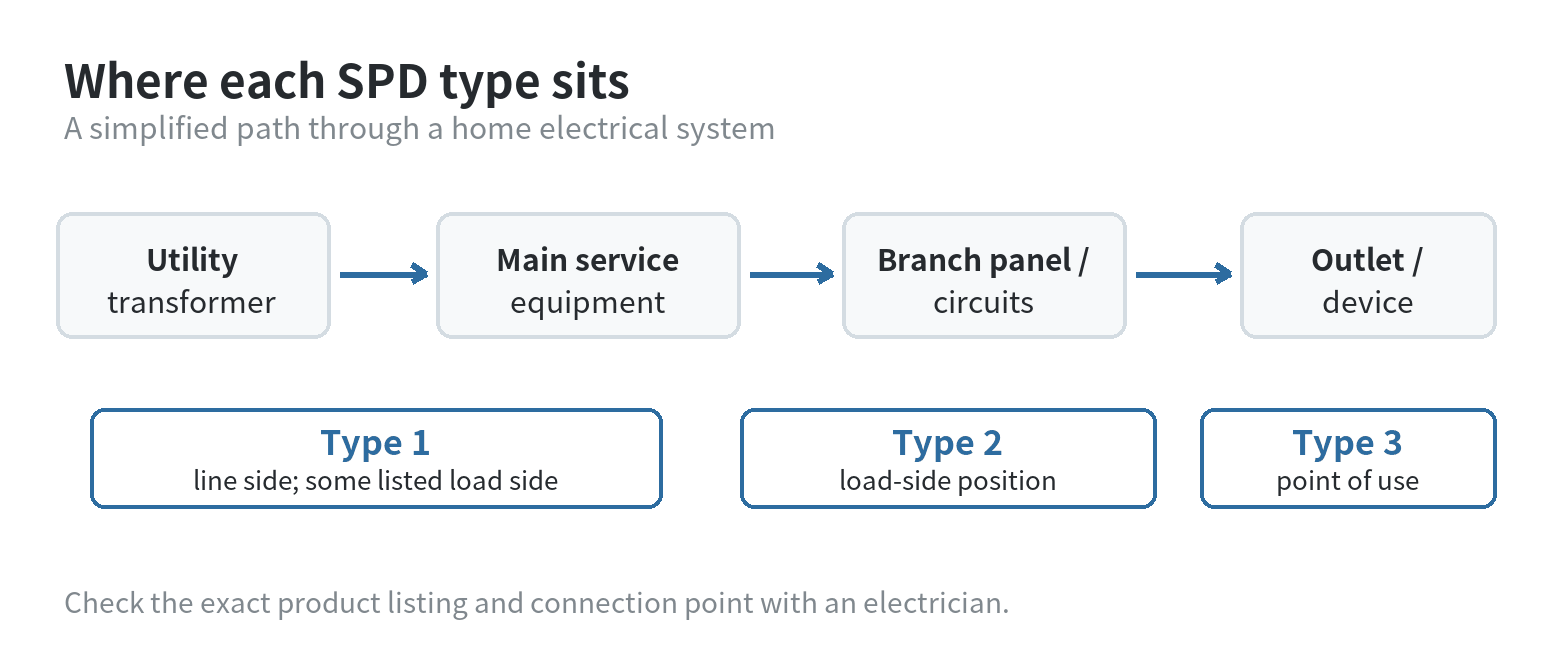
That distinction matters when a listing groups devices with different types under one category. A Type 1 product may suit a line-side application, while a Type 2 unit is intended for the load side. The label and installation sheet take precedence over a broad “whole-house” description.
Check the panel before comparing ratings
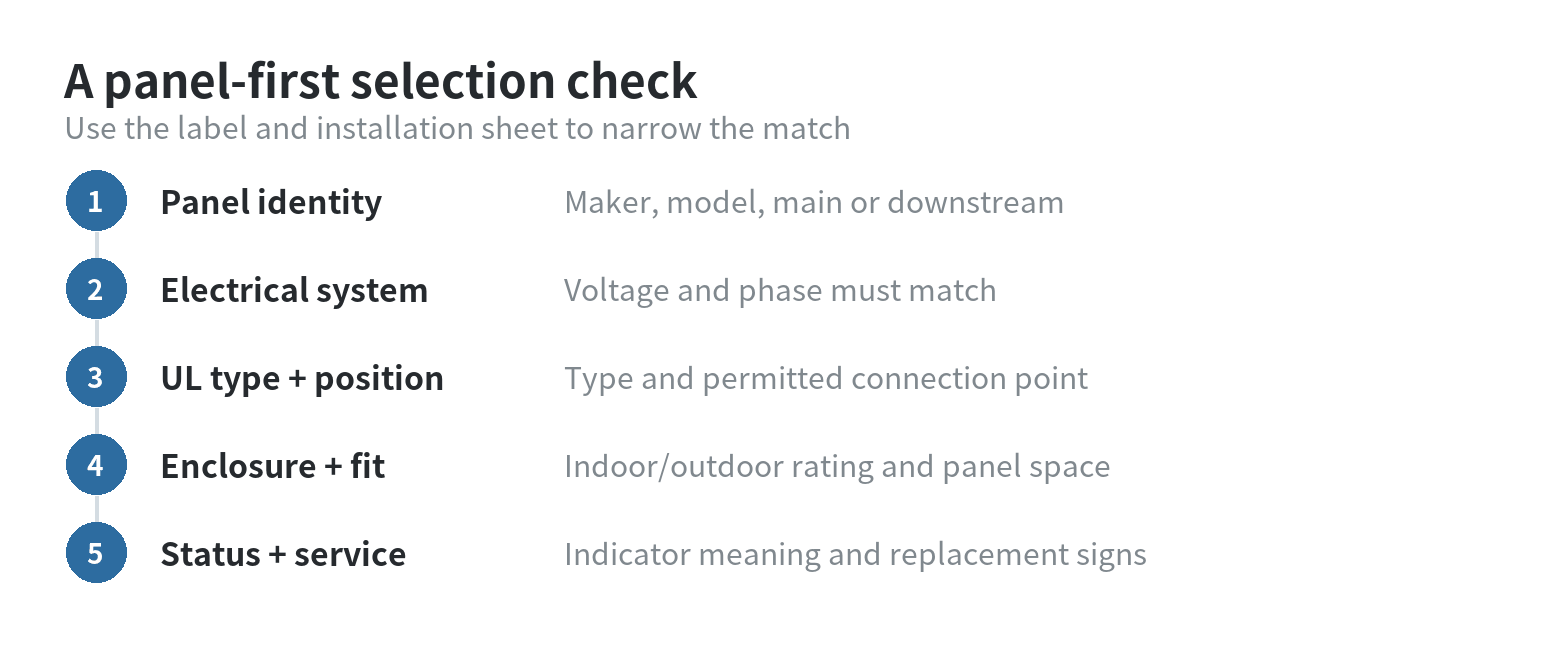
Make a short note of the panel’s manufacturer and model, service voltage, available breaker spaces, indoor or outdoor location, and whether the panel is a main service panel or a downstream subpanel. Do not remove the panel cover to gather this information. Use the panel’s exterior label, existing paperwork, or a qualified electrician’s assessment.
Next, compare the SPD’s voltage and phase ratings with the electrical system. A device intended for a different system voltage is not a match even if its headline surge-current figure looks impressive. Schneider Electric’s product guidance identifies nominal discharge current, often written as In, as a rating tied to UL 1449 testing; so compare the rating labels and test conditions before ranking devices (checked October 2026).
Keep unlike ratings in separate columns when comparing listings. Record whether each number is a nominal discharge current, a maximum surge current, or another rating, along with the test mode and the stated voltage. If the listing does not make those labels clear, ask the manufacturer or electrician to identify the exact rating before comparing it.
A high kA figure by itself does not tell you whether a unit fits your service equipment. Check the data sheet to identify each rating before comparing products. The figures answer different questions, so do not rank two units by comparing mismatched labels. Ask for the data sheet when the product-page summary omits the rating definitions (checked October 2026).
For example, a home may have a main service panel near the meter and a second panel serving an addition or detached workspace. The second panel is not automatically the right place for a whole-house device: Type 1 and Type 2 designations relate to their permitted position around service equipment and overcurrent protection. Give the electrician both panel labels and ask which point covers the intended circuits under the device listing.
Match the enclosure and mounting method
Look for an installation method that fits the panel and the available space: a unit may mount beside a load center, connect through a compatible breaker, or be designed for a specific panel family. “Universal” in a product title does not establish that the terminals, breaker arrangement, or instructions match your installation.
For an indoor location, check the enclosure rating and mounting instructions. For an outdoor location, confirm the enclosure is rated for the site’s exposure and that the installation method maintains that rating. Product documentation may distinguish indoor-only from indoor-and-outdoor enclosures; choose based on where the electrician can install the device, not on appearance.
Schneider Electric’s residential SPD catalog lists LED status indicators for its listed models. Ask what action is required if the status changes and whether the SPD has replaceable modules; those details belong to the exact model’s documentation. A status feature is useful only if someone can see it and knows how to interpret it.
What a whole-house unit does not settle
A panel-mounted SPD is connected to the home’s electrical distribution system and is intended to limit transient overvoltage at that point. It cannot make every surge harmless or replace correct grounding, bonding, wiring, and overcurrent protection. UL Solutions describes SPD use as dependent on the equipment, desired protection level, location, and system environment (checked October 2026).
Schneider Electric notes that point-of-use Type 3 protection can still be used for selected electronics alongside a whole-house device. Think of the two placements as serving different parts of the electrical path: one at the service equipment, another near a device. For more on staying connected when utility power is unavailable, see our guide to using your phone during a power outage and our phone setup for natural disasters.
Do not treat an SPD as protection against a direct lightning strike. ESFI and Schneider Electric both describe limits to surge devices and recommend point-of-use protection for selected equipment; disconnecting sensitive electronics during a severe storm is a separate precaution. If the home has communication or antenna lines entering from outside, ask whether those paths need their own coordinated protection.
Questions to take to the electrician
Ask which SPD type is allowed at the proposed connection point, whether the model’s voltage and phase match the home, and what breaker or disconnect the instructions require. Also ask whether the enclosure rating suits the location, how to check status, and what maintenance or replacement signs to watch for.
Ask where the unit will sit in relation to the panel and how the connection conductors will be routed. Schneider Electric says longer leads can reduce SPD performance and advises keeping the connecting wires as short as needed, without unnecessary bends (checked October 2026). That is an installation detail for the electrician to resolve; a homeowner should not open the panel or alter wiring to improve it.
If the home has a separate communication line, satellite connection, or antenna feed, ask whether that line needs coordinated surge protection too. A protector on the electrical service does not by itself describe how a separate conductive cable path is handled. The NFPA Foundation report identifies protection modes and installation environment as selection considerations, while UL Solutions notes that an SPD strategy depends on the equipment and system involved.
Permanent SPDs connect to energized service equipment. The Electrical Safety Foundation International recommends a qualified, licensed electrician for electrical work, and NFPA Foundation research describes permanent SPD installation as work for a qualified electrician under NFPA 70 (checked October 2026). Use the estimate to confirm scope and placement; do not use online diagrams as wiring instructions.
When you compare products, keep a copy of the full product label and installation sheet with the electrician’s notes. That gives you a record of the UL type, voltage, connection method, enclosure, and status indicator tied to the exact unit considered. Product descriptions can be brief, while the installation document spells out the conditions that make a model suitable for a particular panel.
FAQ
Should a whole-house surge protector replace plug-in surge protection?
No. A service-equipment SPD and a Type 3 point-of-use device connect at different places. Schneider Electric identifies point-of-use Type 3 protection as an additional option for selected electronics.
Can I choose a Type 2 unit if the product page says whole-house?
Only if its listing, voltage, and installation instructions match the panel and connection point. Schneider Electric describes Type 2 SPDs as load-side devices; an electrician can confirm whether the intended location fits.
What does an SPD status light tell me?
It reports the condition defined by that model’s manufacturer. Check the manual for what each light or alarm means and what action to take if the status changes.
Does a whole-house surge protector stop lightning damage?
No device guarantees protection from a direct lightning strike. ESFI notes that surge protection has limits; follow local storm-safety guidance and ask an electrician about the home’s overall protection system.
Last updated: 2026-10