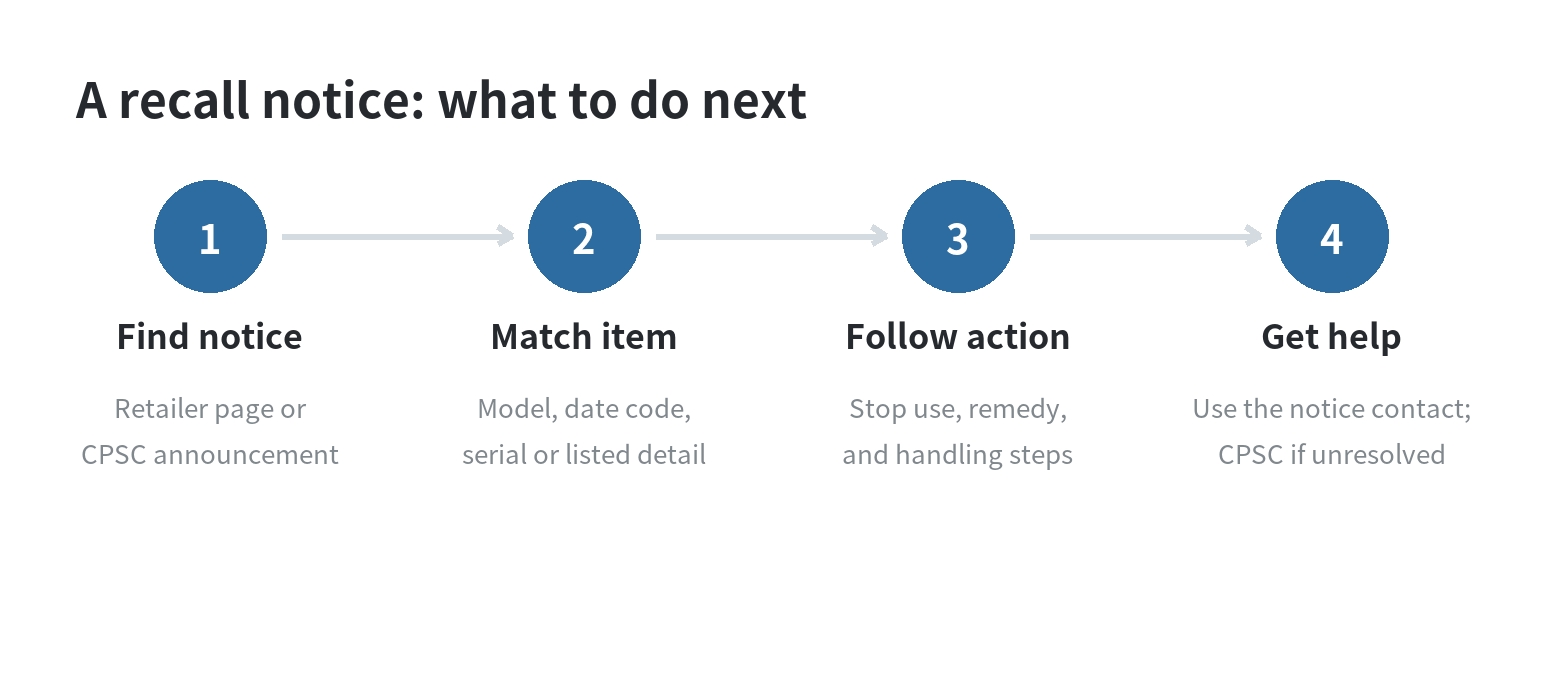
If you bought a product through the retailer and see a recall notice, first stop using the item if the notice says to, then match its model and other
identifiers against the exact notice.
The remedy and the way to request it are specific to that recall; a receipt alone does not tell you whether your unit is included.
The retailer maintains a product recall page, and the U.S. Consumer Product Safety Commission (CPSC) publishes a separate federal recall index.
Read the notice itself before returning, repairing, discarding, or continuing to handle a product.
Start with the notice, not the product name
A recall can cover only certain models, date codes, serial-number ranges, or other production details. CPSC says its recall announcements identify the
specific brand and model covered, and its consumer guidance points owners to the announcement for the applicable action.
A product that looks similar may fall outside the recall.
Open the full notice and locate the product description, model number, and any date or serial range.
Then compare each detail with the label on your item, packaging, manual, or purchase record.
A broad name such as “cordless drill” is not enough when the notice lists a particular model or production run.
Make a short match sheet before you contact anyone: copy the notice’s model and code range, write down the same details from your product, and mark
each line as a match, mismatch, or unreadable. Photograph the label while it is still attached.
This gives you a clear record if the company asks which detail you used, and it prevents a partial match—such as the right product name but wrong
model—from being mistaken for confirmation.
For a concrete example, a product-specific chair notice directs owners to check the underside of the seat base for screw holes and wood screws.
That physical detail determines whether those chairs are included.
Your notice may instead use a model label, serial number, date code, or a combination.
Use the product itself as your main reference. Packaging or an old receipt can help, but a package may have been kept after the product was replaced.
Copy every visible letter, number, and punctuation mark from the product label. Keep uncertain characters marked as uncertain instead of guessing.
Compare the notice and label one field at a time: product description, model, serial range, and date code.
Record a match or mismatch beside each field.
If the notice uses a physical feature, inspect only the area it names.
The chair example uses the seat base; another notice may point to a different part.
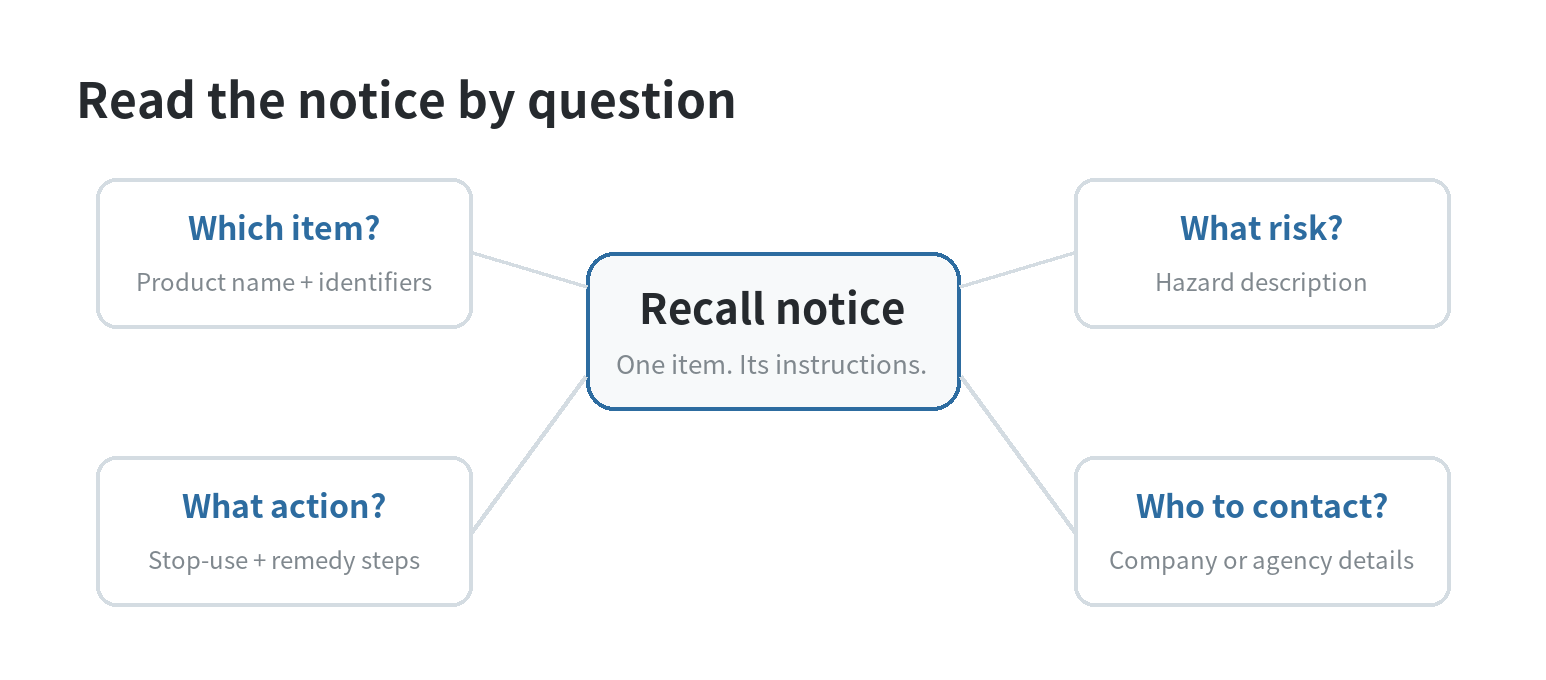
Separate the notice by asking which units are covered, what hazard is described, what action is required, and who handles the remedy.
This keeps a hazard description from being mistaken for an eligibility rule.
A risk can apply only to the models or production details listed in that notice.
For a household with several similar items, check each one separately.
Similar products bought together can have different labels or production details.
Place an affected item where family members or housemates will not use it while the notice says to stop. Tell everyone which item is being checked.
Before contacting the named company, keep the notice open and prepare the label details, a clear photo, and the question you need answered.
For example, ask whether an unreadable final character changes eligibility, or whether the notice requires a photo before you alter the item.
When the remedy involves a return or repair, read its handling and shipping directions before packing anything.
Some notices require a step before the item leaves your home.
If you cannot complete that step safely or do not understand it, pause and ask the listed contact to explain the instruction.
What the retailer’s recall page can tell you
The retailer’s page is labeled as a list of products recalled from its channel. CPSC also maintains an index of federal product recall announcements.
Use either index to locate a relevant notice, then follow the product-specific instructions for identification, safety steps, and the remedy.
A CPSC recall announcement separates key information into product name, hazard, remedy, consumer contact, and product details.
Those fields answer different questions: what to match, what risk prompted the action, what the company offers, and whom to contact.
Read each field before deciding what to do with the item.
CPSC recall announcements list “Sold At” and “Consumer Contact” separately.
The sales location and the company handling the remedy may differ, so follow the contact instructions in the specific notice.
If it points to a manufacturer form, phone line, or dedicated recall page, use that contact instead of assuming a routine return desk handles the
recall.
Keep the item safe while you confirm it
If the notice says to stop using the product, follow that direction while you check the identifiers.
Do not test it to see whether the hazard appears. CPSC’s consumer FAQ says owners should follow the specific guidance in the recall announcement; a
sample recall poster likewise tells affected chair owners to stop using the chairs and inspect the listed feature.
Do not throw away, dismantle, or ship the item unless the notice instructs you to.
CPSC says a remedy request may require documentation such as a photo showing that a product was disabled or destroyed.
Other notices specify return or disposal steps, so follow the instructions for your product before changing it.
Keep the product, packaging, and paperwork together in a place where no one will use the item by mistake.
Save a copy of the notice and any confirmation number or message you receive.
These records help you answer questions about the model, remedy request, and date you contacted the listed company.
Follow the remedy exactly
Recall remedies are not all refunds.
CPSC describes remedies that can include a refund, repair, or replacement, with the applicable option stated in the individual announcement.
A retailer’s sample notice, for example, specifies a refund and lists a consumer contact path; another product’s notice may set different steps.
Before submitting a request, gather only the information the notice asks for.
This may include a model or serial label, proof of purchase, photographs, or contact details.
Enter the identifier carefully: one changed character can point to a different product.
If an instruction is unclear, ask the contact named in the notice what evidence it accepts before modifying the product.
Read the entire remedy section before acting.
If it says to cut a cord, remove a part, or dispose of the item, follow the notice’s sequence and documentation directions.
Do not improvise a destruction step; the company may require a specific photo or registration record to process the remedy.
If the request stalls or your item does not match
If your model does not match, do not assume that a similar appearance makes it part of the recall. Recheck the full model and production details.
If the label is missing or unreadable, contact the company listed in the announcement and describe what information you can see; ask how it wants you
to confirm the item.
If the listed company does not respond or the remedy instructions cannot be completed, CPSC lists its recall hotline as 800-638-2772.
CPSC also has a recall complaint form for people who have already contacted a company and are having trouble with the remedy.
That complaint channel reports the problem to the agency; it is not a substitute for the company’s remedy request.
When you call or submit a complaint, have the recall notice, product identifiers, and your earlier contact details available.
Describe the step that failed—such as an unanswered request or a form that would not accept the model—so the agency can understand the issue.
Frequently Asked Questions
Can I still use a product if it seems to work normally?
Follow the recall notice’s safety instruction, even if the product appears to work.
CPSC advises owners to follow the announcement for the specific item, and a product-specific notice may tell affected consumers to stop using it.
Does a recall cover every version of a product line?
No. CPSC says a recall applies to the specific brand and model in its announcement and can be limited by production dates or codes.
Compare the complete identifiers rather than relying on the product family name.
Will every recalled item qualify for a refund?
No. CPSC says the notice describes the remedy, which may be a refund, repair, or replacement.
Use the option and process listed for that specific recall.
What if I bought the item years ago and no longer have a receipt?
Check the notice for the information it requires before submitting a request. If the notice does not answer whether a receipt is needed, contact the
company named in the recall and ask what identification or purchase records it accepts.
Last updated: October 2026
Last updated: 2026-10