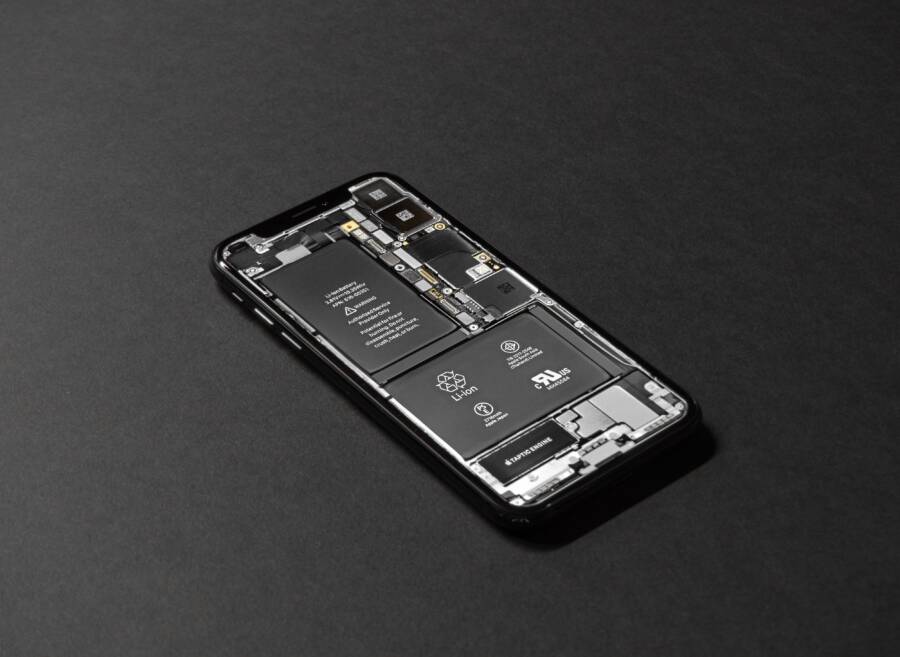
Phone battery drain after a screen replacement usually happens because of faulty hardware connections, a miscalibrated software system, or a defective replacement panel drawing too much current. When your smartphone refuses to hold a charge after a repair, the issue often stems from a poorly seated display connector or a replacement screen that lacks power-efficiency protocols.
Fixing this problem requires isolating whether the fault lies in the hardware installation or the software settings. This guide walks you through the steps to diagnose the underlying cause and restore normal battery performance on your smartphone.
Why Your Phone Battery Drain Is Worse After a Screen Swap
Your smartphone relies on a delicate balance of hardware efficiency and software communication to preserve battery life. When you replace a broken display, that balance often breaks. A new screen might look identical to the original factory part, but internal variations in power consumption can tax the logic board. Hardware mismatches and physical installation errors force the battery to work much harder than normal.
Low Quality Panels and Power Draw
Aftermarket replacement screens often lack the advanced power-efficiency protocols built into original factory panels. Cheaply manufactured LCD and OLED panels frequently require higher electrical current to illuminate the pixels and power the touch digitizer. Because the replacement hardware demands more power from the logic board, your smartphone battery drains quickly even during idle tasks.
Original screens use tightly regulated power-management integrated circuits that communicate efficiently with the central processor. Low-grade panels bypass these strict tolerances, pulling raw, unregulated current directly from the battery circuit.
Aftermarket LCD screens often use thicker backlights that require extra voltage to reach standard brightness levels.
Counterfeit OLED panels lack proper organic compound efficiency, demanding more electrical current to produce acceptable colors.
Inefficient touch digitizer layers on cheap screens constantly draw standby current, preventing the smartphone from entering a deep sleep state.
Poorly Connected Flex Cables
Physical installation errors create hidden power drains that shorten daily battery life. A loose display cable or a slightly misaligned connector forces the processor to work harder to maintain communication with the screen. When a flex cable fails to seat properly into its logic board socket, electrical resistance increases across the contact pins.
This resistance generates microscopic voltage drops that confuse the power management system. The processor constantly sends repeated handshake signals to verify the display connection because the data stream is unstable.
Unstable display data streams force the graphics processor to run at higher clock speeds continuously.
Misaligned backlight pins can leave the display illumination circuit permanently engaged at maximum output.
Microscopic debris trapped inside the connector housing creates partial short circuits that bleed stored power from the battery.
Checking Background App Activity and Hardware Interaction
When your smartphone burns through a full charge hours faster than it did before a repair, you need to isolate whether software processes or physical components are causing the problem. Checking background app activity helps you determine if runaway software is exploiting the new screen hardware.
Checking Background App Activity
Your operating system logs every milliwatt an application consumes, which makes the battery settings menu your best diagnostic tool. Open your device settings and navigate to the battery usage section to review which applications run continuously in the background. Look for apps showing abnormally high active time compared to your actual usage habits.
Social media clients, navigation tools, and poorly optimized widgets often trigger excessive wake locks after a display swap. A wake lock prevents your smartphone from entering a low-power sleep state when the display turns off.
Open the device settings and select the battery menu to view the power consumption list.
Tap on individual applications to check their active time versus background time.
Restrict background data and battery usage for any third-party app showing suspicious activity.
Performing a Soft Reset and Rebuilding Cache
Sometimes the operating system fails to register the replacement display correctly, leading to constant polling and severe power loss. Performing a soft reset forces the device to reload its kernel drivers and clear out corrupted temporary display caches.
Restarting your smartphone flushes the system memory and re-initializes the hardware handshake between the logic board and the new screen. If the display controller was stuck in a high-power polling loop, a clean reboot breaks that cycle.
Power down your smartphone completely and wait for thirty seconds before turning it back on.
Clear the system partition cache through the recovery menu if your operating system supports manual cache wipes.
Test the battery discharge rate for an hour after the reboot to see if the drain stabilizes.
Inspecting the Physical Connections Inside
Hardware-level power drain often stems from a loose flex cable that forces the logic board to pump extra current into the display assembly. Opening the device requires precision tools and patience, so take your smartphone back to the repair technician if you lack repair experience.
A qualified technician must disconnect the battery, lift the display assembly, and inspect the main display ribbon cable for proper seating. If the connector clicks firmly into its socket, electrical resistance drops and stops the phantom power draw.
Power down the device immediately to prevent accidental short circuits during inspection.
Remove the display security shield to access the primary flex cable connectors on the logic board.
Press down gently on each ribbon cable connector until you feel and hear a secure click.
Comparing DIY Repairs Versus Professional Service Shops
Choosing between a do-it-yourself fix and a professional repair shop determines whether your smartphone regains its factory stability or develops persistent hardware faults. While ordering a cheap screen online seems appealing, the hidden consequences often outweigh initial savings. Understanding how component quality and repair warranties influence your device helps you avoid costly secondary failures.
Risks of Using Low Cost Replacement Parts
Bypassing professional repair shops to save money often leads to purchasing low-cost replacement screens from unregulated online marketplaces. These cheap components introduce severe thermal issues because manufacturing shortcuts eliminate essential heat dissipation layers found in original panels. Without proper thermal management, the display traps heat generated by the processor, causing rapid battery degradation and thermal throttling.
Unregulated panels also pull excessive electrical current from the logic board because they lack strict power regulation chips. Your smartphone battery struggles to supply this raw, unmanaged power, which shortens its overall lifespan by months or even years.
Cheap components lack standard power-saving protocols, forcing the battery to drain much faster during normal daily tasks.
Inferior manufacturing tolerances cause internal short circuits that generate localized heat spots near the battery housing.
Low-grade adhesive seals fail quickly, letting moisture and dust enter the smartphone chassis and damage internal power circuits.
When to Claim a Repair Warranty
When battery drain begins immediately after a screen swap, the technician who performed the service bears responsibility for the faulty installation or defective part. Approach the repair shop calmly, present your original service receipt, and explain that the severe power loss started right after the repair. A reputable shop will test the current draw and replace the faulty display or seating cable under their service warranty.
Professional technicians should test power consumption on a diagnostic bench before handing the device back to you. If the shop refuses to honor their warranty or claims the battery failure is a coincidence, you may need to escalate the issue through consumer protection channels.
Keep your physical repair invoice and any diagnostic readouts provided during the initial screen replacement.
Explain the exact timeline of the battery failure so the technician knows the issue connects directly to their recent work.
Request a written report detailing why the replacement screen caused abnormal power draw if you need to file a payment dispute.
Frequently Asked Questions About Post Repair Battery Loss
Getting your smartphone fixed often brings new questions about how the device handles power. Many users notice unexpected changes after a hardware swap, so clear answers help separate normal settling periods from actual faults.
Does a New Screen Always Ruin Battery Health Percentage
Operating systems calculate battery health through complex algorithms that monitor charge cycles and maximum capacity over time. A screen replacement does not physically alter the chemical aging inside your battery cell. Software metrics often drop after a repair because the system resets its power analytics during the hardware change.
Your smartphone measures capacity based on how much energy flows through the system during a full charge cycle. When technicians disconnect the battery to install a new display, the power management chip loses its historical reference data. The operating system recalibrates this data over the next few charge cycles, which can cause the reported health percentage to fluctuate or drop suddenly.
The battery management system needs several complete charge cycles to relearn maximum capacity.
Non-genuine screens lack proper handshake data, which can confuse the operating system’s health reporting metrics.
Physical battery degradation happens due to age and heat, not because a display panel was swapped.
How Long Should You Wait for the Phone to Adjust
New hardware requires a short stabilization window as background processes adapt to changed component efficiencies. You should give your smartphone up to one week to settle after a screen replacement. Temporary power drain during this adjustment phase usually stems from re-indexing files and updating display drivers in the background.
Persistent battery loss lasting longer than ten days indicates a permanent fault in the repair work or component quality. If your smartphone still runs hot and dies quickly after a full week of normal use, the replacement panel is likely drawing too much static current.
Normal settling involves mild warmth and slightly faster discharge for the first forty-eight hours.
A permanent hardware fault shows up as continuous rapid draining even when the device sits idle on a desk.
Contact your repair technician for a warranty evaluation if the battery drain does not improve after seven days.
Conclusion
Fixing rapid battery drain after a display repair starts with identifying whether the issue comes from faulty software or poorly seated hardware. Always check your background application activity and restart the smartphone before opening the housing.
If the power loss continues, inspect the flex cable connections or return the device to the repair technician to claim a service warranty. Prioritizing high-quality replacement parts protects your smartphone from permanent logic board damage and restores normal daily battery performance.