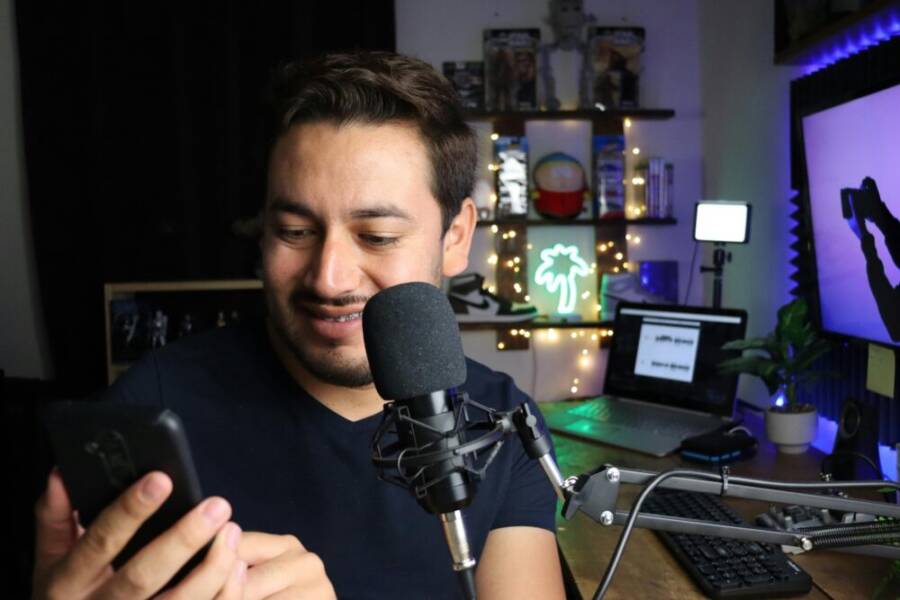
How phone microphones are getting better for creators isn’t a fluke. Modern smartphones now capture crisper voice and richer ambient detail with less gear, making high quality sound feel within reach for anyone. AI noise reduction and smarter DSP work behind the scenes to keep your voice clear, even in busy spaces.
Wireless connections and direct smartphone setups simplify recording on the go. Quick-pair wireless mics, USB-C and Lightning options, and low-latency links mean you can shoot, stream, and edit without clutter or cables. This mobility lets creators keep moving while they capture clean, professional sound.
This post walks you through what’s changed, how it helps different creators, and how to pick gear that fits your needs. You’ll get practical tips you can put into action this week, plus real-world examples from popular phones to guide your setup. If you’re chasing better audio with minimal fuss, you’re in the right place.
Core advances making phone mics better for creators
Phone microphones have become a pivotal tool for creators who want high quality sound without lugging around heavy gear. Several advances are shaping this shift, from smarter on-device processing to convenient wireless options that pair directly with your phone. Below are the core areas where modern mics are improving your workflow, followed by practical tips you can use right away.
AI noise cancellation sharpens every word
Real-time AI noise cancellation analyzes audio as it streams through the mic, distinguishing voice from the clutter of the outside world. The result is cleaner speech with natural-sounding voice quality, not a hollow or muffled effect. Think about recording in a busy cafe where the espresso machine hums, or a street corner where car horns and bus brakes compete with your voice. The AI filter quietly attenuates the traffic, chatter, and keyboard clatter while preserving the nuances of your tone and cadence. At home, it can smooth out fan noise or HVAC whoosh without making your voice sound artificial.
For creators, this means fewer takes and less post production. You can capture a clear voice track in environments that used to require heavy editing or a separate mic. A quick test helps you decide if AI is doing the job you need: record a short clip in a noisy place with AI on, then repeat with AI off. Compare you, in the same frame, with and without the processing and note the difference in intelligibility and warmth.
If you want to explore hardware that emphasizes this capability, consider options that advertise AI noise cancellation as a core feature. For more context on current products, see examples like AI powered mics and noise reduction solutions. Explore AI noise cancellation options.
Wireless mics that connect directly to phones
Wireless mics are easier to deploy than ever, and many systems now connect straight to smartphones via USB-C or Lightning. Two main pathways exist: 2.4 GHz wireless links and Bluetooth. 2.4 GHz systems typically offer low latency and minimal interference when used with a clear line of sight, while Bluetooth solutions emphasize ultra portability and wide compatibility.
Direct connections into the phone mean one less adapter, fewer cables, and quicker setup. Some wireless kits can record two channels at once, which is a boon for scenarios like a solo host with a second guest or a two-person interview. With the receiver either clipping onto a phone or sitting in your pocket, you’re free to focus on the shot, not the gear.
Two practical benefits stand out. First, you gain speed: you can pair, test, and start recording in minutes, which is essential when you’re chasing a deadline or a live event. Second, you preserve your phone for video capture and monitoring. You’re not juggling a separate recorder while trying to keep your subject framed correctly.
If you’re evaluating wireless options, look for mics that offer USB-C or Lightning plugs and compatibility with iPhone and Android devices. Also check whether the system records two channels to help you capture ambient sound or a secondary mic input. For a sense of what’s available, see wireless systems designed for mobile devices and note the two-channel capability when present. Wireless mic systems for mobile devices.
Onboard recording and high resolution formats
Onboard recording lets the mic handle the capture process itself, often in high resolution formats that protect your audio quality before it ever leaves the device. Some newer mics offer 32-bit float recording, which provides an extremely wide dynamic range. In practical terms, this means you won’t clip your peaks even if you inadvertently shout into the mic or move closer to the source. When you later edit, you have more latitude to adjust levels without re-recording.
For creators, onboard high quality recording translates to more robust tracks in post and less time spent chasing the right gain settings during shoots. The 32-bit float capability is particularly forgiving for voiceovers and vlogs that mix dialogue with music or sound effects. It also simplifies the editing process because you can re-balance levels post hoc without sacrificing fidelity.
In everyday use, onboard formats reduce the risk of distortion during quick shoots or improvised interviews. If you’re curious about specific formats and how they affect editing, explore gear that advertises high-resolution capture and 32-bit float recording. For a broader overview of premium wireless mics and features, you can check out reviews of products that highlight these capabilities. Top wireless mics for creators in 2025.
Long battery life and light, portable kits
Portability matters as much as sound quality. Modern phone mics are designed to be compact and light, with long battery life so you can shoot longer without swapping gear. Many models use slim profiles, magnet mounts, or clip designs that attach securely to clothing or accessories, keeping the mic out of frame and ready to go. That means fewer interruptions for battery changes or gear swaps during a long shoot.
In real world terms, long run times and small footprints translate into more flexible shooting. You can walk through a crowded market, move between rooms, or follow a subject without pausing to recharge or rearrange equipment. Clips and magnetic accessories also help you position the mic for optimal pickup, whether you’re talking directly to the camera or addressing a broader ambient scene.
When planning a run-and-gun setup, prioritize mics that emphasize light weight and battery efficiency. You’ll appreciate the extra minutes of shooting and the reliability that comes from a kit that stays out of the way. For a sense of practical designs that keep weight down and performance high, look at compact wireless systems and clip-on mics with solid battery life. Compact wireless mic options with strong battery life.
What this means for different creative tasks
As phones and their mic ecosystems get smarter, the way creators plan and execute content shifts. You can solve more scenarios with less gear, more mobility, and clearer sound straight from your pocket. Below, we break down how these improvements translate into three common creative tasks. Each subsection offers practical setups and quick tests you can run.
 Photo by Benjamin Dominguez
Vloggers and travel gain steady audio on the move
Vlog content thrives when movement and sound stay in balance. Small mics designed for smartphones fit neatly on the go, attaching to lapels, hats, or cameras without adding noticeable bulk. The real win is wind and crowd noise suppression. A compact mic paired with your phone can dramatically reduce wind gusts in outdoor scenes and blunt the chatter of a bustling street, so your voice remains the star.
On a busy day of shooting, you don’t want to swap between devices or juggle a separate recorder. A single phone setup can capture both video and audio, with the mic feeding clean voice data directly into your camera app. This eliminates tangled cables and sync headaches later. When you need to film a quick street interview or a ride-share vlog, the setup is ready in minutes.
Tips to optimize for travel shoots:
- Clip the mic close to your mouth, but out of the frame. Aim for a short distance and a stable mount.
- Use a windscreen for outdoor sequences; the smallest foam covers can shave off harsh breath noises.
- Test in noisy environments before a shoot. Compare with AI noise cancellation enabled and disabled to hear the difference.
- Prioritize mics that offer direct USB-C or Lightning connections for one-step capture and monitoring.
If you’re choosing gear for travel vlogging, focus on two-channel wireless systems that work with your phone and can run in the background while you move. Look for models that advertise direct phone compatibility and lightweight form factors. For more context on wireless options and how they perform in real-world travel shoots, see options like wireless systems for mobile devices. Wireless mic systems for mobile devices.
Interviews and podcasts sound richer and more natural
Two-person interviews or compact podcast sessions benefit from wireless setups that pair easily with a phone. The goal is clean room sound with minimal gear and fast pairing. A well-designed two-channel wireless mic kit lets both participants stay mobile and comfortable, while a phone acts as the hub for both recording and monitoring. No mixer needed; the phone becomes the small, central studio.
Look for two transmitters that pair quickly with a single receiver and a simple USB-C or Lightning connection. The cleaner room sound comes from the mic placement and the absence of room-hum from long cables. Outdoors, this reliability matters even more; you want your guest to feel natural and speak directly to the camera without technical distractions.
A fast pairing process helps you maintain a natural rhythm, reducing the chance of awkward pauses while you set up. For stable performance, consider systems that explicitly support two channels on the phone, so you can separate voices or capture a clean ambient track for later. Examples of reliable two-person wireless mics include compact UC-Duo setups and two-transmitter systems designed for smartphones. Movo Wireless Mini UC-Duo USB-C Wireless Microphone and RØDE Ultra-compact Wireless Microphone show how fast and simple these can be. You can also check out two-person options like the Blink 500 B2+ for easy setup. Blink 500 B2+ Micro 2-Person Digital Wireless Microphone System
Practical setup steps:
- Mount the receiver in a pocket or clip it to your belt; keep the input cables tidy.
- Place the lavalier mics about 6 to 8 inches from each speaker for natural pickup.
- Monitor with headphones to catch room reflections and adjust gain on the fly.
For a quick read on current two-person wireless options, see the two-person podcasting kits described in the linked guides. These options balance ease of use with solid audio quality in outdoor and semi-professional settings. The best wireless mic for 2025.
Live streams and social clips sound great in real time
Real-time streaming demands low latency and fast setup. A phone with a dependable mic system can cut your prep time, letting you jump straight into live content. With a good mic, you can stream, caption, and publish on the fly, all from one device. The key is choosing gear that pairs immediately with your phone and supports quick monitoring so you can adjust on the spot.
Low-latency wireless links ensure your host and guests stay in sync, which matters for reaction shots and on-screen timing. Some wireless kits connect via USB-C or Lightning and can record multiple channels simultaneously, allowing you to capture ambient audio or a second mic feed for later mixing. When you pair this with a phone that can run lightweight editing apps, you get a fully capable on-the-go studio.
Setup tips for real-time content:
- Use a compact transmitter-receiver pair that clips to clothing and minimizes cable clutter.
- Test latency by performing a short live test with someone off-camera and watching the lip-sync closely.
- Keep a small, portable windscreen on hand for outdoor live streams to reduce wind noise without muffling your voice.
- Opt for gear that supports onboard recording at high quality, so you have a clean backup track even if the live feed dips.
If you’re evaluating options for live streaming, look for systems that emphasize low latency and direct phone compatibility. The latest wearable and mobile-friendly mics emphasize speed and reliability, which is exactly what you need for spontaneous clips and real-time engagement. For a broader take on premium wireless mics, explore reviews that highlight features like AI noise cancellation and the ability to run two channels. The best wireless mic for 2025.
Images and videos in this section pull from practical on-camera tests you can replicate. If you’re building a short-form clip, shoot a 30-second test with AI noise cancellation on and off to compare intelligibility, then capture a quick outdoor wind test to hear how the mic handles a breeze.
Tips you can apply today
- Prioritize low-latency links for live streams.
- Keep the setup as compact as possible; minimal gear minimizes delays.
- Use onboard recording features when available to guard against dropouts in the live feed.
- Test in crowds, cafes, and open outdoor spaces to understand how the mic handles real environments.
By selecting the right microphone system and understanding how it integrates with your phone, you can elevate each format without changing workflows. The right setup turns your phone into a capable, single-source production tool for vlogs, interviews, and live streams. For more on smart mic choices and how to evaluate options, review guides on reliable mobile audio gear and two-person wireless systems, which cover setup tips and real-world performance. Wireless mic systems for mobile devices.
How to choose the right setup for you
Choosing the right phone mic setup starts with your goals, surroundings, and how much gear you’re willing to manage. The good news is you can start small and scale up as your projects grow. Use these tiers to map a path from beginner to pro while keeping everything phone-friendly.
Budget options for beginners
If you’re just starting out, prioritize affordable kits that pair well with most smartphones and leave room to upgrade later. Look for lavalier mics with a simple plug-and-go design, or compact wireless kits that connect directly to your phone via USB-C or Lightning. The aim is to capture clear voice with minimal setup and rudimentary post work.
- Kit ideas that balance cost and compatibility: a two-pack lav mic set, a compact wireless system, or a USB-C mic designed for smartphones. These give you a clean voice track without a steep learning curve.
- What to check before you buy: compatibility with both iPhone and Android devices, direct USB-C or Lightning connectivity, and at least two channel options for future expansion.
- Quick tests to run: record a short talking clip in a quiet room, then in a mildly noisy space. Compare clarity with AI noise reduction enabled versus off to see how the budget option handles real-world conditions.
A solid beginner route is to choose a system that includes a clip-on mic, a small windscreen, and a USB-C or Lightning connect, so you can plug in and record right away. You’ll appreciate the ability to upgrade later without replacing the entire setup. For options that emphasize value, see guides on budget wireless mics for smartphones and two-channel kits that are easy to upgrade. Best budget wireless mics for phones.
If you want a quick sense of what affordable kits can do, research reviews of entry-level systems that highlight ease of use and build quality. A good starting point is a two-person kit that can later support a second guest or a separate ambient mic as your needs grow. For guidance on budget-friendly options, see roundups of beginner wireless mics for mobile devices. Wireless mic systems for mobile devices.
Mid range setups for flexibility
As soon as you’ve got a handle on basics, you’ll want a setup that balances cost with sound quality and flexibility. Mid-range options often introduce wireless kits with better preamps, easy pairing for smartphones, and companion apps that let you tweak gain, comp, and EQ. This is where you start to feel like you have a real little studio in your pocket.
- Wireless options with direct phone compatibility: look for systems that support USB-C or Lightning, and that can record two channels at once. Two-channel capability is particularly helpful for interviews or a host plus guest setup.
- Phone compatibility and apps: choose mics that work with iOS and Android, plus companion apps that let you adjust levels, monitor live, and apply basic processing. This reduces post time and helps you keep a consistent sound across shoots.
- What to test: pair, test latency, and monitor in real time. Check if the kit supports onboard recording so you have a backup track if the live feed falters.
A balanced mid-range setup gives you room to grow without breaking the bank. It’s the sweet spot for vloggers, interviewers, and content creators who shoot in varied environments. For inspiration on reliable mid-range kits and how they perform, explore reviews that compare ease of use with sound quality. Best wireless microphones in 2025.
If you’re considering two-person capacity for future guests, pick a system that makes it easy to add a second transmitter and still connect cleanly to your phone. The right choice here lets you upgrade to more channels later while keeping the same core workflow. For examples of practical two-person kits, check product roundups and user guides. Two-person wireless mics for phones.
Pro options that still work with phones
High-end mics can scale with your projects while staying phone-friendly. Look for features like multiple channels, strong preamps, and onboard processing that won’t break compatibility with your device. The advantage is you can run a larger show from a single phone, then graduate to more elaborate setups as needs grow.
- Multi-channel capability: a pro mic system that can feed several transmitters into one receiver or a multi-channel USB interface. This lets you record separate voices or ambient tracks for a richer mix.
- Strong preamps and low noise: higher sensitivity with clean gain reduces the need for external gain staging and lessens hiss in noisy rooms.
- Onboard processing: onboard EQ, compression, and noise reduction can produce a polished track right out of the box, while still allowing you to export to your phone for quick posting.
- Phone-friendly features: ensure the system supports direct USB-C or Lightning. Confirm compatibility with popular mobile recording apps so you can monitor, adjust, and export without extra gear.
Pro options present a clear path to more ambitious projects. They’re designed to scale with you as you take on longer shoots, more guests, and richer sound design. For deeper guidance, refer to guides that compare premium mobile microphones and two-channel workflows, focusing on compatibility and scaling potential. The best wireless mic for 2025.
If you’re planning a future where your phone doubles as a full studio, look for mics with onboard processing and robust preamps that still connect cleanly to phones. The best pro options deliver transparency and headroom, so you’re not forced into heavy post work. For examples of high-end, phone-friendly mics and how they perform in real-world shoots, check out reviews that test multi-channel capability and overall sound quality. Ultra-compact Wireless Microphone – RØDE.
Practical considerations to keep in mind
- Future-proofing: pick a system that can add a second transmitter without replacing your receiver.
- Setup speed: fast pairing and stable Bluetooth or USB-C connections save time on location.
- Monitoring: headphones or in-ear monitors help you catch room tone and wind issues before you start filming.
Beyond the gear, your workflow matters as well. Pairing the right microphone with the right app helps you capture consistent levels, apply gentle leveling, and keep post time short. For more on premium pro mics and how they fit into a phone-based workflow, check out tests and roundups that focus on performance and real-world use. Best wireless microphones in 2025.
Practical tips to maximize sound with phone microphones
Getting great sound with just your phone is absolutely within reach. The right techniques, small gear tweaks, and a couple of smart apps can dramatically improve clarity, focus, and warmth in your recordings. Below you’ll find concise, actionable tips you can apply today, plus quick checks you can run on the fly to keep audio consistent across shoots. The goal is to make every clip sound more professional without weighing you down with gear.
Test in real spaces before recording
Before you commit to a take, run a quick real-space test. Echoes, HVAC hum, distant traffic, and even keyboard clatter can sneak into a recording if you don’t catch them early. Use a simple checklist to verify your environment and mic setup:
- Room: Note the general liveliness of the space. Does it ring, or is it fairly dead? A quick clap can reveal flutter echoes or strong reflections.
- Background sounds: Listen for distant conversations, appliances, or street noise that may bleed through. If it’s loud, bump up wind protection or adjust timing.
- Mic position: Hold the mic or clip it where it will sit during recording. Move gradually from mouth distance of about 6 to 8 inches to 4 inches and back, listening to how the proximity changes tone and crackle.
- Wind outdoors: Even a light breeze can cause hiss. Have a windscreen handy and test in the conditions you plan to shoot in.
A practical, repeatable test helps you decide if AI noise reduction or on-device processing is doing enough. If you’re curious about your room’s impact on sound, you can try a quick acoustics check using tools that measure room reflections. See this guide on measuring room acoustics in seconds with a dedicated app. How to measure room acoustics in seconds with the Nureva app.
When you’re ready, run a short 15–30 second recording in your chosen spot with your preferred settings and listen back with headphones. If the space is clearly adding noise or echo, you’ll know you need a different room, better placement, or a wind screen. A calm, controlled room makes the rest of your setup easier to manage.
Smart placement and wind protection
Placement and wind control are the most immediate ways to improve how your phone mic sounds. A few smart habits can yield big rewards without adding clutter.
- Mic distance from the mouth: Start at about 6 to 8 inches. If you notice plosives or sibilance, back off slightly. If your voice feels thin, move closer in small increments.
- Angling: Aim the mic slightly off-axis from the mouth. This reduces direct breath hits and helps maintain a balanced tone.
- Wind protection: Outdoors, a tiny windscreen or foam cover can cut wind noise dramatically. For windy days, a sock-style windscreen or fur cover can make the difference between readable speech and a muffled mess.
- Position for context: If you’re recording an interview, clip the mic to the speaker’s collar or lapel and point the capsule toward the mouth with a gentle angle toward the cheek.
For wind protection, you’ll often find practical options online. A range of windscreens and wind shields can be used with phone mics, including compact windjammers and slip-on shields. See examples of wind protection products and how they perform in field tests. Windshields for smartphones and guidance on compact wind protection systems. K-Tek windscreen options.
If you’re new to placement, a quick rule of thumb is to keep the mic out of the direct line of breath while staying close enough to preserve presence. A two-channel wireless kit is great for capturing a clean host voice and an ambient track at the same time, especially when you move.
For placement guidance in practice, consider lavalier mics and how to position them for natural pickup. A trusted source outlines the core idea: place the microphone as close to the mouth as possible without being visible on camera. This approach remains a solid starting point for most smartphone setups. 4 methods of lav mic placement.
Use apps to adjust sound live
Live adjustment can save you from lengthy post edits. Several apps let you tweak gain, EQ, and noise controls while you record, so you can dial in a balanced tone on the go.
- Popular options for iPhone and Android: Look for apps that provide real-time input gain, optional EQ, and quick noise suppression controls. These tools help you keep your levels consistent from scene to scene.
- Real-time monitoring: Use headphones to monitor as you record. Immediate feedback helps you catch clipping, background hiss, or unbalanced voices.
- Quick tests: Compare a test clip with processing enabled and disabled to hear how the app affects clarity, warmth, and naturalness.
For live monitoring and simple on-device processing, explore apps that offer direct mic control and real-time monitoring. A few well-regarded options include:
- SoundLab for iPhone, which supports input gain control and real-time adjustments. SoundLab – Audio Editor
- RØDE Capture, a dedicated app that coordinates with your mic and camera workflow for streamlined recording. RØDE Capture
If you want to explore broader guidance on real-time audio tools and how to use them with your smartphone, this guidance on mobile audio apps can help you compare features and capabilities. 11 Best Audio Editing Apps for 2025.
When you’re on location, try a quick live test with and without the app’s processing to hear how it changes your voice. Some creators report a more natural voice with modest compression and subtle EQ; others prefer a more transparent, unprocessed sound. Choose what matches your content style and audience expectations.
Battery management and backups
Long shoots demand reliable power and smart backup plans. Battery anxiety can derail a run-and-gun session, so plan ahead with a simple charging strategy and backups.
- Charging plan: Keep the phone and mic batteries charged to at least 80 percent before starting. If you expect longer shoots, consider charging during breaks so you’re never caught with a depleted device.
- Spare power banks: A compact, fast-charging bank can keep you in the field without looking for an outlet. Choose one with USB-C compatibility and enough capacity to top up the phone between scenes.
- Backups for audio: If possible, enable onboard recording on the microphone or use a small backup recorder in parallel. In a pinch, you can swap to a separate audio source rather than risking a dropout mid-shot.
- Cables and connectors: Pack a short, high-quality USB-C or Lightning cable and a couple of adapters for different devices. A tangle-free kit saves setup time and reduces the risk of loose connections during a shoot.
To keep things simple, treat battery life as a critical part of your workflow. Plan around natural pauses in your shoot to swap or recharge, so you never miss crucial moments. If you’re curious about practical charging strategies and backup gear, there are guides focusing on portable power for mobile recording and two-channel kits that support onboard recording. Compact wireless mic options with strong battery life and The best wireless mics for 2025.
If you want a quick drill, test a full day of shooting with both a primary battery plan and a backup bank, noting how long you can record before the phone slows or shuts down. This exercise helps you map a realistic shooting schedule and keep your audio on track from morning to wrap.
Practical tips you can apply today
- Keep a small power bank in your kit and label it for quick access.
- Charge devices before shooting and plan check-ins between scenes to top up.
- Monitor live audio levels and back up with onboard recording when available.
- Test on-location power needs in advance to avoid mid-shoot interruptions.
This setup mindset helps you stay flexible. You’ll be ready for quick interviews, travel vlogs, or live streams without letting power limits gate your creativity. For more on reliable battery strategies and portable power options, explore guides that review mobile charging gear and two-channel setups. The best wireless microphones in 2025.
What this means for creators
- Real-world testing and smart placement deliver cleaner voice tracks with less effort.
- Apps that let you adjust sound live reduce post work while preserving audio integrity.
- A solid battery plan keeps your shoots from stalling mid scene.
Next, we’ll dive into how to tailor your phone mic setup to your specific project type, including quick-start templates for vlogs, interviews, and live streams.
Conclusion
Phone mics are getting easier to use without sacrificing sound quality, thanks to AI noise suppression, direct smartphone connections, and compact wireless options. These advances empower creators across vlogs, interviews, and live streams to work faster and with less gear, all from a single device like a smartphone. If you’re just starting out, try a simple two-channel wireless kit or a clip-on mic with direct USB-C or Lightning, then upgrade as your projects grow. Quick test idea: record a short sound check video in your next shoot to hear how AI processing and placement affect clarity, and share your findings with your audience.