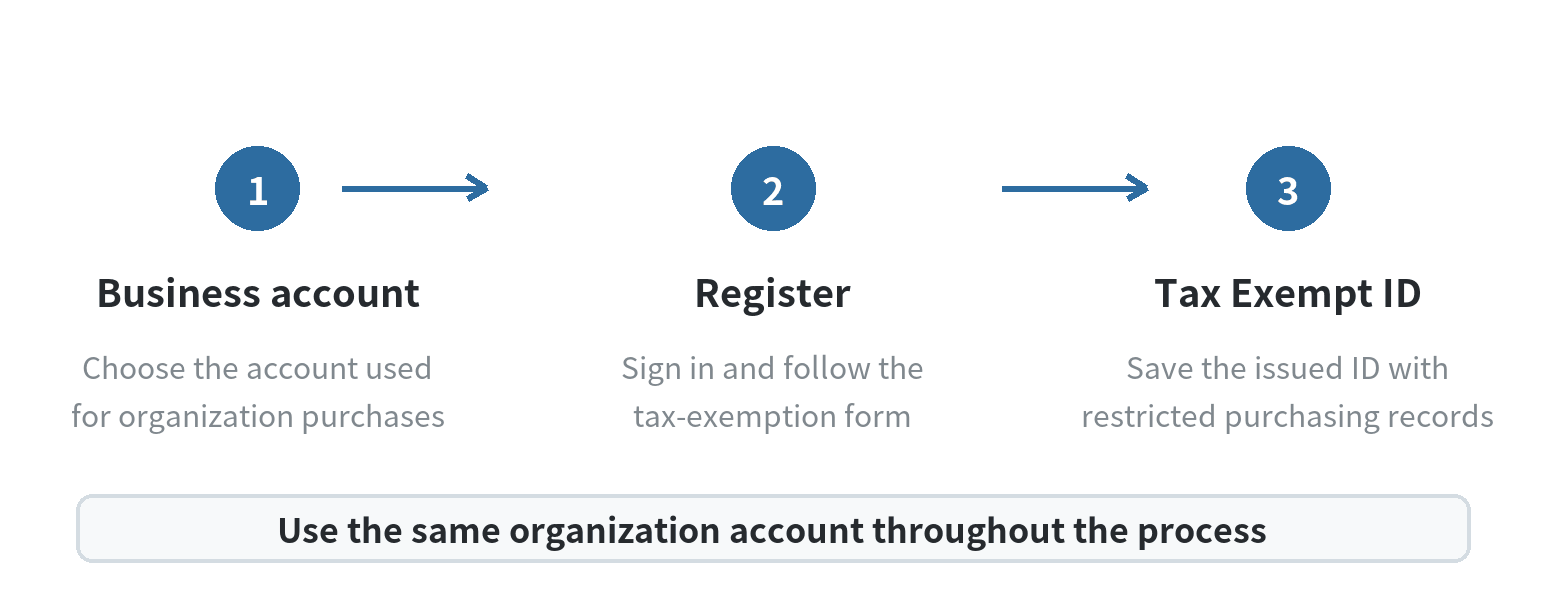
If your organization qualifies for a sales-tax exemption, set it up on the business account you will use for purchases. The retailer’s tax-exemption registration page says to sign in with that business account; it then issues a Tax Exempt ID for eligible purchases in stores and online. The account links the organization’s approved status to the people placing orders, so confirm the account owner and purchasing users before you start.
Start with the account your organization will actually use
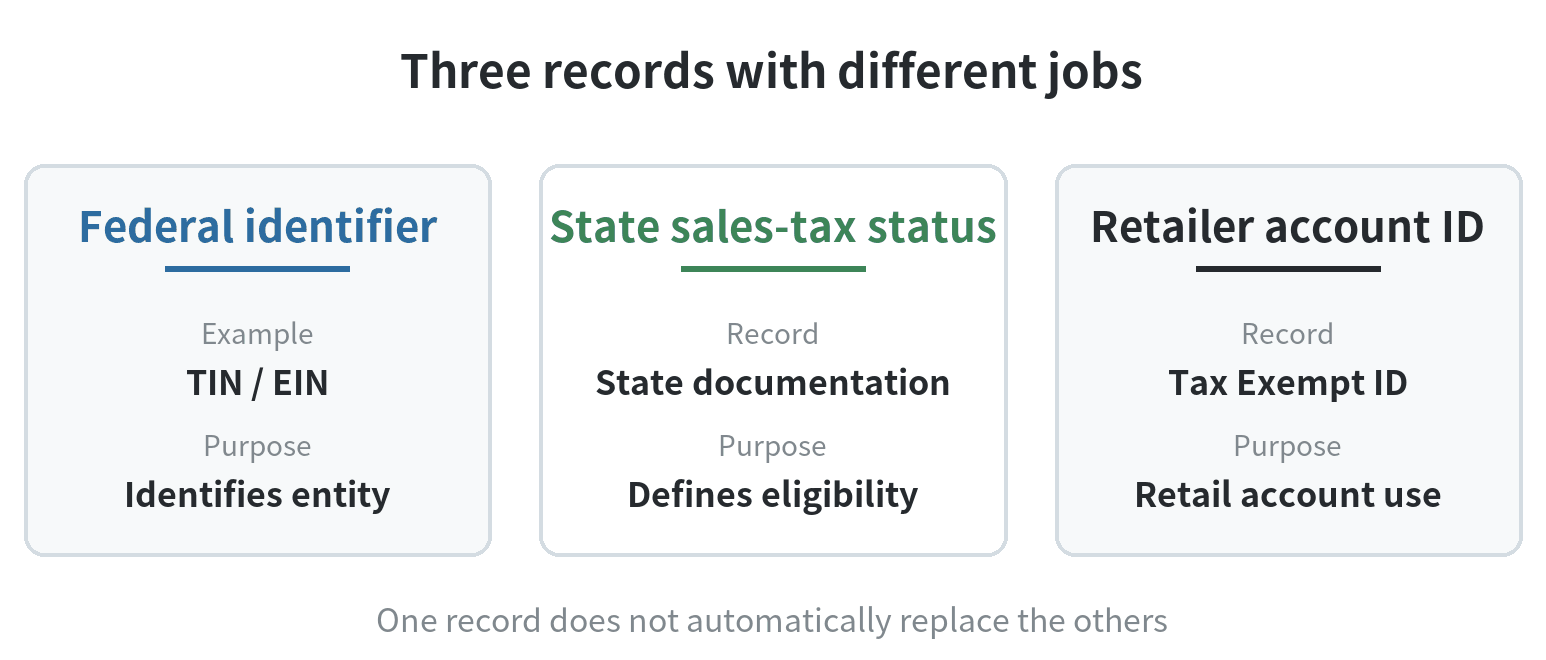
A business account and a tax-exempt approval solve different problems. The account identifies the organization and its purchasing activity. Tax-exempt registration records supporting information so the retailer can issue its own Tax Exempt ID. Creating a business account by itself does not establish that a purchase qualifies for a sales-tax exemption.
If the organization already has an account, check who controls its login and whether it is the staff purchasing account. If nobody can confirm that, resolve account access first. Register and purchase through the same account so the exemption stays connected to the order history the team expects to use.
For an organization with a team of buyers, agree on a shared account plan before anyone submits paperwork. Decide which organization account will hold the exemption, who can access it, and how employees will identify eligible purchases. Keep those decisions with the organization’s purchasing instructions so a new employee does not substitute a personal account or another department’s login. The separate guide to managing team members on a business account covers access setup.
Keep the retailer’s ID separate from a tax number
The Tax Exempt ID described by the retailer is an account tool for its own purchases. It is not an IRS-issued “tax-exempt number.” The IRS explains that sales-tax exemption comes under state law, and that the IRS does not issue a special number to prove an organization is exempt from sales tax. A federal taxpayer identification number or employer identification number identifies an entity; it does not, by itself, establish a state sales-tax exemption.
This distinction matters when someone hands a buyer an EIN and calls it the organization’s tax-exempt ID. The number may help identify the entity, but the retailer’s registration process asks for its own Tax Exempt ID when changing an existing exemption. Do not enter a federal identifier in a field intended for the retailer’s ID. Read the label on the current form and ask the account’s tax administrator which documentation the organization has.
Gather the organization’s own exemption records
Before opening the registration flow, locate the organization’s current sales-tax exemption certificate, letter, or other record issued or accepted by the relevant state. The exact document and details depend on the organization’s status and the state involved. A federal nonprofit determination letter or nonprofit incorporation document may describe a different status from a state sales-tax exemption record.
Use records that name the same entity that will make the purchase. Check the legal name, address, and any state or account identifiers for consistency. If an organization has multiple locations, affiliates, or legal entities, do not assume that a document for one entity automatically covers a related entity. The state’s tax agency can explain its own documentation rules; the retailer can explain what its registration form accepts.
Keep a clean copy of the submitted material and record who completed the registration. Store sensitive tax documents where only authorized purchasing or finance staff can access them. Avoid sending account credentials or exemption records through an informal staff chat. For keeping transaction records organized after enrollment, see the guide to organizing purchase records for tax files.
Before submitting, compare the organization name on the exemption record with the name on the account and note any difference for the tax administrator. If the form asks for a state permit, certificate number, exemption type, or effective date, copy that information from the state record instead of filling a blank from memory. Keep a short submission log with the account used, the date, the documents sent, and the confirmation received. That gives the next purchasing lead a clear record if a staff change or account update interrupts the process.
Follow the registration flow using that same account
The retailer’s official tax-exemption page describes a registration path: sign in with the business account that will be used for exempt purchases, then register the exemption. The page says the retailer will provide a Tax Exempt ID. Follow the fields and document requests shown in the current registration flow rather than relying on an old screenshot or instructions for a different organization type.
After submitting the information, save the confirmation and the ID in the organization’s restricted purchasing records. Check that the organization name and account match the records submitted. If the page rejects a document or the account details do not match, pause and ask the retailer’s support team what needs correction; do not guess at a substitute document or number.
The retailer describes the ID as usable for in-store and online purchases. Before a purchase, make sure the order is being placed under the registered account and that the person buying can access the ID or any required account setting. IRS guidance says state law governs sales-tax exemption; the retailer-issued ID applies to its own account process.
Make the setup usable for staff
Give buyers a short internal note with the registered organization name, the account they should use, where the Tax Exempt ID is stored, and whom to contact if an order still shows sales tax. Keep the note operational. It should not tell employees that all purchases automatically qualify.
For example, a nonprofit facilities team may use a maintenance account and separate personal accounts for staff. The purchasing lead can record which account is registered, who is authorized to use it, and where the state-issued exemption document is stored. A department buying on behalf of a different legal entity should check with its finance office before using the organization’s ID.
When a purchase appears taxable, retain the receipt and order details, then ask the retailer how it handles that transaction and ask the organization’s tax contact whether the purchase meets its exemption rules. The seller’s account setting and the organization’s legal eligibility are related but separate questions.
Update an existing exemption carefully
The retailer’s registration page also provides an update path. It asks for the existing Tax Exempt ID before a user views or changes exemption details. If the ID is missing, use the page’s recovery option or contact account support instead of creating a duplicate registration under a different login.
When the organization changes its legal name, address, structure, or purchasing account, have its tax administrator review the state documentation and ask the retailer how to update the registered record. Keep the old confirmation until the updated record is complete so buyers know which account information has changed.
For a new setup, the practical sequence is simple: identify the correct organization account, locate the organization’s state sales-tax records, complete the retailer’s registration while signed into that account, then save the issued ID and confirmation for authorized buyers. For state-specific eligibility or filing questions, contact the state tax agency or the organization’s tax professional.
FAQ
Is an EIN the same as a retailer’s Tax Exempt ID?
No. The IRS describes an EIN as an entity identifier and says it does not issue a special number that proves state sales-tax exemption. The retailer issues its own Tax Exempt ID for its account process.
Can I register an exemption using my personal account?
The retailer’s registration page says to sign in with the business account that will be used for tax-exempt purchases. Use the organization’s purchasing account identified by its authorized staff.
Does federal nonprofit status automatically exempt purchases from state sales tax?
No. The IRS says sales-tax exemption is governed by state law. Check the organization’s state records and eligibility with its tax administrator or state agency.
What if the Tax Exempt ID is lost?
The retailer’s registration page includes an ID recovery option. Use that option or contact account support to recover the existing record instead of creating a duplicate.
Last updated: 2026-10