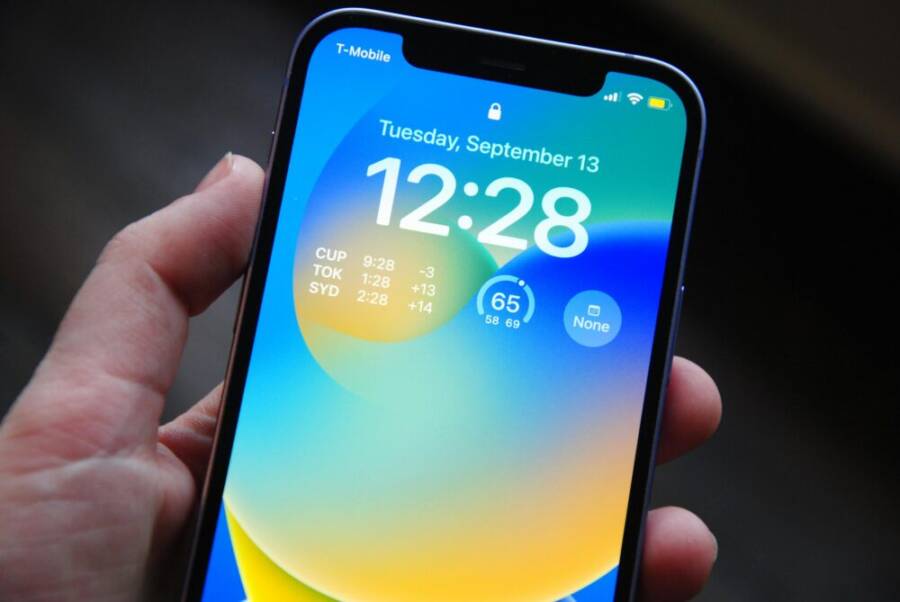
What if a simple lock screen could spark your best day, every day? This post shares practical lock screen ideas that serve as constant nudges for motivation and daily prompts. You’ll find ideas you can try right away that fit into real life.
You’ll get quick ideas you can implement today, with separate tips for iPhone and Android. The goal is to turn screen time into healthier smartphone habits without adding noise to your day. Each idea is easy to customize so you can make it your own.
These prompts work even in a busy morning routine or a late night unwind. By pairing small changes with your lock screen, you create a steady rhythm that supports focus, intention, and momentum.
Why lock screen motivation matters for daily success
A small nudge can steer a big portion of your day. Your lock screen is that first touchpoint every time you pick up your phone. When it carries a clear prompt, it becomes a quiet coach that helps you start with intention and finish with momentum. This section explains why a motivating lock screen matters and how to use it as a reliable daily tool.
Benefits of a motivating lock screen
A motivating lock screen serves as a compact, constant reminder that travels with you. Here are concrete advantages you can expect when you design it with purpose:
- Quick focus at a glance: A single line or image can cut through morning chaos. Instead of sifting through apps, you see a goal or cue immediately as you unlock.
- Habit cue without friction: Prompts become triggers that initiate small actions. The moment you wake or pause between tasks, the prompt nudges you toward action without adding extra steps.
- Mood lift with visual cues: Positive visuals or a hopeful quote can shift your tone for the day. A bright image or a calm mantra reduces cognitive load and lowers resistance to starting.
- Goal alignment across the day: A clear focal point keeps you aligned with long-term aims. Even routine tasks can feel more meaningful when they connect to a bigger objective.
- Consistent accountability, privately held: You don’t need to broadcast goals to others to stay on track. The lock screen acts as a personal accountability partner.
- Micro-optimizations that compound: Small prompts promote small wins. Those wins add up, strengthening habits and confidence over weeks and months.
- Reduced decision fatigue: With a fixed cue, you spend less time deciding what to do next. The right prompt makes the next action almost automatic.
Think of your lock screen as a personal coach that works in the background. It doesn’t demand time or effort, yet it rewards you with clearer mornings, steadier focus, and a smoother day. If you’ve ever wished for a reliable starter pistol for productivity, this is it. A well crafted lock screen does more than look nice; it channels your energy toward outcomes you care about.
To illustrate, imagine a lock screen that reads, “Today’s top 3: move, learn, connect.” That simple line reminds you to move your body, learn something new, and reach out to someone you care about. You unlock with a small action in mind and start the day with intention. Over a week, the repeated cue builds a pattern that feels almost automatic, yet remains fully controllable.
For further ideas on how visuals and prompts impact motivation, see sources that discuss how visual prompts on devices improve focus and momentum. You can explore examples like inspirational lock screen photos that boost productivity and vision board style prompts, which show how visuals hold goals in sight and lift daily drive. These concepts resonate with the idea that small, consistent prompts on unlock can steer daily actions without extra effort. If you’d like a quick primer, you can read more about how daily prompts sustain positive habits in other contexts as well.
- External example: an inspiring lock screen photo can boost productivity by providing a clear emotional cue at the start of the day. See how people use visuals to reinforce daily aims. Inspirational Lock Screen Photos to Boost Your Productivity
- External example: a vision board style lock screen helps keep long-term goals front and center, making daily tasks feel purpose driven. Transform Your Life with a Vision Board Lock Screen
In short, a motivating lock screen is a small but powerful tool. It creates a habitual prompt that nudges you toward better choices throughout the day, without requiring extra time or effort.
How to decide what motivates you
The key to a highly effective lock screen prompt is personal relevance. Start with simple questions and quick tests to uncover what really moves you. The goal is to identify prompts that feel natural and doable, not arbitrary or generic.
- What three outcomes matter most to you right now?
- Health: For example, “drink water, stretch, move 20 minutes.”
- Study: “review notes for 5 minutes, summarize what I learned, plan the next session.”
- Work: “tackle the top priority task, limit email catches, complete one meaningful step.”
- Personal growth: “read 10 pages, practice a new habit, reflect on progress.”
- When do you feel most discouraged or fatigued, and what would help you push through?
- If mornings are hard, a short prompt like “One quick win before coffee” can be enough to get started.
- If evenings drag, a prompt such as “Finish one task, then unwind” sets a concrete finish line.
- What small, non negotiable actions fit easily into your day?
- Hydration reminders, a 5 minute stretch, or a 2 minute plan review.
- A micro goal like “write 100 words” or “spend 15 minutes on a skill.”
To illustrate how these questions translate into concrete prompts, consider these examples across different life areas:
- Health: A lock screen that says, “Hydrate 8 oz, 5 mins of movement, 2 fruits today.” It nudges you to drink water and move without a big time commitment.
- Study: “Review 3 notes, summarize in 2 lines, plan tomorrow’s study block.” This keeps study sessions focused and measurable.
- Work: “Finish the top 1 task, then a 5 minute brain break.” The cue creates momentum by prioritizing impact work first.
- Personal growth: “Read 10 pages, jot 1 takeaway, apply one idea.” The prompt supports consistent learning and practical application.
If you want more structure, try a quick three question framework each weekend. Ask yourself:
- What goal will move my week forward the most?
- What tiny action can I do every morning to support that goal?
- How will I measure progress in the next 7 days?
The answers will shape a lock screen prompt that feels authentic and doable. You want prompts that you look forward to engaging with, not ones that feel like chores.
Here are additional prompts that demonstrate how different prompts can align with specific goals:
- Short, action oriented: “Move 15 minutes, drink water, plan tomorrow.”
- Reflective and growth focused: “What did I learn today and how can I apply it?”
- Momentum builder: “Finish one small task, then a 2 minute break.”
To maximize usefulness, pair the prompts with a few design choices. Use a high contrast font for readability, and pick an image that conveys your goal. If you choose a health prompt, an image of a sunrise jog or a glass of water can reinforce the message. If you prefer study or work prompts, use clean typography and a simple, uncluttered background to minimize visual noise.
If you’re looking for ready made inspiration, a few curated examples exist that align with the idea of daily prompts and motivation. You can explore resources that showcase how daily prompts and lock screen visuals support ongoing motivation, including readers who keep long term goals in sight via lock screens. These references illustrate the value of keeping goals in view and using simple cues to stay on track.
- Inspirational prompts and visuals can serve as reliable daily nudges that keep focus on what matters most.
- Vision board style prompts help you maintain a clear sight of long term aims without clutter.
In summary, deciding what motivates you starts with small, personal questions. The prompts that emerge should feel natural to your routine and easy to act on, every single day. When you tailor your lock screen to reflect real goals, you create a reliable tool that supports daily progress without adding friction. That is the essence of a motivating lock screen and why it matters for daily success.
Creative lock screen ideas to boost motivation
A great lock screen does more than show time and notifications. It can be a tiny coach that nudges you toward your goals with every glance. Below are practical, ready-to-implement ideas that feel personal and doable. Each subsection provides actionable steps you can adopt today, plus simple ways to update or rotate your setup weekly.
Daily motivational quotes and affirmations
Short, punchy quotes work best on a lock screen because they’re quick to read at a glance. Aim for 1–2 lines that spark action or focus. Choose fonts that are clean and legible, such as a sans serif with medium weight, and keep high contrast between text and background to ensure readability in bright morning light or low evening lighting.
- How to pick quotes: look for statements that are specific to your day. Examples include “Move first, think later” or “One small win today.” Avoid long sentences that you’ll have to squint at.
- Font and contrast: use a font size that stays readable when your phone is unlocked to check a notification. Black text on a white or light background or white text on a dark background works well.
- Rotating quotes to stay fresh: set a weekly schedule to swap quotes. Pick a theme for the week, such as energy, focus, or learning, and choose 2–3 quotes that fit. At the same time, keep a small archive of favorites you can rotate in when you feel stuck.
- Quick weekly update method: every Sunday, replace the current quote with a new one and archive the old quote in a note. If you use a photo-based lock screen, you can pair each week’s quote with a simple graphic or image.
Tip: for ready-made inspiration and templates, Canva offers free motivational wallpaper templates you can personalize with your own quotes and colors. See how others customize quotes to fit their vibe. Free motivational wallpaper templates
Using a few reliable sources for quotes can save time while keeping the content fresh. If you prefer a rotating library of ideas, consider pairing your quotes with a small, related image or icon that reinforces the message on your screen. This approach helps the prompt feel tangible rather than abstract.
Visual goals and progress trackers
Visible progress on the lock screen creates a constant sense of momentum. Simple progress bars, streak indicators, or checklists can live on your screen without crowding important information. The key is to keep the layout clean so you can read it quickly.
- Progress bars: show 3 bars for current priorities (e.g., health, growth, tasks). As you complete each area, the bar fills. This provides a quick status check without opening an app.
- Streaks: lock screen streaks for daily activities like hydration, steps, or a focused 25-minute work block. A small numeric indicator or a tiny badge can be enough to motivate.
- Checklists: list 2–5 compact tasks that contribute to a larger goal. Keep items short and actionable, such as “walk 10 minutes,” “read 5 pages,” or “plan tomorrow’s top 3 tasks.”
- Simple task templates you can reuse:
- Health, study, work: “Move 20 minutes, Read 5 pages, Top 1 work task.”
- Personal finance: “Save $2 today, Track expenses, Review budget.”
- Learning: “Watch 1 short lesson, Write 1 takeaway, Plan next block.”
- Visual balance: use a clear hierarchy so the most important item is front and center. A subtle accent color helps guide attention without overwhelming the screen.
If you want a ready-made reference, check out ready-to-use visuals that align with daily prompts and motivation. For example, lock screen ideas that emphasize a clean, minimal design paired with a straightforward progress indicator. These visuals show how simplicity can drive consistency and focus.
- Inspirational visuals and prompts can help you stay aligned with goals as the day unfolds.
- Vision board style prompts keep long-term aims in view without clutter.
To add variety, you can rotate between a progress bar one week and a simple checklist the next. This keeps the lock screen feeling fresh while retaining a reliable cue.
Personal photos and memories
A meaningful photo acts as a powerful power cue. When the image reflects your values or a future you’re building toward, every unlock becomes a reminder of what matters.
- Choose a photo with clear, simple foreground elements. Busy backgrounds steal attention from your message.
- Pair a photo with a minimal caption or just a single word that anchors your intent, such as “Momentum” or “Today.”
- Layout tips for a clean look:
- Place the image off-center so the time and status icons don’t overlap the message.
- Use a soft, neutral overlay behind white or dark text to improve readability.
- Keep the overall composition uncluttered; avoid adding multiple text lines or icons over the image.
- How to keep it fresh: swap in a small album of 4–6 photos that represent different goals or moments. Change the image weekly or monthly to refresh your cue.
- Privacy considerations: if your lock screen shows a notification gutter, ensure sensitive elements stay away from the image edge and avoid embedding private data in the image itself.
A well-chosen photo can be a calming anchor on tough days. For inspiration, explore galleries that show how people use lock screen visuals to reinforce personal aims with simple, meaningful imagery. Using a photo that evokes a positive memory or a future milestone can make your daily routine feel more purposeful.
- A photo of a place you want to visit can remind you to save and plan.
- A snapshot of a family moment can reinforce the why behind your routines.
- A single prop, such as a running shoe or a book, can symbolize a habit you’re building.
For reference, you can find examples of visually clean lock screens and photo layouts that balance aesthetics with clarity on platforms that curate motivational imagery. These can help you craft a layout that stays legible while still feeling personal. And if you’re short on photos, stock imagery with a simple composition can work just as well.
Quick tasks and reminders
Lock screens work best when they prompt one or two high impact tasks. The aim is to avoid sensitive information exposure while keeping prompts short and actionable.
- 1 to 2 high-impact tasks: pick tasks that unlock forward motion. Examples include “Finish top task,” or “Read 10 pages and summarize.”
- Privacy first: avoid showing detailed personal information. Use generic prompts or initials and keep sensitive data in a secure app.
- Short and actionable prompts: use verbs that prompt immediate action, like “Draft,” “Review,” or “Plan.”
- Example layouts:
- Prompt area: “Finish top task today.”
- Context area: “2 min plan” (a quick note to prepare for the next block).
- Why this helps: a focused prompt minimizes decision fatigue. You know exactly what to do next, and you can complete it quickly.
If you want ready-made prompts, several sources offer ideas aligned with quick, high impact tasks. You can draw from short, action oriented prompts that push momentum without invading privacy. A simple rotation where you replace the prompt every few days keeps the lock screen feeling fresh and useful.
To keep privacy intact while remaining practical, consider a layout that separates content into two zones: a high visibility cue (the task) and a privacy-safe footer (a minimal indicator such as the day or a tiny icon). This approach preserves readability while protecting sensitive details.
External references provide additional ideas on how to structure quick prompts and maintain privacy without sacrificing clarity. For example, you can explore motivational prompts and visuals that support daily focus, including vision board style cues that help you keep long term goals in sight. These resources illustrate how small, consistent prompts can guide daily actions without extra effort.
- Motivational prompts and visuals can serve as reliable daily nudges that keep focus on what matters most.
- Vision board style prompts help you maintain a clear sight of long term aims without clutter.
With these strategies, your lock screen becomes a compact blueprint for the day. It nudges you toward the right actions without adding friction. When you tailor the prompts to your life, you create a dependable tool that supports momentum and growth, every time you unlock.
External links for further inspiration and templates:
- Inspiring lock screen ideas and quotes: Inspirational Lock Screen Photos to Boost Your Productivity
- Vision board style lock screens: Transform Your Life with a Vision Board Lock Screen
Practical setup tips for iPhone and Android
You can set up a motivating lock screen on your iPhone or Android in minutes. These tips work across both platforms and focus on simple steps that keep your prompts clear and effective. Start with templates or apps, then check privacy and readability to make sure everything fits your needs.
Easy templates and apps
Free tools make custom lock screens simple. Apps like Canva and Widget Club offer templates you can tweak for quotes or progress trackers. They work on iPhone and Android, so pick one and follow these steps.
Download Canva from the App Store or Google Play. Search for “motivational phone wallpaper,” pick a template, add your prompt like “Move 15 minutes today,” adjust colors for contrast, and save as wallpaper. Set it as your lock screen in iPhone Settings > Wallpaper or Android Settings > Wallpaper & style.
For widgets that update prompts, try Widget Club. It has 49 styles with photos and colors. Install the app, select a motivational widget, enter your daily goal, resize it small for the lock screen, and add it via iOS home screen long-press or Android’s widget drawer.
Here are example layouts you can copy:
- Quote focus: Center text on a gradient background. Top: time. Middle: “One win today.” Bottom: subtle icon.
- Checklist style: Three short lines left-aligned. “Water. Walk. Work block.” Pair with a clean image.
- Progress bar: Thin bars at bottom for habits. Use 20% fill to start your day.
These apps save time and let you rotate designs weekly. Your smartphone stays fresh without much effort. Check free custom motivational phone wallpaper templates for more ideas.
Privacy and security considerations
Lock screens show previews to anyone nearby, so protect your info. Skip details like full names, emails, or exact locations. Use general prompts instead, such as “Top task” over “Call boss at 2 PM.”
On iPhone, go to Settings > Notifications > Show Previews and pick Never or When Unlocked. This hides message content until you enter your passcode. For Android, open Settings > Notifications > Lock screen notifications and select Don’t show notifications or Hide content.
Safe practices include these steps:
- Limit text to initials or codes, like “Task A done.”
- Turn off notification dots if they reveal too much.
- Test your setup: Lock the phone, glance from afar, and ask if it shares anything private.
Your smartphone’s lock screen should motivate you, not expose you. These settings keep prompts useful while adding a safety layer.
Accessibility and readability
Everyone reads lock screens differently, so prioritize clear visuals. Bigger fonts and strong contrast help in any light. Aim for text at least 24pt on most devices.
Boost readability with these tips:
- Font size: Scale up prompts to fill 20-30% of the screen. iPhone users adjust in Settings > Display & Brightness > Text Size. Android: Settings > Display > Font size.
- Contrast: White text on black or dark backgrounds scores high. Avoid pastels; test with your phone’s accessibility checker.
- Icon size: Keep them 1.5x larger than default for quick scans. Place prompts away from time and battery icons.
- Brightness: Set auto-brightness on, but bump it manually for outdoors. Dark mode at night cuts glare.
A simple test works: Hold your phone at arm’s length. Can you read the prompt in 2 seconds? Adjust until yes. Tools like iOS’s Accessibility > Display & Text Size or Android’s Color correction ensure it suits color vision needs.
These changes make your lock screen work for busy days or quick checks. Your prompts stay sharp and inclusive.
How to customize for different goals
Your lock screen can be more than a pretty wallpaper. When you tailor prompts to specific outcomes, you create a powerful daily lever. Below are practical ways to customize your lock screen for three common goal areas. Each section includes ready-to-use prompts, simple design tips, and quick examples you can adapt today.
Fitness goals
Turn your mornings into a momentum boost with prompts that nudge you to move, hydrate, and prioritize recovery. The trick is to keep it short, concrete, and easy to act on within minutes.
- Short, actionable prompts: Use phrases like “Move 15 minutes” or “Hydrate 8 oz” so the next action is obvious and fast.
- Hydration reminders: Pair movement cues with water prompts to maintain energy and prevent cramps. A simple combination such as “Move + 1 glass water” works well.
- Recovery cues: Include a quick cooldown or stretch reminder after a workout window. For example, “Cool down 5 minutes” signals finishing strong.
- Simple progress visuals: A tiny bar or a trio of checkmarks for hydration, movement, and sleep encourages daily consistency without clutter.
Design tips
- Choose a high-contrast font on a clean background so the prompt is readable in bright morning light or dim evening glow.
- Use a relevant image that reinforces the goal, like a sunrise run or a glass of water, to anchor the cue visually.
Ready-to-use prompts
- “Move 15 minutes, drink 8 oz, plan tomorrow’s route.”
- “Hydrate 1 glass, stretch 5 minutes, breathe 2 minutes.”
- “Finish workout block, 2 minute cooldown, log effort.”
Inspiration and templates
- Visual reminders like water and workout wallpapers can reinforce healthy habits. For example, water reminder wallpapers and exercise reminder wallpapers offer ready-made visuals you can customize with your own text. See examples here: Water Reminder Wallpaper and Exercise Reminder Wallpaper.
- If you want a portable hydration coach, apps like Hydro Coach can provide timing prompts that you can mirror on your lock screen. Explore this concept here: Hydro Coach on App Store.
Photo note
- Image idea: a bright morning scene with a runner and a glass of water. This kind of image reinforces action and hydration as part of your daily routine.
- Photo credit: Photo by Sarah Blocksidge
Study and productivity goals
A focused lock screen helps you carve out study blocks and stay visually connected to your tasks. Keep prompts compact, with clear next steps and a quick snapshot of what matters most.
- Study blocks: Prompts like “25 min focus block” or “Review notes for 5 minutes” set a clear time frame.
- To-do highlights: A 2–4 item checklist can keep tasks in sight without crowding the screen.
- Easy framing for tasks: Use concrete verbs and measurable outcomes, such as “Summarize chapter 3 in 2 bullet points” or “Plan tomorrow’s study block.”
- Progress indicators: A small, unobtrusive tracker showing blocks completed today can boost momentum.
Design tips
- Favor a clean, minimal layout with a single prominent task and two supporting items.
- Use a calm, distraction-free image or a plain gradient to keep focus on the text.
- Ensure high contrast so the text is legible in different lighting conditions.
Ready-to-use prompts
- “Study 25 minutes, 1 page summary, 3 key takeaways.”
- “Review notes for 5 minutes, flashcard 10 items, plan next session.”
- “Plan tomorrow’s study block, identify top 3 tasks, set time blocks.”
Inspiration and templates
- For study focused visuals, Canva offers templates you can customize with your prompts and color scheme. See free motivational wallpaper templates you can adapt: Free motivational wallpaper templates.
Photo note
- Image idea: a tidy desk with a notebook and a laptop, suggesting focus and productivity.
- Photo credit: Photo by Sarah Blocksidge
Mindfulness and mental health
Prioritize calm, balance, and small daily rituals. Gentle prompts and breathing reminders create a steady anchor amid a busy day.
- Breathing cues: Short prompts like “5 breaths now” or “ inhale 4, exhale 6” can be done in under a minute.
- Gratitude notes: A daily line such as “Today I appreciated…” invites a quick reflection.
- Gentle reminders: Use soft affirmations that don’t press too hard, like “Pause. Breathe. Begin again.”
- Color and imagery: Choose soothing colors and minimal icons to avoid overstimulation.
Design tips
- Soften the background with muted tones or a subtle gradient to support a meditative mood.
- Use readable fonts with generous letter spacing for quick recognition.
- Include a tiny, private space where you can jot a quick note if needed.
Ready-to-use prompts
- “Breathe for 5 deep breaths.”
- “What am I grateful for today? One line.”
- “Pause, notice one comfort, continue with intention.”
Inspiration and templates
- Visual prompts that emphasize calm and balance can be simple yet powerful. Look for visuals that pair consistent prompts with a clean aesthetic.
- If you want a quick primer on how daily prompts help with habit formation, you can explore resources discussing why small reminders sustain momentum.
Photo note
- Image idea: a serene scene, like a soft sunrise or a calm desk, to reinforce a peaceful mindset.
- Photo credit: Photo by Sarah Blocksidge
Images for overall section
- If you’d like a photo to accompany this section, consider the following image that fits the theme of a smartphone being used in daily routines.

- Credit: Photo by Sarah Blocksidge
External links and further reading
- Inspirational lock screen ideas and quotes: Inspirational Lock Screen Photos to Boost Your Productivity
- Vision board style lock screens: Transform Your Life with a Vision Board Lock Screen
Tips for implementing across devices
- Keep prompts consistent across iPhone and Android so you maintain a uniform motivation thread.
- Rotate prompts every few days to keep the cue fresh without breaking habit continuity.
- Test readability in both bright daylight and low light, then adjust contrast and font size accordingly.
By tailoring lock screen prompts to these specific goals, you create a lightweight, high-impact routine helper. The right prompts act as a tiny coach that travels with you, guiding actions with minimal friction and maximal clarity. This approach turns your lock screen into an active partner for daily progress across fitness, study, and mental wellbeing.
Conclusion
A few simple lock screen ideas can become a steady coach in your day. Daily quotes, progress trackers, personal photos, and quick task prompts each shape momentum with minimal friction, so you stay focused longer than you expect. Pick one or two ideas to test this week on your smartphone and watch how small prompts compound into clearer mornings and steadier focus.
If you try a prompt or rotate a design, share your results or tweaks in the comments. I’d love to hear what worked for you and what didn’t, and I welcome any feedback to improve this guide.