
There Is a Frequency That the Wealthiest Families Have Used for Generations and Most People Will Never Know It Exists
>>> Open the Door <<<

Starting an Instagram page with just your phone sounds straightforward, yet many feel stuck before they begin. If you’re new to this, you’re not alone, and this guide will show you a clear path using only a smartphone.
This introduction outlines a practical, step by step plan that covers setup, content planning, shooting, editing, growth, and a simple launch strategy. You’ll learn how to make a strong first impression, publish consistently, and measure what matters, all from a single device.
The core idea is simple: you can build a meaningful presence without extra gear or complicated processes. With practical tips and real-world examples, you’ll move from idea to posted content quickly. By the end, you’ll have a ready to execute plan that fits into your daily routine, powered by your smartphone.
Set Up Your Instagram Page on a Phone
Starting an Instagram page directly from your phone keeps things simple and nimble. You can set up, optimize, and publish without touching a computer. In this section, you’ll learn how to choose the right account type, craft a profile that attracts the right audience, and keep your setup secure from day one.
There Is a Frequency That the Wealthiest Families Have Used for Generations and Most People Will Never Know It Exists
>>> Open the Door <<<
Choose the Right Account Type
Instagram offers Personal, Creator, and Business accounts. Each type unlocks different tools, so picking the right one matters for growth and ease of use.
- Personal: Best for private sharing and casual posting. It keeps things simple with standard viewing and engagement options. If you’re just experimenting or keeping your presence low profile, a personal account is a solid start.
- Creator: Designed for public figures, content creators, and influencers. It provides more advanced analytics, easier messaging controls, and flexible content labeling. This is a strong middle path when you want better insights without turning on ads.
- Business: Tailored for brands, shops, and service providers. It adds in-depth analytics, shopping features, and ad capabilities. If you plan to run promotions, collaborate with brands, or drive website traffic, a business account makes sense.
When to choose each:
- Start with Personal if you’re unsure about content direction or want to test the waters.
- Move to Creator if you focus on content output and want clearer engagement metrics.
- Switch to Business when you want ads, shopping, and robust analytics tied to a brand or service.
Practical tip: You can switch account types later with minimal friction. If you expect to run ads or offer products, plan for a Business setup so you don’t hit feature gaps later.
For quick reading on how each type differs, check these resources:
- Understanding the differences between account types and available features
- How analytics and ads vary by account type
Set Up Your Profile for Success
Your profile is the first impression visitors get. A well crafted setup helps people find you and know what to expect.
- Profile photo: Use a clear, high resolution image. If you’re building a brand, your logo works well. For personal brands, a clean portrait is best.
- Username: Keep it short, memorable, and aligned with your content. Avoid numbers unless they’re part of your brand.
- Bio: State who you are, what you offer, and why someone should follow. Use keywords naturally and include a simple call to action, like “Follow for daily tips” or “DM for collaborations.”
- Link options: Your bio can include one clickable link. Use it for your website, a Linktree style hub, or a current promotion. Update it as your content focus shifts.
- Contact methods: If you’re using a Business or Creator account, enable contact options like email or a phone number so followers can reach you easily.
- Highlight covers: Create a few story highlights with clear titles. This helps new visitors understand what you offer at a glance.
- Visual consistency: Pick a cohesive color scheme and style for your profile picture, bio, and post thumbnails. Consistency builds recognition.
A few quick optimization ideas:
- Include a clear value proposition in your bio.
- Use one strong keyword in your username or bio to improve searchability.
- Add a call to action in your bio, such as “Watch our latest tips” with a link.
For inspiration and best practices, you can review profiles in similar niches and note what works for them. You’ll rarely go wrong by keeping things straightforward and authentic.
Helpful reads:
- How to set up a professional Instagram profile
- Tips for crafting an engaging Instagram bio
Keep Your Account Safe and Private
Security and privacy should be a baseline, not an afterthought. A few simple practices keep you in control of your presence.
- Privacy basics: Decide whether you want a public or private profile. If you’re building a brand or business, public is usually the default. Private helps when you want a more controlled audience.
- Two factor authentication (2FA): Turn on 2FA for extra protection. It adds a second step to sign in, so even if someone knows your password, they can’t access your account easily.
- Password habits: Use a unique password for Instagram and update it periodically. Consider a password manager to keep track of it securely.
- Handling comments: Moderate comments to keep conversations constructive. Use filters to block certain phrases and keywords. If a comment crosses the line, delete it and don’t engage with trolls.
- Managing messages: Turn on message filtering so you only receive important DMs. Set up quick replies for common questions to save time.
- Notifications: Adjust push notifications so you’re alerted to important activity without being overwhelmed.
In practice, start with 2FA enabled and a clean, professional profile. If you ever see suspicious activity, change your password immediately and review connected apps.
Helpful reads:
- About professional accounts on Instagram
- How to enable two factor authentication on Instagram
Links for deeper reading and setup guidance:
- Instagram account types explained
- Tools to help you choose the right account type for your goals
If you’re ready to dive in, you’ll find the next steps carryover neatly into content planning and publishing from your phone. Your phone becomes a powerful studio, keeping everything you need in reach as you grow. For further ideas as you flesh out your page, explore how other creators structure their profiles and posts to maximize discoverability.
Plan Content That Connects
Planning content that resonates starts with clarity and a simple rhythm. When you’re using only your phone, every post should feel intentional, not hurried. This section helps you define a focused niche, set achievable goals, map out content ahead of time, and choose formats that fit your skills and your audience’s habits. Think of it as the spine of your Instagram page: clear, repeatable, and easy to maintain from a phone screen.
 Photo by Arina Krasnikova
Define Your Niche and Goals
Choosing a narrow topic helps you stand out in a crowded feed. A well defined niche signals to people exactly why they should follow you and what they can expect from your posts. Start with a specific angle rather than a broad theme. For example, instead of “fitness,” try “quick at home workouts for busy parents” or “postpartum mobility for new moms.” The more precise, the easier it is to create content that sticks.
Set small, concrete goals that you can hit with a phone. Think in terms of the next 30 days rather than the next year. Examples:
- Reach a specific follower count by a set date.
- Achieve a defined engagement rate on weekly posts.
- Publish a minimum number of posts each week and maintain consistency.
Clear goals keep you moving even when inspiration dips. They also guide your content decisions, from captions to post formats. To keep momentum, pick one measurable metric to track at first, such as new followers or saves per post. When you hit that target, raise the bar gradually.
To help you sharpen your niche and goals, consider comparing ideas with proven guidance from reliable sources that outline how others have chosen profitable and sustainable themes. See resources like a practical overview of niche selection and the role of goals in growth, plus real world examples that show what works in practice. You can explore discussions on how creators pick niches and build momentum with focused content, such as articles that explain the relationship between niche, audience, and growth signals. For further reading on related topics, these sources can provide solid context:
- How to understand the differences between account types and what they mean for your goals
- A straightforward guide to analytics and growth on Instagram based on account type
- A practical example of choosing a niche and applying it to growth strategies
If you’re seeking a more tactical frame, a niche page often centers around a single subject you can post about consistently. For instance, a travel micro-niche that highlights affordable weekend getaways can help you post regularly without losing focus. To validate your choice, describe your ideal follower in a sentence and write down the exact topics you will cover. This alignment will keep your content cohesive and easier to plan.
Helpful reads:
- Understanding the basics of finding a niche that fits your strengths
- How to set achievable social media goals that actually move the needle
External resources:
- https://www.example.com/instagram-niche-guide
- https://www.example.com/instagram-analytics-by-account-type
Create a Simple Content Calendar
A lightweight content calendar keeps you organized without overwhelming you. Start with a two week plan and adjust as you learn what resonates. Your calendar should map out when you post, what you post, and the format you’ll use. The goal is to create a rhythm you can sustain from your phone.
How to build a beginner friendly calendar:
- Choose a posting cadence: 3–5 posts per week with 1–2 Stories daily. This balance keeps your feed active without burning you out.
- Diversify post types: mix single photos, carousels, short videos, and occasional Reels to see what sticks.
- Assign topics to days: designate specific themes for certain days to reduce decision fatigue. For example, Motivational Monday tips, Tutorial Tuesday, and Friday Favorites.
- Keep content prompts handy: write 5–7 prompts that align with your niche. Use captions that invite engagement, such as asking a question or requesting a quick tip.
A simple weekly template could look like this:
- Monday: Carousel with 3 tips
- Wednesday: Short video demonstration
- Friday: Photo with a personal story tied to your niche
- Daily Stories: Behind the scenes, quick polls, or Q&A
To stay consistent, batch create when you have spare time. Even with just a phone, you can shoot, edit, and schedule content using built in features and default tools. If you want a structured approach, look for templates that map topics to days and keep launches predictable. The aim is a light system you can manage on the run.
For inspiration and practical guidance, consider resources that explain planning and consistency for beginners. Explore ideas on building a reliable content cadence and see how different formats perform when used in a simple schedule. When you’re ready to expand, you can layer in more advanced tactics, but start with a calendar you actually use.
Helpful reads:
- A beginner friendly guide to setting up a consistent posting schedule
- How to plan your content weeks ahead for social media
External resources:
- https://www.example.com/social-media-content-calendar
- https://www.example.com/beginner-post-ideas
Content Ideas and Post Formats
Beginner friendly formats keep your workload manageable while you learn what resonates. Start with simple, proven formats and expand as you gain confidence. The key is to align formats with your niche and the needs of your audience.
Recommended formats for beginners:
- Single photos: A clean shot with a clear focal point. Use a strong caption that delivers value in a sentence or two.
- Carousels: A sequence of 3–6 slides that tell a story or break down a tip into steps.
- Short videos: Quick demonstrations, behind the scenes, or before/after comparisons.
- Reels: Short, punchy clips that capture attention fast. Use captions since many users watch without sound.
- Stories: Daily updates, polls, and questions to boost interaction.
Niche aligned ideas you can start with:
- If you share wellness tips, post a short routine video and a carousel of 5 simple moves.
- For budget travel, publish a photo with a mini-guide in the caption and a carousel of affordable budget hacks.
- For a food niche, create a step by step reel showing a quick recipe and follow with a carousel of plating ideas.
Template prompts to jumpstart creativity:
- How to solve a common problem in 3 steps: show the steps with text overlays on a carousel.
- A before and after comparison of a technique or process, with a caption that explains the change.
- A day in the life focused on a specific routine within your niche, using Stories to supplement the post.
To maximize reach and engagement, mix formats within your niche. Use the caption to deliver practical value, not just a statement. Invite replies with a question or a simple call to action like “Save this for later” or “Share your own tip in the comments.” Short, clear hooks in the first line help capture attention as users scroll.
The following resources offer practical guidance on content ideas and formats, including how to tailor posts to your niche and how to structure prompts that spark engagement. They provide real world insights into what formats tend to perform well for beginners and how to repurpose content across formats to save time.
External resources:
- https://www.instagram.com/p/DRFh1DsErwE/ (how to pick a niche and grow your following)
- https://sellfy.com/blog/instagram-niches/ (top niches and monetization ideas)
- https://medium.com/technical-excellence/how-i-grew-an-instagram-niche-page-to-12-2k-followers-in-6-months-b0ab08c6e496 (niche page growth case study)
In addition, you can look at curated guides that map content ideas to specific audience needs. A well timed mix of posts and Stories keeps your audience engaged without requiring you to be in production mode all day. Remember, your goal is to build familiarity and trust.
Tips to keep content sustainable:
- Reuse successful formats with new angles to avoid creative fatigue.
- Track what performs best and lean into those formats.
- Keep captions concise and scannable; use bullet points or emojis to break up text.
- Maintain a consistent visual style so your posts read as a cohesive grid.
To help readers get started, you can reference successful profiles that previously tested niche ideas and documented what worked. Real world examples show how a focused topic and smart posting rhythm translate into growth over time.
Helpful reads:
- A practical approach to choosing formats that fit beginners
- How to adapt content ideas to your evolving niche
External resources:
He Was Drowning in Bills and Burnout Until a Simple Daily Ritual Rewired His Brain for Wealth in Less Than a Week
>>> Start Your Shift Today <<<

- https://www.example.com/beginners-guide-to-instagram-post-formats
- https://www.example.com/creating-story-driven-content
Images to accompany this section can depict planning on a phone, quick filming setups, or behind the scenes work. If you want a visual cue for readers, a simple layout showing a weekly calendar and content prompts can be helpful. Always credit photographers when using stock imagery.
Remember, the goal of this section is to give readers a concrete, actionable blueprint they can implement using only their phone. By defining a tight niche, setting achievable goals, planning content in a light calendar, and using beginner friendly formats, you create a strong foundation for steady growth and authentic connection with your audience.
Create and Edit Content on Your Phone
You don’t need a studio to post impressive content. Your smartphone is a capable studio in your pocket. This section shows how to capture, edit, and polish photos and videos directly on your device, keeping your workflow fast and focused. You’ll learn practical lighting tricks, quick editing habits, and ways to maintain a consistent look across your feed.
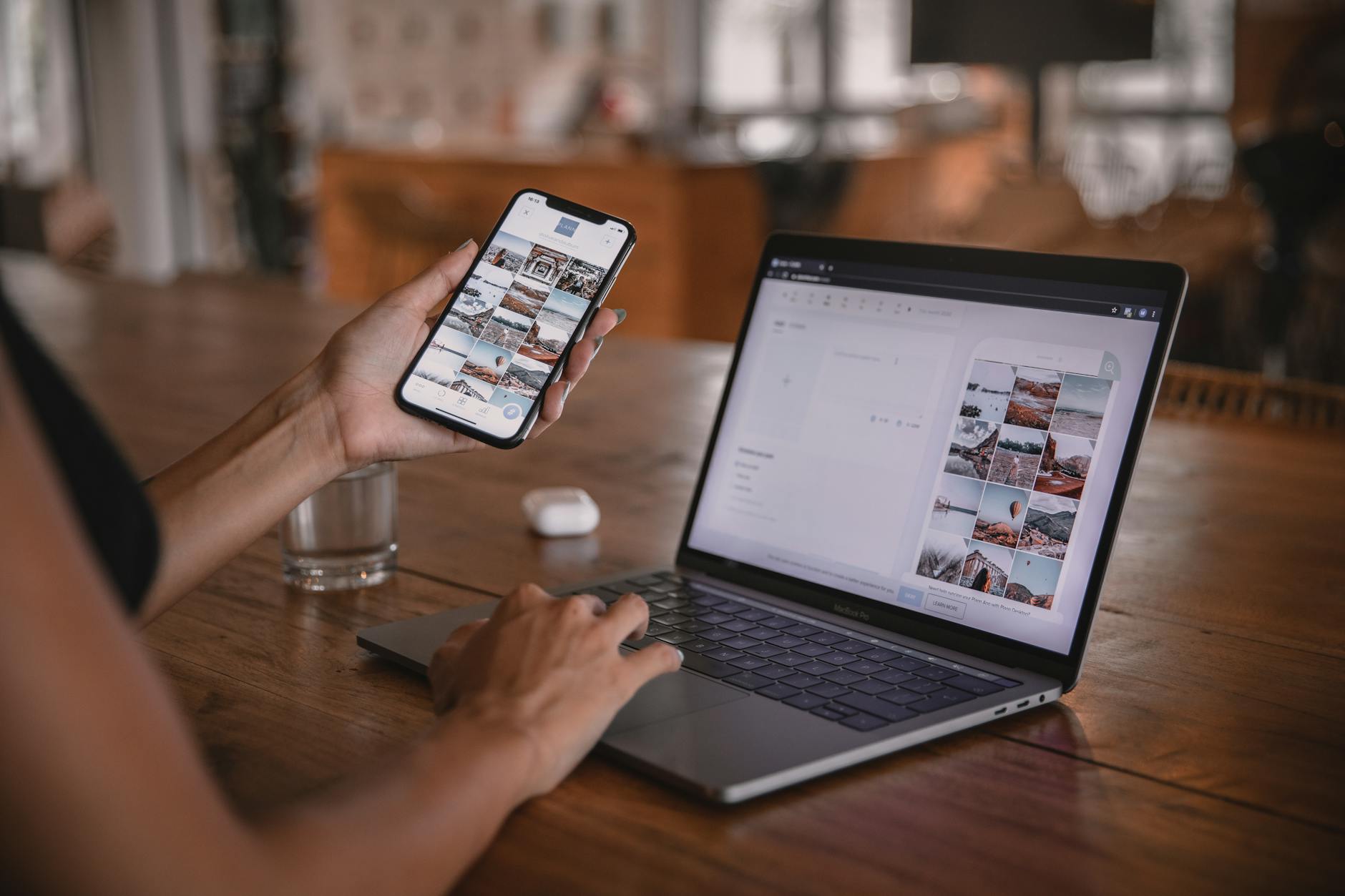 Photo by Plann
Photo and Video Essentials
Great content starts with solid basics. On a phone, you’ll want to maximize your light, frame thoughtfully, and ensure audio is clean. Here are easy, practical practices you can apply today:
- Lighting: Use natural light whenever possible. Face a window for soft, even illumination. If you’re indoors, place a lamp at eye level in front of you to avoid harsh shadows. Avoid overhead lighting that creates unflattering shadows.
- Framing: Rule of thirds helps with balance. Position your subject slightly off-center and leave space for movement, especially in videos. Keep horizons level and avoid cluttered backgrounds.
- Audio: Clear audio beats flashy visuals. If you have to shoot in a noisy space, consider a cheap lavalier or use a makeshift microphone near the sound source. Watch out for wind noise when outside.
- Stability: A steady shot matters more than you think. Use a small tripod, a desk stand, or prop your phone on a steady surface. If you must handhold, brace your elbows and keep movements minimal.
- Basic shooting modes: Use your phone’s native camera mode for the highest control. Shoot in 1080p at 30fps for smooth, widely compatible videos. For photos, capture in RAW if your device supports it to preserve editing latitude.
- Micro-tasks: Shoot a handful of quick B-roll clips that can be stitched into a longer video. This saves you from scrambling for content later.
If you want a quick reference, a few free editing apps can help you refine these assets without slowing you down. See sections below for beginner friendly options and simple presets.
Related reading on mobile editing apps can guide your first edits. For instance, a roundup of free tools often highlights apps that are friendly to beginners and work well with quick cropping, color tweaks, and filters. You can explore practical app ideas in these guides:
- Best mobile editing apps for Instagram beginners
- How different editing apps handle color and style
Edit Quickly with Free Apps
Editing on your phone should speed up rather than slow you down. Start with one or two reliable apps and build a habit of saving presets for consistency. Here are beginner friendly options and practical tips to keep your workflow smooth:
- Cropping and framing: Apps like Photo editing tools bundled in your phone or free editors let you crop to exact aspect ratios used on Instagram. Crop to 4:5 for feed posts and 9:16 for Reels.
- Color and contrast: A simple color boost can make images pop without looking artificial. Look for a one-tap boost or a small set of sliders for exposure, contrast, highlights, and shadows.
- Filters and presets: Create and save a couple of presets that reflect your brand. Presets ensure your feed has a cohesive look even when you post at different times.
- Audio improvements: If your video needs sound, use the editing tool to adjust volume and remove background noise. A clean audio track can elevate the whole piece.
- Export settings: Save exports in the highest quality your device supports without creating overly large files. Consistency in resolution helps with faster loading.
Beginner friendly apps to consider include those that offer straightforward cropping, color adjustments, and easy filters. For a deeper look at options and how they stack up, check curated guides to find the best free mobile editing tools. For example, a quick reference list from credible sources highlights apps suited for beginners and outlines their strengths.
She Pressed Play on a Strange Audio Track and Within Days Her Financial Reality Started Shifting in Ways She Could Not Explain
>>> See How It Works <<<

Helpful reads:
- The best mobile photo editing apps we’ve tested
- How to pick a user friendly video editor for social media
External resources:
- https://www.pcmag.com/picks/best-mobile-photo-editing-apps
- https://themframes.com/features/the-best-photo-editing-apps-to-use-right-now/
- https://www.techradar.com/best/best-video-editing-apps
Tips to keep it simple:
- Save at least two presets: one for photos and one for videos.
- Use a consistent naming convention for drafts to stay organized on a busy smartphone.
- Create a quick export recipe: 1080 x 1350 for feed, 1080 x 1920 for Stories or Reels.
Develop a Consistent Visual Style
Consistency helps your audience recognize your posts in a crowded feed. It doesn’t require a big budget—just a plan and some discipline on your smartphone. Here’s how to build a repeatable look that feels authentic:
- Color palette: Pick 2–3 core colors that appear in lighting, backgrounds, and overlays. Use those hues across photos and videos to create harmony.
- Typography for overlays: Choose one or two legible fonts for captions and on video overlays. Keep font sizes readable, especially on small screens.
- Layout rules: Establish a simple grid approach. For example, mix 1 photo, then a carousel, then a short video, all using the same framing and color cues.
- Overlay elements: Use a subtle watermark or logo in a corner, and keep it consistent in size and placement.
- Story templates: Create reusable cover images for story highlights and a standard intro frame for videos.
To implement, you don’t need fancy tools. Your phone and a couple of free apps can handle color grading presets, typography overlays, and template frames. The goal is to create a cohesive feel that signals quality at a glance.
External resources you can consult for quick visual style guidance:
- A practical guide to choosing a color palette for social media
- Tips for selecting readable fonts for overlays
Useful resources:
- https://www.example.com/instagram-niche-guide
- https://www.example.com/instagram-analytics-by-account-type
Captions and Accessibility
Captions do more than explain what’s on screen. They invite engagement and widen your reach. Keep captions clear, useful, and easy to skim. Add accessibility touches to make your content usable by more people, including those who rely on screen readers.
- Clear captions: Start with a hook that states the value or takeaway in the first sentence. Use short sentences and bullet your key points if needed.
- Alt text: Instagram allows alt text for images. Describe the scene with essential details and the main action. Include context that helps someone understand what the image conveys.
- Hashtags strategically: Use relevant hashtags to reach the right audience. Mix broad and niche tags, but avoid stuffing. Aim for 5–12 well chosen hashtags per post.
- Engagement prompts: End with a question or prompt that invites comments. Simple questions boost engagement and can improve discoverability.
- Accessibility for video: Add concise captions or subtitles so viewers who watch without sound understand the content.
A practical approach is to write captions in two passes: a concise version for immediate impact and a longer version that adds value in the feed description. Use line breaks to improve readability, but keep the first lines punchy to hook readers as they scroll.
For further reading on accessibility and captioning best practices, consider sources that cover alt text and captioning strategies for social media. They provide practical guidelines that you can apply right away.
External resources:
- https://www.instagram.com/p/DRFh1DsErwE/ (niche and growth ideas)
- https://sellfy.com/blog/instagram-niches/ (niche ideas and monetization)
- https://medium.com/technical-excellence/how-i-grew-an-instagram-niche-page-to-12-2k-followers-in-6-months-b0ab08c6e496 (case study)
In addition, you can explore curated guides that map content ideas to audience needs. A well timed mix of posts and Stories keeps your audience engaged without requiring you to be in production mode all day. Remember, your goal is to build familiarity and trust.
Key takeaways:
- Build a crisp, repeatable visual language using your phone.
- Save two or three editing presets to keep your feed cohesive.
- Use captions and alt text to improve clarity and accessibility.
- Mix formats and maintain a steady posting rhythm to grow with intention.
If you’re ready to apply these ideas, you’ll find your phone becoming a reliable tool for creating, editing, and sharing content that resonates. For more hands on examples, review creator profiles that test different formats and styles to see what clicks with audiences. The next steps turn your plan into action, with real content you can publish today.
Grow Your Page with Smart Engagement
Building an Instagram page that grows sustainably starts with how you engage. Smart engagement means adding value, not just chasing numbers. It’s about creating conversations, inviting participation, and building a community that keeps coming back. In this section, you’ll find practical tactics you can apply today using only your phone to boost visibility and loyalty.
Engagement Tactics for New Pages
New pages win when every interaction feels meaningful. Start with simple moves that compound over time.
- Comment for value: Leave thoughtful, specific comments on posts from accounts in your niche. Rather than a generic “great post,” add a quick insight or a question that invites a reply.
- Engage with similar accounts: Regularly like and comment on peers’ posts. When you support others, you often spark reciprocal engagement and raise your own profile among their audiences.
- Post polls and questions: Use Stories to ask questions or run polls. People love input that shapes what you post next, and polls are a low-friction way to start dialogue.
- Leverage Stories for dialogue: Prompt viewers to share opinions, experiences, or tips in Stories. Save the most engaging responses to a Highlights reel so new visitors see social proof of your community.
Tip: Treat engagement as a daily micro-habit. A few deliberate comments and Story prompts every day beat sporadic bursts of activity. For inspiration on how to structure engagement, see guides that explore quick, practical moves like polls, comments, and Story interactions.
Images can reinforce these ideas and show real-world examples of engagement in action. For example, a quick shot of a creator replying to comments or a screen grab of a poll results screen helps readers visualize the tactic.
Photo by Karola G.
Photo credits: Karola G, https://www.pexels.com/@karola-g
Ethical engagement matters too. Avoid leaving generic, repetitive comments or joining conversations just to drop a link. Authenticity wins trust and long-term growth. Want more ideas? Resources like these explore practical engagement tactics:
- Reddit discussions on real ways to boost engagement
- Practical tips for using polls and questions to boost interaction
- Case studies showing how consistent commenting and story prompts drive results
Helpful reads:
- Any real ways to boost Instagram engagement
External resources:
- https://www.reddit.com/r/socialmedia/comments/1nvzvzc/any_real_ways_to_boost_instagram_engagement/
- https://whitepeak.io/tips-to-increase-instagram-engagement/
- https://chatfuel.com/blog/instagram-polls-guide
Smart Hashtag and Caption Strategy
Hashtags and captions are the bridge between discovery and action. A smart combo can extend reach while guiding followers to engage.
- Choose 5–15 relevant hashtags: Mix broad tags with niche, highly targeted ones. This balances reach with relevance, helping you appear in both large and focused feeds.
- Blend broad and niche tags: Broad tags pull in general discoverability; niche tags connect with the exact audience you want.
- Captions that prompt action: Lead with value in the first sentence, then finish with a clear call to action. Questions, prompts to save, or invites to share tips work well.
Example approach:
- Post: a simple tip set
- Caption: “Three quick moves to boost your morning routine. Save this for later and tell me which tip you’ll try first.”
Tips for efficiency:
- Save a small set of evergreen hashtags you rotate with each post.
- Update hashtags occasionally to reflect evolving topics and seasonal themes.
- Pair captions with alt text to improve accessibility and reach.
External reading can help you refine this approach. A quick look at niche guidance and practical hashtag strategies will expand what you can test.
Helpful reads:
- 11 Tips to Increase Instagram Engagement
- Instagram polls 101: how to use them to boost engagement
External resources:
- https://whitepeak.io/tips-to-increase-instagram-engagement/
- https://chatfuel.com/blog/instagram-polls-guide
Collaborations and Community Building
Collaborations are social proof in action. They expand reach by introducing your content to a new audience while reinforcing your own credibility.
- Collaborate with peers: Partner on a shared post, co-host a live session, or create a joint short video. Ensure the topic aligns with both audiences.
- Shoutouts and cross-promotion: Exchange shoutouts with creators at a similar stage. Even a simple “follow Friday” shoutout can yield mutual gains.
- Join small creator communities: Being active in group chats or creator circles helps you stay informed, get feedback, and spot collaboration opportunities quickly.
How to start:
- Identify 3–5 peers with complementary niches.
- Propose a lightweight collaboration, such as a 60-second Reel or a carousel explaining a shared tip.
- Schedule a simple monthly collaboration calendar to keep momentum.
Community-building tips go beyond content. Show up consistently in comments, duets, and cross-promo threads. Readers respond to reliability and shared experiences.
External resources:
- 5 Steps to Increase Your Engagement on Your Instagram Posts
These tactics lay the groundwork for a supportive, engaged audience. They also help you stand out from accounts that post in isolation rather than as part of a living community.
Images can illustrate collaboration dynamics or show creators working together. If you want a visual cue, a photo of two creators filming or a small group planning content can reinforce these ideas.
Photo by Karola G.
Photo credits: Karola G, https://www.pexels.com/@karola-g
End of this section provides practical, actionable steps you can implement immediately. The combination of thoughtful engagement, smart hashtags, and collaborative efforts creates a momentum that compounds as your page grows. For further depth on engagement mechanisms and real-world results, consider exploring the linked resources and case studies.
External resources (additional reading for readers who want more):
- https://www.nobledesktop.com/learn/social-media-marketing/creating-polls-and-quizzes-in-instagram-stories-to-boost-engagement
- https://www.reddit.com/r/socialmedia/comments/1nvzvzc/any_real_ways_to_boost_instagram_engagement/
Launch Plan: Your First 1,000 Followers
Launching an Instagram page from your phone is all about momentum. The goal in the first week is to move from zero to a visible, growing presence by sticking to a simple, repeatable plan. This section lays out a practical launch playbook you can follow day by day, plus guidance on sustaining engagement after that initial rush. You’ll set realistic targets, test small experiments, and build a foundation you can scale without extra gear. Your smartphone becomes your studio, scheduler, and calendar rolled into one.
7 Day Kickoff Checklist
A crisp, day by day plan helps you stay focused and avoid paralysis by analysis. Each day focuses on a mix of posting, engagement, and quick experiments that reveal what resonates with your audience.
- Day 1: Publish a strong intro post. Share who you are, what you’ll cover, and the value you offer. Pair it with a simple, high quality image and a caption that invites a quick reply. Target 10–20 new followers from initial outreach.
- Day 2: Post a carousel with 3–5 practical tips related to your niche. Carousels tend to drive saves, which signals value to the algorithm. Aim for 5–15 saves and 10–20 new followers.
- Day 3: Add a short video or Reel showing a behind the scenes process. Keep it to 15–30 seconds with crisp captions. Target 50–100 views and 5–10 new followers.
- Day 4: Story sequence with a poll or question. Use a poll to gauge interest and gather content ideas. Save the best responses to a Highlights collection.
- Day 5: Publish a post featuring a quick how-to or tip sheet. Use a clean layout and scannable captions. Expect 10–30 saves and 10–25 new followers.
- Day 6: Engage relentlessly. Leave thoughtful comments on 15–20 posts from peers in your niche. Respond to every comment on your own posts within 24 hours.
- Day 7: Run a simple collaboration or cross-promotion if you have a ready partner. A shared Reel or carousel can double your exposure. Track signups, follows, and saves from this effort.
Targets to aim for in the first week:
- Grow followers by 100–300 depending on niche and reach.
- Achieve a 2–5% engagement rate on your posts.
- Build a small but stable routine for content creation and engagement.
Tips for staying on track:
- Use your smartphone as a flexible content studio. Shoot on the fly, edit quickly, and post without overthinking.
- Keep a simple notebook or notes app with a handful of post ideas and prompts.
- Batch create a few assets ahead of time for consistency.
For inspiration on how others structure a first week, you can review real world experiences where creators break past their early follower milestones and grow through steady, authentic content. A practical take on this topic is available in various community discussions and case studies, such as those outlining what actually moved a new account past the first thousand followers. You can explore perspectives like these to tailor your own kickoff.
External references:
- What actually helped you break past your first 1000 real followers on Instagram
- 0 to 1000 Instagram Followers in 4 steps
Content Rhythm for Week One
A balanced content rhythm keeps your feed lively without burning you out. Plan a mix that includes feed posts, Stories, and Reels. The goal is to build visibility while demonstrating consistency and reliability. Your week should feel varied but cohesive, so followers know what to expect and newcomers can quickly understand your value proposition.
- Feed posts: Alternate between single photos, carousels, and short videos. A common cadence is 3 feed posts per week, plus 1–2 carousels or videos that deliver deeper value.
- Reels: Include 1 Reel in the first week if you can. Reels often have higher discovery potential, especially when you caption them well and add captions.
- Stories: Use Stories daily for behind the scenes, quick tips, or polls. Stories create a sense of proximity and invite ongoing engagement.
- Captions and hooks: The first sentence should deliver a clear takeaway. Use bullet style or line breaks to improve readability.
- Hashtags: Use a small, targeted set of hashtags to widen reach without clutter. Aim for 5–12 well chosen tags per post.
- Engagement windows: Dedicate short blocks each day to comment on peers, reply to DMs, and engage with your audience’s content. The more you show up, the more likely people will return the favor.
A simple week one template could look like this:
- Monday: Feed post (carousel with 4 slides) plus a Story poll
- Tuesday: Reel under 30 seconds with a practical tip
- Thursday: Feed post (single photo) with a personal anecdote
- Friday: Story Q&A or quick behind the scenes
- Saturday: Collaboration post or cross-promo if available
- Daily: 3–5 minutes of engaging with other posts and replies
To keep your rhythm practical, batch as much as possible. Shoot multiple clips in a single session, edit on the go, and schedule posts using built in tools. This approach minimizes friction and helps you stay consistent even on busy days.
If you’re looking for sample structures and formats that work well for beginners, review guides that map content ideas to audience needs. They offer practical patterns you can adapt to your niche and energy level. For further reading, consider these sources that discuss niche selection and growth signals as part of a broader strategy:
- How to understand the differences between account types and what they mean for your goals
- A straightforward guide to analytics and growth on Instagram based on account type
External resources:
- Instagram niche guide
- Instagram analytics by account type
Common Mistakes to Avoid
The first week is a learning curve. Avoid these rookie errors that commonly derail new pages, and adopt quick fixes to stay on track.
- Overposting with no clear value: Posting for the sake of posting trains followers to expect low effort. Fix: publish content that teaches, informs, or entertains in a single, well crafted piece.
- Inconsistent posting cadence: Irregular posts kill momentum. Fix: commit to a simple rhythm you can sustain on your phone, even during busy days.
- Ignoring engagement: Likes aren’t enough. Fix: reply to comments, ask questions in captions, and use Stories to spark dialogue.
- Neglecting accessibility: Skipping alt text and captions reduces reach. Fix: add alt text to images and captions to videos.
- Running too many experiments at once: Friction leads to burnout. Fix: test one change at a time and measure results.
- Poor visual consistency: A scattered grid confuses new visitors. Fix: establish a simple visual language with color, typography, and framing rules.
- Not leveraging Stories and Reels early: Stories and Reels often drive discovery more than static posts in early stages. Fix: mix formats, especially early on.
- Skipping the analytics step: Without data, you guess wrong. Fix: track saves, shares, comments, and follower growth to guide future content.
Quick win fixes you can apply today:
- Update your bio to reflect a tight value proposition and a call to action.
- Create two editing presets for photos and videos to keep your feed cohesive.
- Add alt text to your first few posts to improve accessibility and reach.
- Schedule time for daily engagement to build relationships with peers and potential followers.
For deeper dives into avoiding common missteps, you might explore practical guides and case studies that show how new creators identify and fix these issues. Reading about the early paths others took can help you avoid the same pitfalls and accelerate your momentum.
External resources:
- Polls and quizzes in Instagram stories to boost engagement
- Any real ways to boost Instagram engagement
This launch plan centers on practical action you can take using only your phone. It prioritizes steady momentum, clear goals, and a repeatable process. As you implement, you’ll learn which formats and topics resonate most with your audience and where to focus your energy for sustainable growth. If you want fresh examples or more advanced tactics later, you can revisit these strategies and adapt them to your evolving niche.
Conclusion
Starting an Instagram page with just your smartphone is entirely doable and highly effective. With a clear niche, a simple content cadence, and smart engagement, you can move from idea to posted content quickly. Your smartphone becomes a compact studio, calendar, and publishing tool all in one, letting you test ideas and iterate fast. Start today, share your results, and invite others to follow your journey as you refine your approach.
There Is a Frequency That the Wealthiest Families Have Used for Generations and Most People Will Never Know It Exists
>>> Open the Door <<<