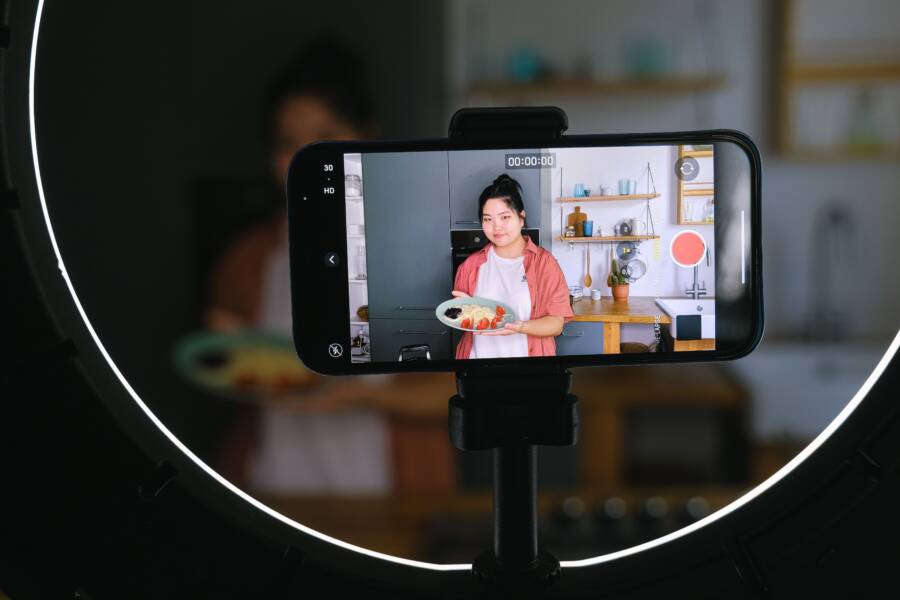
You don’t need expensive equipment to produce professional tutorial videos. Your smartphone is a capable tool that already contains the technology required for high-quality results.
Clear and steady video builds immediate trust with your audience. When your image is sharp and stable, viewers focus on your message rather than technical distractions.
Simple adjustments to your technique will make a noticeable difference in your production value. Follow these steps to improve your setup and record cleaner tutorials today.
Setting Up Your Smartphone for Perfect Shots
Your smartphone is a powerful tool for recording tutorial videos. Achieving a professional look requires attention to detail before you start filming. Small changes in your camera settings and physical setup prevent common issues like graininess or flickering light. These adjustments provide the foundation for clear, steady, and reliable content that keeps your viewers focused on the lesson.
Optimizing Your Camera Settings for Clarity
High-quality video starts with selecting the right resolution. Most modern devices allow you to choose between 1080p and 4K settings. Choose 1080p for most tutorials because it saves storage space and makes editing faster. If you need to crop or zoom in on specific details during the edit, use 4K to maintain sharpness after you scale the image.
Exposure control is another important factor for consistency. If you let your smartphone adjust exposure automatically, the lighting will fluctuate whenever you move your hands or change the frame. This creates distracting flickering effects. Lock your exposure by long-pressing on the screen until you see an exposure lock indicator. You can then drag your finger up or down to adjust the brightness to your preference. This ensures the lighting remains steady throughout your entire video.
Cleaning Your Lens for a Crisp Look
A blurry or hazy image often stems from a simple, overlooked issue. Smartphones spend most of their time in pockets, bags, or hands, which leaves the camera lens covered in fingerprints and skin oils. These smudges cause light to scatter, resulting in soft focus, strange flares, or a washed-out appearance.
Always wipe your lens with a clean microfiber cloth before recording. Avoid using your shirt or paper towels, as these can scratch the delicate surface of the lens. A quick cleaning improves contrast and color accuracy immediately. You might find that your video quality looks significantly sharper after this brief, essential step. Clear images look professional and help your audience see every detail you demonstrate in your tutorials.
Achieving Rock Solid Stability Without a Professional Tripod
You can record smooth, professional videos without spending money on expensive camera gear. Stable footage relies on simple physics and finding creative ways to lock your smartphone in place. By using common objects or your own body, you eliminate the jitter that ruins tutorial quality.
Using Household Objects to Stabilize Your Phone
Look around your room for items that provide a sturdy base for your camera. You rarely need a dedicated tripod to keep a phone still during a demonstration. Stacking objects creates a firm platform that matches your desired camera angle.
Books work well for height adjustments. Stack several hardback books to reach the correct eye level for your tutorial. You can place a rubber band around the stack to hold the phone firmly against a heavy book. If you need a tilt, place a smaller object like an eraser or a coin under one edge of the phone.
A coffee mug is another simple, effective tool. Place your phone inside a sturdy mug so the camera lens points over the rim. This works best when you record top-down shots of a desk or table. Make sure the mug is heavy enough that it does not slide when you touch the screen.
If you prefer specialized DIY stands, you can find many options:
- Use a binder clip to create a stand. Fold the metal handles down to grip the table, then balance the phone against the clip.
- Cut two slits into a tennis ball. This creates a flexible, custom mount that holds your phone at various angles.
- Use a stack of sticky notes or a roll of tape as a temporary prop to lean your phone against a flat surface.
These household items allow you to position the camera accurately. Experiment with different combinations until you find an angle that shows your work clearly.
Improving Your Handheld Technique
Sometimes you must move the camera to follow your hands or show a process. You can still achieve fluid motion by using specific body movements. Hold your smartphone tightly against your torso to transform your upper body into a human gimbal.
Keep your elbows tucked into your ribcage. This creates a triangle of support that absorbs small tremors from your hands. When you walk while filming, adopt a ninja walk pattern. Bend your knees slightly and roll your feet from heel to toe with each step. This movement prevents the harsh up and down jerks that occur when you walk normally.
You should also keep your knees loose to absorb vibration. Breathe slowly while you move the camera. Avoid sudden pivots, because the camera lens on a smartphone captures movement differently than the human eye. Slow, deliberate pans are much easier to watch than fast, sweeping motions. Practice these movements before you start your recording session to ensure your footage stays clear and steady.
Mastering Lighting and Audio for Better Tutorials
Professional tutorial videos rely on quality light and sound to keep your viewers focused. A sharp image and clear audio build credibility quickly. You do not need studio gear to achieve these results. Your smartphone is capable of producing high-quality content when you follow basic physics and simple placement rules.
Finding the Best Natural Light
Lighting sets the mood and defines how professional your video looks. You want your face well-lit so viewers can see your expressions and follow your demonstrations. The most common mistake is placing your main light source behind you. This creates a silhouette and leaves your face in dark shadows.
Instead, position yourself directly in front of a window. Natural light from a window acts as a large, soft light source. It fills in shadows evenly and gives your skin a healthy, bright appearance. If the sun is too harsh, you can hang a thin white curtain or sheer fabric over the window to diffuse the light.
Follow these tips for optimal window lighting:
- Keep the window in front of you so the light hits your face directly.
- Avoid side lighting, as it creates deep shadows on one side of your face.
- Turn off overhead lamps if they produce a different color temperature than the daylight.
- Record during the day when the sky provides the most consistent illumination for your smartphone camera.
When your face is the brightest part of the frame, the camera on your smartphone will adjust its internal settings to favor your skin tones. This result makes your tutorial look polished and easy to watch.
Ensuring Your Voice Is Crystal Clear
Audio quality is often more important than video quality for tutorial creators. If viewers struggle to hear your instructions, they will leave your video regardless of how high your resolution is. The internal microphone on your smartphone captures decent sound, but only if you follow specific proximity rules.
Sound waves lose strength quickly as they travel through the air. You should keep the device as close to your mouth as possible without the phone blocking your view of the work. If you are demonstrating a process on a desk, try to keep your head near the phone during the entire recording.
Alternatively, use your wired earbuds for a significant audio upgrade. The microphone on these cables sits closer to your mouth than the camera lens ever will. Most modern wired earbuds offer clear pickup and help block out ambient room noise.
Apply these audio strategies to improve your production:
- Test your recording space by speaking for ten seconds and playing it back.
- If you hear an echo, add soft items like blankets or rugs to dampen the sound.
- Turn off noisy appliances like fans or air conditioners before you start.
- Keep the microphone away from your fingers to avoid loud scratching sounds on the case.
Clear audio makes your content accessible and professional. When you manage these simple factors, your smartphone effectively replaces expensive hardware in your video setup.
Common Mistakes That Ruin Tutorial Videos
Even small errors can prevent your audience from engaging with your content. Viewers lose interest quickly when technical flaws distract them from the instructions you provide. You can produce better results by identifying and avoiding these common pitfalls during your recording process.
Neglecting to Lock Focus and Exposure
Most smartphones use automatic settings that adjust to the slightest change in the frame. If you move your hands into view, the camera might shift focus from your subject to your fingers. This creates a pulsing effect that makes the footage difficult to watch.
Lock your focus and exposure before you begin the recording. You can do this by holding your finger on the smartphone screen until the AE/AF Lock indicator appears. This forces the device to maintain the same settings throughout the entire demonstration. Your viewers will enjoy a stable, consistent image that does not change brightness unexpectedly.
Ignoring the Background and Distractions
A cluttered background pulls the viewer’s attention away from your lesson. If your workspace contains piles of laundry, dishes, or stray items, the audience will focus on the mess instead of your instructions. You should clear your desk and choose a neutral background to keep the framing simple and effective.
Consider these quick steps to improve your frame:
- Remove all items from your desk that do not relate to the tutorial.
- Check the periphery of your shot to ensure no household items peek into the edges.
- Position yourself in a space with a solid wall or a simple backdrop behind you.
These adjustments help the audience focus on the task. A clean setup builds immediate trust and makes your video look more professional.
Recording with Incorrect Video Orientation
The orientation of your smartphone defines how the video appears on a screen. You should always record in horizontal or landscape mode for most tutorial platforms. Vertical video often leaves distracting black bars on the sides of a standard monitor or television screen.
Keep your phone horizontal for a wide, cinematic view that captures your entire workspace. This format allows you to show multiple tools or complex movements clearly without the camera cutting off important details. Make sure you check the rotation of your phone before you tap the record button. Consistently using the correct orientation makes your channel look organized and helps viewers see your work without needing to resize their own screens.
Failing to Plan the Content Flow
Starting a video without a basic plan often leads to rambling and unnecessary pauses. Viewers value their time, so they appreciate tutorials that get straight to the point. You should write a short outline of the steps you intend to show.
Practice the process a few times before you start the final recording. If you stumble over your words or get lost in the steps, stop the recording and start that segment again. Editing out long, awkward silences is possible, but it takes extra time. A clear, well-rehearsed flow makes the final video much easier to watch and follow.
Conclusion
Great tutorial videos start with a clean lens and locked camera settings on your smartphone. Stability is possible with household items, while clear audio requires keeping the device close or using external microphones.
These habits keep viewers focused on your message. You can create high-quality content without expensive equipment by mastering these simple physical setup rules.
Consistency is the true secret to success. Practice these techniques until they become second nature for every project you record.