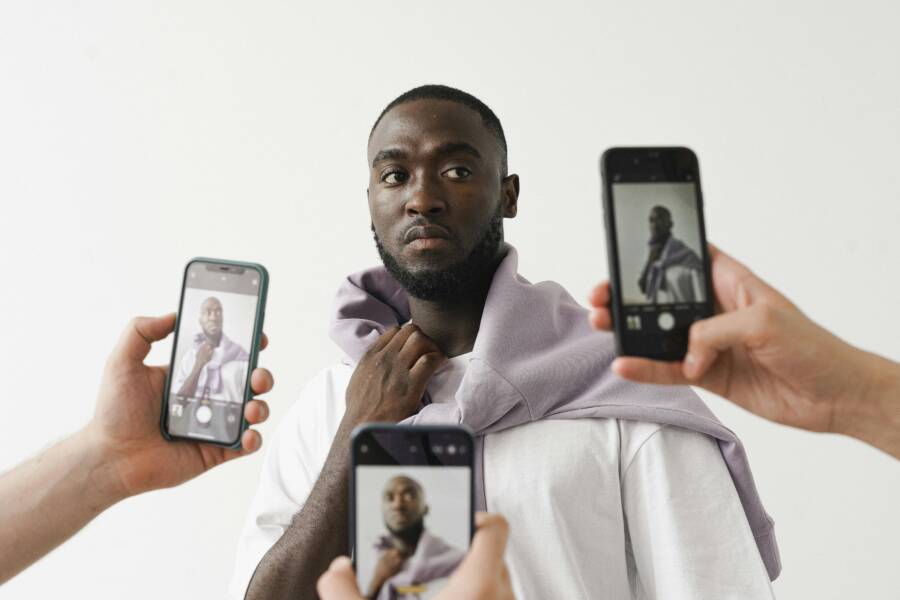
High-quality profile photos depend on soft, natural lighting and thoughtful framing that follows the rule of thirds. A clear image is the first thing people notice, and it sets the tone for your personal brand across every platform.
You don’t need a professional camera studio to achieve great results. Your smartphone contains enough power to produce high-end portraits if you know how to position your subject and manage light.
This guide provides actionable techniques to improve your images immediately. You will learn how to adjust your surroundings and use your settings to get better shots today.
Why Good Lighting Makes Your Smartphone Photos Stand Out
Lighting is the foundation of every professional-looking portrait. Even with a high-end smartphone, poor light hides detail and creates unwanted noise in your images. Quality light flatters your skin tone and sharpens your facial features, making your profile photo appear crisp and intentional. You do not need expensive studio gear to control these conditions. Instead, you can produce professional results by choosing your environment carefully and understanding how light interacts with your camera sensor.
Finding the Best Natural Light Sources
The most effective light for portraits is soft and indirect. Soft light wraps around your face to smooth out textures and skin tones without creating distracting highlights. You can find this quality easily by facing a window during the day. The glass acts as a filter, spreading the sunlight evenly across your features. Standing three to five feet away from a window provides enough brightness to light your face while maintaining depth in the background.
Shade is another excellent option when you are shooting outdoors. Direct sunlight is rarely your friend because it causes high contrast, which leads to deep, dark shadows under your nose and eyes. It also forces you to squint, which changes your natural expression and makes you look tense. Instead, seek out open shade, such as a porch or the shadow of a building. This environment provides consistent, neutral light that allows the camera on your smartphone to focus accurately.
Avoiding Common Lighting Mistakes That Ruin Selfies
One common error is positioning yourself with a bright light source behind you. This is known as backlighting, and it turns your subject into a dark silhouette because the phone camera tries to balance the exposure for the bright background. If you notice your face looks too dark, turn around so the light hits your front. You want the light source to face you, not the lens.
Overhead lighting presents another challenge, especially in indoor settings. Ceiling lights often cast unflattering shadows under your eyes and create an aged appearance. You can fix this by tilting your head slightly or moving to a spot where the light hits your face at eye level. A simple adjustment like turning to face a lamp or shifting your body toward a nearby window transforms the light from a harsh overhead beam into a soft, frontal glow. These small movements ensure your smartphone captures clear, balanced photos every time.
Mastering Framing and Composition for Impactful Profiles
Your composition determines how people perceive your personality before they even read your profile text. You can capture a professional, high-quality image using your smartphone by controlling where your subject sits within the frame. Effective framing removes visual clutter and directs the viewer’s gaze exactly where you want it.
Applying the Rule of Thirds to Your Portraits
The rule of thirds is a standard method for creating balanced and engaging photos. Most smartphone cameras include an optional grid overlay in the settings menu. Turning this grid on displays two horizontal lines and two vertical lines across your screen. These lines divide your frame into nine equal rectangles.
Positioning your eyes along the top horizontal line immediately improves your portrait. This placement prevents your head from feeling cramped at the top of the photo. It also creates a natural, open space below your chin that makes the image feel balanced. Following this grid helps you avoid common mistakes like placing your face dead center, which often feels stiff or static.
Try these steps to apply this technique during your next photo session:
- Enable the grid feature in your camera app settings.
- Align the horizontal grid line with your eye level as you frame the shot.
- Keep your face off-center by shifting your body to line up with one of the vertical lines.
- Leave a small amount of space above your head to prevent a cut-off look.
This method gives your photos a professional aesthetic. It encourages viewers to scan the entire image rather than focusing only on the middle. The result is a dynamic portrait that feels intentional and well-composed.
Choosing the Right Background to Avoid Distractions
A cluttered background often ruins an otherwise great profile photo. When your surroundings are filled with furniture, street signs, or messy textures, the camera struggles to isolate your face as the main subject. Your goal is to keep the background simple so your professional image remains the focal point.
Look for a neutral, solid-colored wall or an area with soft, out-of-focus colors. If you cannot find a plain wall, you can use your phone to minimize distractions. Most modern devices include a feature called Portrait Mode, which creates a shallow depth of field. This setting blurs the background while keeping your features sharp and clear.
Consider these tips for selecting a clean environment:
- Choose a space with a solid color that does not clash with your clothing.
- Step at least three feet away from the wall to reduce harsh shadows behind your head.
- Use the depth effect on your smartphone to soften busy backgrounds.
- Check the frame for random objects like trash cans or cables before you hit the shutter button.
A simple background removes competition for the viewer’s attention. When the environment is clean, your face becomes the clear anchor of the frame. This approach ensures your smartphone profile photo conveys a polished, credible impression on any platform.
Practical Steps to Capture Your Best Profile Picture
You achieve professional results by following a repeatable process for every shot. Consistency is your primary tool for creating a reliable personal brand. By preparing your environment and adjusting your camera settings, you remove the guesswork from the process. These steps help you capture a clear, high-quality image using only your smartphone.
Preparing Your Shooting Environment
Start by cleaning your camera lens with a microfiber cloth before you begin. Fingerprints and natural oils often create a hazy look that software cannot fully correct. Once the lens is clear, choose a location with consistent, soft light. Avoid harsh artificial bulbs or bright midday sun, as these create heavy shadows on your face.
Check your background for clutter or distracting elements before you position yourself. A plain wall or an open space with soft textures works best. You want the viewer to focus on your face, not on your surroundings. If your background feels too busy, move forward toward the light source. This simple physical adjustment helps separate you from the wall and adds natural depth to your portrait.
Optimizing Your Smartphone Camera Settings
Your phone settings play a massive role in image quality. Most devices offer features to improve portraits, yet many users leave them at the default values. Start by checking your resolution and exposure settings. You want to ensure your camera is set to the highest possible quality for standard photography.
Locking the exposure is a specific trick that prevents the camera from shifting brightness while you move. Open your camera app and tap the spot on your screen where your face appears. A sun icon or a slider will appear next to the focus box. You can slide this up or down to adjust the light intensity until your skin tone looks natural. Press and hold your finger on the screen until you see “AE/AF Lock” at the top. This prevents the phone from automatically re-adjusting the brightness between multiple frames.
Refining Your Pose and Expression
Relax your shoulders and keep your posture upright to look more confident. Many people hold their phone too low, which creates an unflattering angle. Raise your smartphone to eye level or slightly above. This position creates a more approachable and balanced look.
Adjust your head position to find your most flattering side. A slight tilt or a gentle turn often adds dimension to your face. You should keep your expression natural by thinking of something pleasant during the process. Avoid forced smiles that look stiff, as these often feel unnatural in a professional profile. Take several shots while shifting your angle slightly between each one. You can compare these later to see which pose highlights your features best.
These adjustments ensure your images look professional and intentional. Reviewing your shots immediately helps you identify what works best for your face shape and lighting setup. Once you find a pose that looks consistent, make it your standard starting point for future photos.
Comparing Pro-Looking Photos Versus Amateur Snaps
The difference between a professional portrait and an amateur snap is often subtle. It rarely comes down to the price of the equipment. Instead, the gap relates to specific choices about light, focus, and framing. A high-quality image on your smartphone relies on intention rather than luck. You can achieve professional results by adjusting how you interact with your environment.
Identifying Key Differences in Image Quality
Professional portraits look clean because they feature sharp focus and balanced exposure. You notice that the subject stands out against the background. In contrast, amateur photos often look flat or cluttered. The camera might struggle to find the right focus, or the light might create harsh shadows across the face. These technical missteps make an image look unplanned.
You can spot the difference by looking for these details:
- Sharpness: Professional photos keep the eyes in clear, crisp focus.
- Depth: A blurry, soft background helps pull the subject forward.
- Exposure: Consistent light prevents blown-out highlights or dark, muddy shadows.
- Color: Accurate skin tones look natural rather than orange or blue.
Amateur photos often look busy because the background competes with the person in the frame. If you see a trash can, a distracting pattern, or a pole growing out of the subject’s head, the image loses its polished feel. Removing these distractions is the fastest way to upgrade your smartphone results.
Moving From Casual Snaps to Professional Portraits
You do not need a studio to change your habits. A professional look comes from controlling your environment. Start by finding a consistent light source, such as a window. Do not settle for the first spot you find. Move around the room until you see soft light falling evenly across your face. This deliberate choice transforms a standard snap into a professional portrait.
Professional portraits also rely on purposeful posing. Amateur photos often feature people looking down at the camera or standing in stiff positions. When you lift your smartphone to eye level and relax your posture, you project confidence. Small shifts in your head position also add dimension to your face. These adjustments help your smartphone produce an image that looks intentional. When you take the time to set up your shot, you move past the typical quick snap and create a profile photo that captures your personal brand.
Answers to Common Questions About Social Profile Photography
People often wonder about the specific technical requirements for creating high-quality images on their mobile devices. You do not need a degree in photography to produce clean, professional shots. Most concerns center on camera settings, lighting choices, and how to pose correctly for different platforms.
Do I need a high-end smartphone to take professional portraits?
You do not need the newest or most expensive model to capture a great profile image. Modern smartphone technology relies heavily on software processing to balance light and sharpness. As long as your device has a functional camera from the last few years, you can achieve professional results by controlling your environment. Good light and stable framing matter more than the hardware specifications of your phone.
Why does my face look distorted or stretched in some photos?
Wide-angle lenses on most phones cause facial distortion when you hold the camera too close. This effect makes noses appear larger and ears seem to shrink. To fix this issue, move the smartphone a few feet away from your face and use the zoom feature if necessary. Standing back helps preserve your natural features and creates a more flattering perspective for portraits.
Is portrait mode worth using for my profile picture?
Portrait mode is a useful tool because it simulates the shallow depth of field found in professional camera lenses. It blurs the background automatically, which helps your face stand out from busy or cluttered surroundings. Use this feature when you cannot find a clean, neutral wall or a simple backdrop. Keep in mind that software-based blurring sometimes struggles with hair edges, so check your final image for any unnatural artifacts before you upload it.
How do I keep my skin tone looking natural?
Many camera apps apply filters or smoothing effects that can make skin look waxy or artificial. Start by turning off any beauty filters in your settings menu to capture a more realistic image. If your skin looks too orange or blue, it is usually a white balance error caused by inconsistent lighting. Moving to a different light source, like a window with natural daylight, often solves the problem instantly without needing post-processing edits.
Should I use the front-facing or rear camera?
The rear-facing camera almost always provides higher image quality than the front-facing selfie lens. While the front camera is convenient for framing, the primary lens on the back has a larger sensor and better optics. You might need to experiment with your positioning or ask a friend to help you frame the shot. This simple shift often results in much sharper, more detailed images for your professional profiles.
Choosing the rear camera provides a clear advantage in detail and texture. Most people notice a significant jump in clarity when they stop using the front-facing lens for their primary profile photo. If you must use the front camera, ensure you are in a very bright location to help the smaller sensor perform its best.
Conclusion
Professional profile photos depend on soft, natural light and precise framing. You achieve these results by positioning your face near a window and using your smartphone grid settings to balance the composition.
Practice these techniques during your next session to find the angles that suit you best. Experiment with different light sources to see how they change your appearance on screen.
A high-quality image creates a clear, positive first impression. Your profile picture is a simple tool to help others connect with your personal brand.