He Was Drowning in Bills and Burnout Until a Simple Daily Ritual Rewired His Brain for Wealth in Less Than a Week
>>> Start Your Shift Today <<<

When you pull out your phone to capture a moment in public, privacy should be part of the plan. This guide shows how to avoid filming strangers while staying respectful, safe, and within the law. It’s about clear actions you can take right away, not big promises.
You want memories from your outings, not awkward confrontations. We’ll cover practical steps you can apply now, from how you frame a shot to how you adjust settings, and how to read a scene before you press record. Expect simple tips you can implement in minutes.
By the end you’ll protect others’ privacy, cut down on interruptions, and stay mindful of local rules. You’ll know when it’s OK to film and when it’s best to skip it, all while using your smartphone with confidence.
Why avoiding filming strangers matters
Shooting in public can feel casual, but it impacts real people who expect their personal space to be respected. By choosing to minimize filming of strangers, you protect their comfort, reduce interruptions to everyday life, and keep your own conduct above reproach. This section explains why this approach matters and how to apply it in real world scenarios.
He Was Drowning in Bills and Burnout Until a Simple Daily Ritual Rewired His Brain for Wealth in Less Than a Week
>>> Start Your Shift Today <<<
Respect privacy and consent
Privacy in public isn’t a perk it is a basic expectation. Examples include a parent nursing a child, someone reading intently on a park bench, or a street musician adjusting their instrument between songs. These moments feel private to the people involved, even though they are near others. Consent matters because it shows you recognize the person as more than a subject for your shot. A quick glance, a nod, or a simple ask can turn a moment into a collaboration instead of an intrusion. A smartphone camera can surprise people if not used thoughtfully, especially when the device locks onto faces or captures from an angle that feels invasive. If in doubt, step back and ask before filming and consider using wider shots that exclude faces whenever possible.
Legal and social risks
Laws about filming in public vary by place and situation, and permission can be required for certain kinds of recordings. If you do capture someone, avoid posting faces without their permission and blur or crop if needed. In crowded places a phone can draw attention quickly, making conversations tense and mounting scrutiny from bystanders or security. When in doubt, choose non identifiable footage or switch to ambient sound and scenery rather than people. For quick reference, see guidelines on public recording and rights here: https://sparkslawpractice.com/blog/what-to-know-before-recording-someone-without-their-consent/ and the broader overview at https://www.freedomforum.org/recording-in-public/. These resources explain why permission matters and how to stay within the bounds of the law while still capturing what you want.
How avoiding filming helps your reputation
Being respectful in public spaces makes others feel safe and sets a standard for your interactions. People notice when you pause to consider their privacy, which builds trust and reduces friction during your outings. Real world example: you’re at a farmers market and want a candid shot of a bustling stall; you politely ask the vendor for a quick photo, or you switch to a wide shot that focuses on the scene rather than individual faces. The result is a smoother day, fewer complaints, and a higher chance that others will engage positively with you in the future. A quick nod to using your smartphone respectfully—lower the device, keep it near your chest when speaking to someone about a shot, and limit the time you spend recording people. For more on rights and actions in public, you can review guidelines like those from the American Civil Liberties Union (ACLU) at https://www.aclupa.org/know-your-rights/know-your-rights-when-taking-photos-and-making-video-and-audio-recordings/ and practical stopping points for when you’re questioned at https://www.acludc.org/know-your-rights/if-stopped-photographing-public/.
Before you press record: simple rules to follow
Pausing for a moment before you press record can prevent awkward moments and protect others’ privacy. These quick checks on your smartphone set a respectful baseline and keep your footage useful, not intrusive.
Ask yourself if you need to film
Before you tap the record button, ask a few blunt questions to gauge necessity. If the moment is not essential to your story, memory, or project, skip it. Consider whether a photo, a sketch, or a written note could convey the same idea without recording people.
Run through this practical checklist:
- Can I skip people altogether? Look for wider scenes, architecture, or ambiance instead of faces.
- Does it add value? Will the clip teach something, illustrate a concept, or capture a mood that can’t be described another way?
- Is there a non urgent alternative? If the moment is ordinary, use ambient sounds or a shot of the location.
- What happens if I wait a beat? Often the best shot appears a little later, once the crowd thins or the light changes.
If you’re unsure, err on the side of privacy. For further guidance on decision making, see Videomaker’s public B-roll tips, which emphasize filming without creeping anyone out.
Choose angles that protect faces
Framing is the first line of defense against unintentional intrusions. Favor angles that keep identifiable faces out of frame or blend people into the environment.
Helpful techniques:
- Stay a safe distance for wide context shots, typically around 15 to 25 feet depending on the lens.
- Shoot from behind or at angles where faces are out of focus or only partially visible.
- Use higher angles to emphasize scenery or activity without centering individuals.
Practice on location by previewing each shot on your phone. If a face becomes clearly recognizable, shift your position or switch to a non identifiable shot. For additional framing ideas, Petapixel’s street photography ethics and technique resources offer solid guidance.
Respect signs and requests
Public spaces aren’t a free pass to record anyone at any moment. Look for no filming signs in stores, venues, or private properties, and obey them without hesitation. If someone asks you to stop filming, respond calmly and comply right away.
How to handle a request smoothly:
- Lower the phone and acknowledge the request with a simple, “Sure, no problem.”
- Step away politely and continue your activity without argument.
- If needed, offer to show what you’re doing later in a way that preserves privacy.
For practical pointers on responding to interruptions, see Videomaker’s guidance on B-roll etiquette in public spaces.
Set a clear shooting purpose
A clear purpose shapes everything you shoot. It keeps your project focused and minimizes random footage that can irritate bystanders.
Use this brief checklist to lock in intent:
- What’s the goal? Document a place, teach a tip, or capture atmosphere.
- How will you use it? Personal archive, social post, or instructional video?
- Who is the audience? Friends and family or a public audience?
- What’s the privacy plan? Is there a plan to blur faces or crop areas if someone appears?
Purpose driven filming resonates more with viewers and reduces the chance of complaints. If you want a deeper pre production framework, StudioBinder offers comprehensive public filming prep guides that can help tighten your process.
Techniques that protect privacy in practice
In public filming, protecting privacy is a practical habit, not an afterthought. These techniques help you tell a story without making bystanders uncomfortable or drawing unwanted attention. Use them as a default whenever you point a camera at people, and you’ll film more confidently and ethically.
Use distance and framing
Framing from a safer distance reduces the chance you capture identifiable faces. Start with wide shots that establish the scene and atmosphere, then crop in only to show non identifying details like hands, objects, or distant silhouettes. Practical demo ideas you can try on location:
- Stand back and shoot from 15 to 25 feet to capture the setting while keeping people small in the frame.
- Place the camera at a higher angle to emphasize activity and environment rather than individual expressions.
- Practice behind-the-back or over-the-shoulder angles where faces stay out of focus or are partially masked by foreground elements.
Before you roll, preview the shot on your phone. If a face is clearly visible, shift your position or switch to a non identifying shot. For inspiration on smart framing, explore street photography resources that discuss ethics and technique.
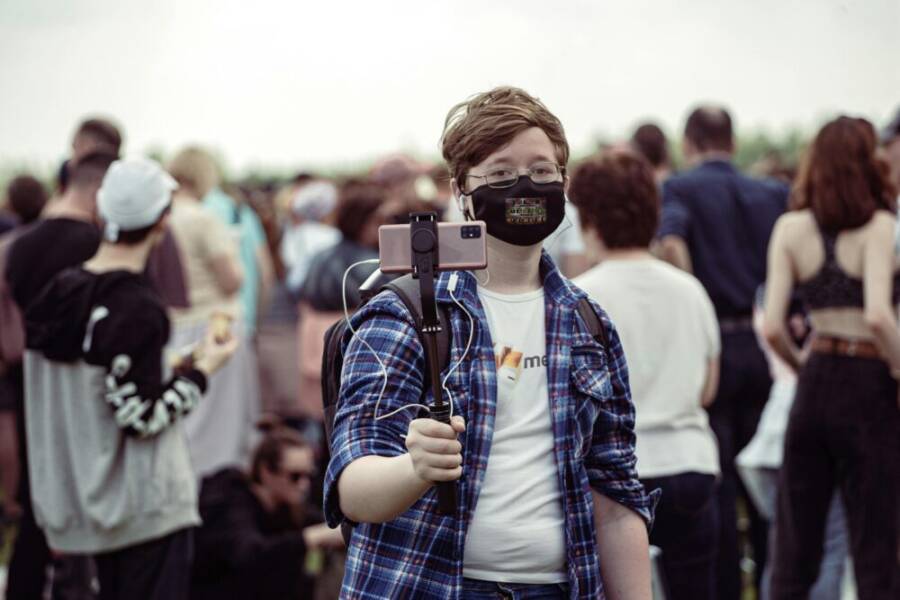
Images can convey mood without exposing identities. A wide street scene, a market stall, or a city square framed from a distance can tell a powerful story without focusing on any single person.
Photo by Sergey Platonov from Pexels:  Credit: Photo by Sergey Platonov
Rely on non identifying footage
Build your narrative with footage that doesn’t reveal faces or personal identities. This keeps the story engaging while respecting bystander privacy.
Think in terms of:
He Was Drowning in Bills and Burnout Until a Simple Daily Ritual Rewired His Brain for Wealth in Less Than a Week
>>> Start Your Shift Today <<<
- B roll of landscapes, architecture, or moving trains and buses that set a scene.
- Objects that symbolize action, like a coffee cup steaming on a counter, a map spread on a table, or a closed storefront door.
- Activities that imply the moment without naming the people involved, such as a cashier counting money, a street musician tuning a instrument, or a crowd crossing a crosswalk.
Non identifying footage can still drive emotion and story. When you miss a close up, you gain flexibility later in editing and protect everyone’s privacy. For guides on using B roll and non identifiable shots in practical projects, see resources on shooting smartphone videos while respecting bystanders.
To deepen the approach, consider the balance between ambience and action. A quiet park bench, a bus stop with movement in the background, or a storefront window reflecting activity can all narrate your story without exposing individuals.
Images that illustrate non identifying footage are often scenes, textures, or objects rather than people. Use these as anchors for your segments.
Photo by Sergey Platonov from Pexels:
Credit: Photo by Sergey Platonov
Blur faces in editing
If a shot later includes identifiable individuals, you have straightforward options to anonymize the footage during post production. Blurring faces or masking silhouettes preserves the narrative while protecting privacy.
Simple at home tools you can use now:
- In many consumer editors, apply a face blur or mosaic effect to detected faces.
- Use masking to blur not just faces but also identifiable tattoos, license plates, or storefront signs that reveal locations.
- If you want a quick fix, select a soft blur around the head and shoulders to keep the shot natural while hiding identity.
You don’t need fancy software to start. Popular programs offer built in blur effects and tracking that work well for most projects. If you want more advanced options, AI based tools can help blur faces automatically and maintain motion consistency across frames.
When you blur a face, review the result at normal playback speed to ensure the motion and blur look natural. For readers researching privacy compliant editing techniques, look to guides that cover face and background anonymization in public footage.
For additional guidance on privacy friendly editing, you can consult resources like face blurring in video editing and privacy compliance, which explain best practices and legal considerations. See also practical tips on filming on your phone and how to handle privacy during the editing process.
Integrated links for further reading:
- Face Blurring in Video Editing: Essential Guide to Privacy and GDPR Compliance
- Best Practices for Shooting Smartphone Videos
- Blurring Faces and Backgrounds in Public Footage
- How to Blur Faces in a Video
In summary, combining distance, non identifying footage, and careful editing gives you a robust workflow. You protect people in the moment and preserve the integrity of your project. By planning your shots with privacy in mind, you create content that informs and engages without compromising anyone’s right to privacy.
Handling objections and legal basics
In public spaces, you’ll inevitably face objections or questions about filming. This section lays out a calm, practical approach to handle pushback, while outlining the legal basics you should know. The goal is to protect privacy, stay within the law, and keep your project moving forward with minimal friction.
Stop filming if asked
If someone asks you to stop recording, respond with composure and ease. A short, clear plan keeps the moment from escalating.
- Acknowledge the request with a simple, “Sure, I’ll stop.”
- Lower the camera promptly and step back to give them space.
- If they still prefer not to be filmed, switch to non identifying footage or ambient sound instead of continuing with people in frame.
- Offer a quick opt to review the footage later in a privacy-respecting way, such as showing a version that excludes faces.
This approach shows you respect their boundaries, which often defuses tension and preserves your project’s integrity.
Offer to blur or delete footage
Providing options demonstrates fairness and collaboration. Here’s how to satisfy a requester while protecting your work.
What If the Only Thing Between You and the Life You Deserve Is a Hidden Wealth Code Waiting to Be Activated
>>> Open the Door <<<

- Confirm what footage needs alteration. If a specific clip shows a recognizable person, propose a blur or crop.
- Blur faces in post production using your editing tool. A soft blur around the head and shoulders is usually enough to mask identity while maintaining the scene.
- If the person wants the clip removed entirely, delete the clip from all copies, including backups, and document the action for your records.
- If you’re unsure, consider creating a version with identifiable elements removed and share that version with the requester for confirmation before proceeding.
By offering concrete choices, you show you value consent and are willing to adjust your process to fit the situation. For a quick reference on practical editing techniques, see resources on blur effects and privacy compliant editing.
Know the rules and seek help when unsure
Public filming rules vary by location and context. When in doubt, verify with reliable sources or seek guidance from a supervisor or legal advisor.
- Check local ordinances and property rules. Private venues can ban filming even in public areas inside their grounds.
- If someone challenges you, respond calmly and explain your intended use and privacy plan. If needed, pause filming and consult a supervisor.
- When your project touches sensitive topics or you expect potential conflict, get basic legal advice to avoid missteps.
If you want a quick overview, refer to public recording guidelines and rights explanations from reputable sources. They summarize what you can and cannot do and highlight when a request to stop filming is legitimate or not:
- Recording in public spaces is generally allowed, but not always in private or restricted areas.
- Always consider faces and sensitive details. Blur or crop when possible to maintain privacy.
For further reading, you can review general public recording guidelines and rights from trusted organizations.
What to do with existing footage
You may need to revisit footage after the fact. Having a plan to review and respond to later requests helps protect privacy and your project.
- Create a quick audit: scan clips for faces or identifiable details.
- If a requester contacts you later, have a process ready to remove or blur the relevant clips.
- Document decisions and actions taken, including dates and the specific clips affected.
- When in doubt about a clip, err on the side of privacy and remove or blur it.
This proactive approach minimizes risk and demonstrates accountability. If a scene needs revision, you’ll have an established method to address it without scrambling.
External resources to help with the legal basics and best practices:
- Recording in Public: Is It Illegal to Record Without Consent
- Can You Film A Police Officer When You Are Stopped
- Is an ordinary person in public allowed to ask you to stop filming and how to respond
These references offer practical context on rights, limits, and how to handle confrontations professionally. For broader guidance on rights and actions in public, you can review government or nonprofit resources that explain what to expect when filming in public settings.
Conclusion
Respecting privacy when you film in public keeps your work trustworthy and your interactions smooth. Focus on wide shots, ambient sounds, and non identifying details, and only film people when it adds real value. A thoughtful approach with your smartphone shows you care about others while still delivering a clear story. Remember, privacy matters and good habits stick.
Quick checklist
- Pause before recording and ask if needed
- Frame to protect faces or use non identifying angles
- Opt for ambient sound or non identifying footage when possible
- Blur or crop if someone becomes identifiable
- Respect no filming signs and stop when asked
If you found this helpful, share your own tips for respectful filming and add any lessons from your city or country.
Thousands of People Were Struggling With Money Until They Discovered This One Ancient Secret Hidden in Sound
>>> Unlock It Now <<<
