Staying powered up while you roam can feel like part of the itinerary, yet it often gets overlooked until the battery bar shrinks to red. If you rely on maps to navigate, taxis or rideshares to get around, photos to capture moments, and messages to stay in touch with friends and family, a dead phone undermines the day. A charged smartphone isn’t a luxury, it’s a practical tool that keeps you moving.
This guide cuts through guesswork with simple, repeatable steps you can start using today. You’ll learn practical strategies for conserving power, choosing the right charging gear, and making smart choices on the go. We’ll cover why your phone drains faster when you’re abroad, what settings to tweak for maximum endurance, and how to plan around long travel days so you’re never left scrambling.
By the end you’ll have a clear, actionable plan that fits real-world travel. Expect quick wins like enabling battery saver modes and packing light, plus smarter tactics such as using offline maps and portable power options. Your smartphone will stay reliable from dawn to dusk, helping you navigate new places, capture memories, and stay connected with ease.
Plan for All Day Battery Life Before You Travel
A well planned charging strategy starts before you step out the door. By checking your battery health, packing the right gear, estimating daily power needs, and setting realistic expectations, you can glide through a long travel day with confidence. These practical steps help you avoid scrambling for outlets in busy terminals or cafes. Use them as a simple, repeatable routine so you stay powered from morning to night.
Check Battery Health and Capacity
Know what you’re carrying in the battery department. On most smartphones, you can assess health right in the Settings app. Look for a Battery or Battery Health section. You’ll want to see a maximum capacity percentage that’s close to or above 80 percent for best performance. If capacity has dropped significantly, you may notice rapid draining or erratic behavior, especially during hot days or when using power hungry apps.
Here are quick, actionable checks you can perform:
- Open Settings > Battery > Battery Health (or equivalent). Note the “Maximum Capacity” and any message about service or performance reduction.
- Compare real usage to design specs. If you consistently lose battery before the day ends, consider a replacement or a targeted charging plan.
- Start a simple test: charge to 100 percent, use your phone normally for a day, and see how many hours pass before you reach 20 percent. If you routinely hit 20 percent well before bedtime, you’re in a maintenance mode rather than a healthy baseline.
- If you can’t find battery health info on your device, a reputable support page can guide you through steps for your model. For iPhone users, Apple offers clear guidance on battery health and charging in their support materials.
If you want a deeper dive, see Apple’s guidance on battery health and performance. It’s straightforward and designed for quick reference. For reference, you can read about how to understand battery usage and health here: https://support.apple.com/guide/iphone/understand-iphone-battery-usage-health–iphd453d043a/ios
When to consider a replacement or a battery saver strategy
- If Maximum Capacity falls below 70 percent, expect noticeably shorter days out. A replacement battery can restore most of the original life.
- If aging batteries cause unexpected shutdowns, add a conservative charging plan to your routine and keep a portable charger handy.
- If replacement isn’t feasible, combine smarter usage with battery saver features and a reliable power bank to stretch each charge.
For more practical tips on battery health and performance, this Apple guide is a solid reference point: https://support.apple.com/en-us/101575
Pack the Right Gear for All Day Use
Your gear is the backbone of staying powered on the road. A compact, reliable setup keeps you moving without hunting for wall outlets.
Essential items to pack
- A high capacity power bank: Look for at least 20,000 mAh to cover a full day of heavy use. If you’re traveling in areas with long transit times, go higher.
- A reliable wall adapter: A small, fast charger can shave hours off your day. Prefer a charger with multiple ports if you travel with a companion.
- A compact cable: One sturdy USB-C to USB-C or USB-C to Lightning cable is enough for most phones, plus a short backup cable in case you need a quick top up.
- Needed adapters: If you’re traveling internationally, bring a plug adapter compatible with your destination. Don’t rely on hotel outlets alone.
Tips to keep cables tangle free and durable
- Use a small pouch or cable organizer to separate charging cables from other gear.
- Choose braided or rugged cables for added durability. They’re less likely to fray after daily use.
- Coiling cables correctly prevents kinks. A simple method is to wrap in figure-eight loops and clip with a small strap.
If you’re curious about reliable sources for charging gear, you can explore general guidance on smartphone charging accessories and best practices. Here are a couple of solid starting points:
- Understanding your device’s charging needs and how to pick the right adapter: https://support.apple.com/en-us/guide/iphone/ibrw5f2a3f30/ios
- A practical look at battery usage and charging habits from reputable guides: https://www.apple.com
Estimate Your Daily Power Needs
A daily usage map helps you plan when to top up and how long to stretch a single charge. Start by listing activities that drain power the most.
Common power drains by activity
- Maps and navigation: Location services, screen on time, and data use.
- Calls and messaging: Background apps and notifications.
- Photos and videos: Camera usage, screen brightness, and recording time.
- Music and video streaming: Audio and video playback, often with high screen brightness.
A simple 12–16 hour day example
- Start with a full charge at 8 a.m. A typical day might include maps for 2 hours, a few calls totaling 1 hour, 20 minutes of camera use, 2 hours of music listening, and 1 hour of video streaming.
- Add standby time. Even when you’re not actively using the phone, background processes and network activity drain power. Estimate standby at 6–8 hours.
- Result: If your phone’s baseline endurance is about 10–12 hours on a typical day, add a power bank or plan for a brief top up around midday and again in the late afternoon.
How to translate this into a practical plan
- Create a lightweight schedule for top ups. Plan to recharge at least once every half day on long travel days.
- If you know you’ll be in transit with little access to power, top up before you leave in the morning and after you arrive at your first major stop.
- Use offline maps when possible. They save both data and battery by reducing background activity.
For a deeper look at how to estimate power use on your device, you can reference battery usage guidance from Apple’s support pages. See the battery usage guidance here: https://support.apple.com/guide/iphone/understand-iphone-battery-usage-health–iphd453d043a/ios
Set Realistic Expectations for Your Phone
Plan for multiple charges rather than relying on a single full charge. Think of your day like a long hike where you stop by a cafe for a top up rather than aiming for a single water source.
A practical charging rule of thumb
- Recharge when you reach around 40–50 percent if you have a long day ahead and uncertain access to outlets.
- If you’re in a busy sequence of activities, aim for a quick top up every 4–5 hours to keep the charge above 30 percent.
- Use battery saver modes during low activity periods. They can stretch the remaining battery by slowing background tasks and reducing screen brightness.
Balance top ups with smart usage
- Dim the screen when you don’t need full brightness. A lower brightness can dramatically reduce consumption.
- Close unnecessary apps running in the background. Some devices show a quick list of recently used apps; it’s a fast way to trim drain.
- Prefer offline maps when possible. They reduce location tracking and data use, extending life.
A quick takeaway for planning
- Treat your phone like a companion on the trip. It should be there when you need it, not a source of anxiety about running out of power.
- Pair top ups with mindful usage. Short, strategic charges beat long, unplanned recharges.
If you want a quick, trusted reference on battery health and charging behavior, you can explore Apple’s battery and performance guidance. It provides practical tips you can apply right away: https://support.apple.com/en-us/101575
If you want to tailor this section further for your audience or adjust the tone, I can adapt the sections to match your preferred style or add more examples and quick checklists.
Optimize Your Phone Settings on the Go
Smartphone settings can make or break a day on the road. Small tweaks done thoughtfully can stretch power without sacrificing usefulness. In this section, you’ll learn quick, practical adjustments you can apply during travel to keep your phone alive from sunrise to the evening return.
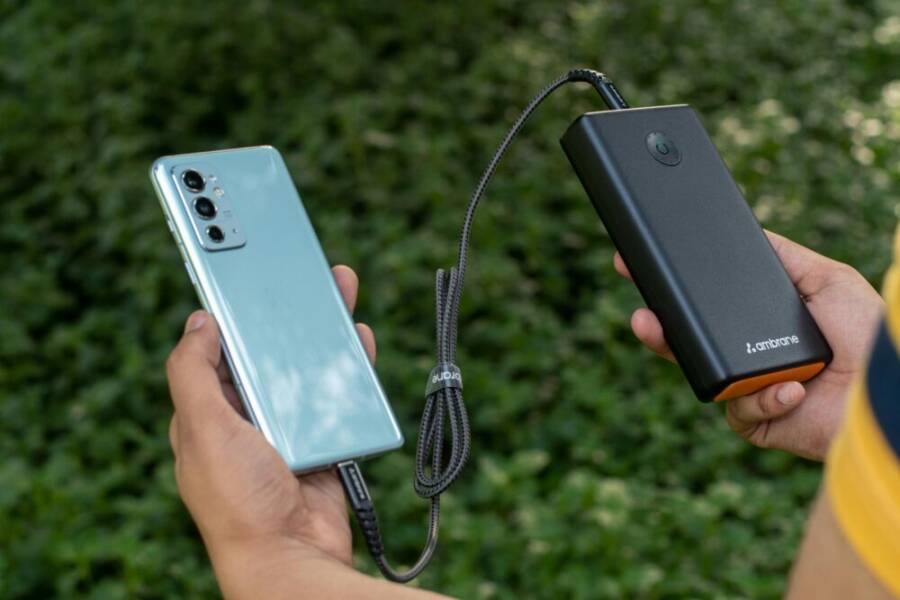
 Photo by DEBRAJ ROY
Adjust Screen Brightness and Sleep Timing
Lowering screen brightness is one of the fastest ways to save power. Start with a comfortable level that still lets you read maps and messages in bright outdoor light. If your device supports Auto Brightness, enable it and give it a few minutes to adapt to changing lighting conditions. Auto modes work well in varying environments, especially when you’re walking between indoors and outdoors.
Set a shorter screen timeout or auto-lock interval. A 30 to 60 second timeout is common on most phones and prevents a bright, live display from draining power when you’re checking details or taking quick photos. Do a quick ambient light check: if you’re under harsh sun, a slightly higher brightness helps readability, but you’ll pay a small energy cost. In dim rooms or at night, both brightness and duration can be reduced without sacrificing usability.
- Quick setup tip: on iPhone, go to Settings > Display & Brightness > Auto-Lock. On Android, Settings > Display > Screen timeout.
- Battery impact: shorter wake time and lower brightness can noticeably extend endurance on long travel days.
Limit Background Apps and Sync
Background activity drains battery even when you aren’t actively using your phone. Tighten up background refresh and prune non essential notifications, especially while traveling. Close apps you won’t use for hours and disable auto-sync for rarely needed services during transit.
- How to implement:
- iPhone: Settings > General > Background App Refresh, turn off for apps you don’t need in real time.
- Android: Settings > Apps & notifications > See all apps > [App] > Background restriction.
- Notification management: mute non critical alerts during busy travel periods. This reduces wakeups and data usage.
Tip: turn off auto-refresh for rarely used apps while you’re on the move. You’ll notice a steadier battery level by midday.
Use Power Saving Modes and Network Settings
Power saver modes are a friend on long travel days. They throttle background activity, reduce screen brightness, and limit certain features to conserve energy. When you don’t need peak performance, switch to a lower power profile to extend life.
- When to enable: use power saver modes during long transports or between stops, especially if outlets or power banks aren’t readily available.
- What changes: expect slower app refresh, reduced audio and video quality in some apps, and longer times between connectivity updates.
- Network tips: limit high drain features like constant location services and heavy data use when possible. Offline maps, downloaded music, and cached articles can all help.
Turn Off Unused Radios When Possible
Radios like Bluetooth, GPS, and cellular data consume energy, particularly when searching for connections. Turn them off when not needed and re enable only as required by your activities.
- Bluetooth: disable when you don’t need wireless peripherals or car kits.
- GPS: keep location services off for apps you don’t rely on in real time.
- Mobile data: when you’re in areas with spotty reception, switching to Wi Fi can save both power and data.
- Airplane mode: a last resort during long waits. It stops all radios but keeps essential alerts on if you enable a few exceptions, like emergency calls or messages.
Pro tip: use offline maps on days with limited connectivity. It reduces both energy use and data consumption, letting you stay on track even without a reliable connection.
Links to extend your knowledge:
- How Android helps save battery across devices: https://www.android.com/articles/how-to-save-battery-android/
- Practical battery management guidance from credible tech sources: https://www.usmobile.com/blog/rapid-battery-drain-on-ios-and-android-a-complete-guide/
- Battery health and charging tips from Apple: https://support.apple.com/en-us/101575
Images credits and sources: Photo by DEBRAJ ROY on Pexels.
Smart Charging Gear You Should Carry
Staying powered up on the go is a small investment that pays off all day. A compact, well-chosen kit lets you top up in cars, cafes, airports, or hotel lobbies without hunting for outlets. Here is a practical breakdown of the gear you should have and how to use it for all-day reliability.
Choose a Reliable Power Bank for All Day Use
Aim for a power bank in the 20,000 to 30,000 mAh range. This capacity covers multiple top ups for a typical smartphone and keeps you moving through long travel days. If your usage is lighter, a 10,000 mAh model can work, but it won’t stretch a heavy day as well.
Safety features matter. Look for:
- Overcharge protection that stops power flow when the battery is full
- Short-circuit safeguards for unexpected issues
- Temperature monitoring to prevent overheating
Recharge the power bank every night. A standard wall charger will usually bring it back to full in 3–5 hours. If you have a long layover or flight with USB access, top up there too. Check the indicator lights to keep track of level and plan a top-up when you’re around 20–50 percent.
For a solid sense of what to buy, see reputable buying guides and reviews such as Anker power banks for travel. They help you compare capacity, safety features, and real-world performance. Anker power banks for travel
Pick Cables and Adapters That Last
Durable cables are worth the extra few dollars. Braided nylon cables resist wear and fraying far better than plain plastic. Match connectors to your device: USB-C for most Androids and newer iPhones, Lightning for older models.
Keep cables in good shape with simple habits:
- Store them in a small pouch to prevent sharp folds
- Avoid wrapping tightly around devices; use loose loops
- Inspect ends monthly and replace if you see wear
A 3-foot cable balances reach and portability, with a short backup for tight seating or quick top ups.
For reliable guidance on cable quality and durability, check out Wirecutter’s cable guides. Wirecutter’s cable guide
Car Chargers and Travel Adapters
A car charger is a quiet workhorse on road trips. Choose a dual-port USB model with ample output (around 30W total) so you can charge your phone and another device at the same time.
Multiport travel adapters are essential for hotels or shared spaces. A four-port setup with a mix of USB-A and USB-C ports keeps everyone charged. When moving between outlets abroad, a universal travel adapter that swaps plugs for different regions is invaluable. Always test unfamiliar adapters before you rely on them.
If you want well-regarded options, look at PCMag’s picks for the best car chargers and travel adapters. The best car chargers
Wireless Charging Options and When They Help
Wireless charging pads shine in spots like hotel desks or cafes with built-in chargers. Just place your phone on the pad and let gravity do the work. It’s great for hands-free top ups during a work session or a meal break.
Be aware of speed and compatibility. Wireless charging typically tops out around 7.5–15W, which is slower than high-speed wired charging. If your phone supports faster wireless charging, you’ll still want to use a cable for urgent top ups. Thick cases or misalignment can cut charging speed, so remove a bulky case if you need a quick fill.
Public pads are common in airports, coffee shops, and hotels. If you rely on them, apps and hotel websites can help you locate pads nearby. For a broad overview of wireless charging reliability and speeds, see CNET’s wireless charging guide. CNET wireless charging overview
Key takeaway: carry both a capable power bank and a fast cable. Wireless pads are convenient for low-stress topping up but won’t replace wired charging when you’re in a hurry.
If you want extra confidence, Apple’s battery and charging guidance offers practical tips you can apply right away. Apple battery usage and health guidance
Optional read for deeper planning
- For broader context on safe charging practices and device health, Apple’s battery health resources are a solid reference. Battery health and performance guide
Tips you can use today
- Keep a dedicated charging pouch with your power bank, a braided USB-C to USB-C cable, and a compact USB-C to Lightning cable if you carry both Android and iPhone devices.
- Check airline rules for carry-on batteries before you pack. Most 20,000 mAh packs fall under common airline limits, but always verify the current guidelines.
By assembling these essentials and using them with a simple daily routine, you’ll stay powered through airport transfers, hotel check-ins, and long train rides. Your smartphone will be ready for maps, photos, messaging, and just-in-time updates, wherever you roam.
Charging Habits While Traveling
Keeping your phone powered on all day requires a simple, repeatable routine. By pairing smart charging habits with practical gear, you can navigate airports, trains, and new cities without weathering a dead battery. This section covers actionable strategies you can start using on your next trip.
Charge During Waiting Time and Transit Delays
Waiting times are opportunities, not annoyances. Use moments in airports, on trains, or during bus transfers to give your phone a quick top up without derailing your plans. A short charging session while you queue for security, board a train, or grab a snack can keep you from ever hitting zero during a crucial moment.
- Plan micro top ups: aim for 10–15 minutes whenever you have a free pause. Even a brief boost can extend your usable day.
- Prioritize high-use periods: charge while you’re reading a map, waiting for a boarding call, or grabbing a meal.
- Use trusted outlets: if you must charge in a public space, avoid suspicious USB ports and choose a wall outlet or your own power bank whenever possible.
If you’re unsure about public chargers, a quick read from reputable sources highlights safe charging practices and how to identify reliable power sources. For practical guidance on staying safe while charging in public spaces, see Apple’s battery and charging guidance and related tips: https://support.apple.com/en-us/guide/iphone/understand-iphone-battery-usage-health–iphd453d043a/ios
Tip: keep a small, organized charging pouch ready. It makes grabbing a quick top up during a layover as easy as grabbing your passport.
Top Up Before Key Activities
Long sightseeing days, museum visits, or crucial travel legs demand a fully charged phone. A quick top up before you head into a packed itinerary ensures you won’t be scrambling for outlets midday.
- Build a pre-activity charging checklist:
- 100% before leaving the hotel or home base
- 80–90% before a day of navigation-heavy activity
- 60–70% before long transit segments with limited access
- Use predictable windows: charge after breakfast, before lunch, and again before dinner if you expect a lot of field activity.
- Don’t wait for a low battery alert to act. Regular top ups keep you in control.
A concise reference for battery health and charging behavior can help you decide when to swap a battery or adjust your plan. See Apple’s battery usage and health guidance for quick, practical tips: https://support.apple.com/en-us/guide/iphone/understand-iphone-battery-usage-health–iphd453d043a/ios
Quick checklist you can print or save:
- Charge to 100% before a big day
- Pack a portable charger with full capacity
- Keep a lightweight cable in your day bag
- Enable Low Power Mode if you notice a dip
If you want more practical guidance on charging gear, you can explore reputable buying guides for travel power banks and accessories, such as Anker power banks for travel. https://www.nytimes.com/wirecutter/reviews/best-usb-battery-packs/
Use Offline Modes to Save Battery
Staying connected across borders can be power hungry. Offline maps, downloaded content, and limited connectivity help extend life without sacrificing your ability to navigate or enjoy media.
- Download essential maps before you depart, and mark your route in advance.
- Save articles, podcasts, and playlists for offline use.
- Limit background data and switch off auto updates while in transit.
Keeping important directions offline ensures you can still reach your destination even if signal is weak. If you rely on maps, offline options dramatically reduce location tracking and data use, which in turn saves energy. For more on offline strategies and battery-friendly practices, Apple’s battery guidance offers useful context: https://support.apple.com/guide/iphone/understand-iphone-battery-usage-health–iphd453d043a/ios
A practical example: download the walkable route you plan to take through a city, save the transit line you’ll rely on, and pre-download music or podcasts for the train ride. This keeps you moving without swapping outlets constantly.
Avoid Overcharging to Protect Battery Health
Constantly charging to 100% and leaving the phone plugged in all day can stress the battery over time. Regular top ups are better for long term health and reliability. The goal is to keep the battery within a healthy range and avoid prolonged full charges.
- Charge in shorter bursts rather than keeping the phone at full capacity for hours.
- Try to keep the battery between 20% and 80% most of the day when possible.
- Use a mix of wired and wireless charging, depending on availability, to avoid heating the device too much.
Develop simple, repeatable habits to maintain battery health on the road:
- Don’t constantly run battery-intensive apps at full brightness when you don’t need them.
- Keep the operating system and apps updated; newer versions often include better power management.
- Monitor heat: high ambient temperatures can accelerate wear, so shade your device when charging in hot environments.
For a trusted overview of battery health and charging practices, Apple provides practical tips you can apply today: https://support.apple.com/en-us/101575
If you want a broader take on safe charging practices, you can read credible guides that discuss charging in hotels, airports, and cafes. One helpful source explains the risks and safer alternatives to public charging: https://www.cu.edu/security/stay-cybersecure-while-traveling-avoid-public-usb-charging-risks
Key takeaway: brief top ups aligned with your day, rather than long, constant charging, helps preserve battery health and ensures your phone stays reliable when you need it most.
If you want to tailor this section further for your audience or adjust the tone, I can adapt the sections to match your preferred style or add more examples and quick checklists.
Where to Find Power On the Road
Keeping your smartphone charged while you travel requires a little planning and a sharp eye for outlets. From airports to cafés, the world is full of opportunities to top up your battery if you know where to look and how to approach it. This section breaks down practical places to find power, plus quick tips to stay safe and considerate while you recharge in public spaces.
Public Outlets in Airports and Stations
Airports and major train hubs are the most reliable sources of power for travelers, but outlets can be tucked away in surprising spots. Start by scanning gate areas, passenger lounges, and dining zones where seating is arranged near walls or columns. Many terminals now feature clearly marked charging stations, sometimes labeled with power icons or “Get Plugged In” signs.
- Look behind seating clusters in the gate area, near information desks, and at end-of-aisle clusters in food courts.
- In lounges and business centers, outlets often come with built-in USB ports or multiple USB-C/USB-A adapters—great for sharing with a traveling companion.
- If outlets are scarce, a portable power bank becomes your best ally. A quick top-up during a layover can extend your day by hours.
Safety matters when you plug in near other travelers. Use your own wall outlet if possible rather than a public USB port from an unfamiliar device. Avoid plugging into obviously damaged ports and never leave chargers unattended in busy spaces. For a practical read on locating outlets and staying safe, see helpful travel guides that cover airport power access, such as Tripsavvy’s airport power outlet guide. The Air Travel Expert’s Guide to Airport Power Outlets
If you’re curious about how outlets work in transit hubs or want a lighter take from fellow travelers, you’ll find stories and questions from the traveling community useful as well. For example, discussions about outlet availability at train lounges can be insightful when you’re planning a rail leg. Where Can I Find Power Outlets In Train Station Lounges?
Smart tip: keep a small charging pouch with a compact USB cable and a foldable wall plug. It makes quick top-ups in crowded spaces fast and hassle free.
Hotels and Lounges
Hotels offer several reliable charging options, from room outlets to dedicated charging stations in lobby areas. When you arrive, start with your hotel room. Check the desk, nightstand, and any seating areas for outlets, especially near lamps or USB ports on the TV console. If your room lacks outlets in convenient spots, recover your battery by using common areas in the lobby or business lounge.
- In the lobby, look for charging stations that mix wall outlets and USB ports. These are usually near seating clusters or work zones.
- If you’re staying at a business hotel, the executive lounge often has accessible outlets and quiet desks ideal for a long top-up.
- Don’t forget to check the room’s power setup before you head out for the day. A quick re-charge in the morning or after a nap can set you up for success.
Public charging etiquette matters in hotels too. Be mindful of others who may need to use the same outlet, especially in compact hotel lobbies or cafe corners. If outlets are crowded, a power bank in your day bag is a simple backstop that keeps you moving.
Useful reading on battery health and charging behavior can help you decide when to swap a battery or adjust your plan. See Apple’s guidance on battery health and charging for clear, quick tips: Apple battery usage and health guidance
Cafes and Restaurants with Outlets
Cafes and restaurant spaces have become great allies for travelers who want to blend a meal with a top-up. Many modern cafés offer dedicated power outlets, USB hubs, or even wireless charging pads near seating areas. When you’re looking for outlets in a cafe, prioritize places with steady seat availability and a predictable crowd pattern to minimize waiting times.
- Seek spots with table outlets or wall sockets in quiet corners, away from heavy foot traffic.
- If you’re offered a shared power strip, keep your cable tidy and avoid occupying multiple ports beyond your needs.
- Be mindful of wait times during peak hours. If the cafe is busy, order a drink or a snack first, then ask about a quick top-up so you don’t appear to be taking advantage of the space for too long.
Etiquette matters here as well. Always unplug your device when you’re finished, offer to share a charger if your neighbor is in urgent need, and avoid detaching chargers from a crowded table just to grab your device. A practical overview of finding and using cafe outlets can be found in guides about public charging and safe practices in transit spaces. For additional context, see general guidance on safe public charging and trust signals, like Apple’s battery tips: Apple battery usage and health guidance
If you want a broader perspective on reliable charging in public venues, credible tech sources offer practical advice on selecting outlets and protecting your data while charging in cafes and lounges. For example, trusted outlets and charging etiquette are discussed in travel-focused articles and forums. You might also explore general guidance on safe charging in public spaces to help you stay secure while you top up: The Air Travel Expert’s Guide to Airport Power Outlets
Safety Tips When Using Public Chargers
Public chargers are convenient, but they carry risks. A few simple precautions can protect your device and your data while you recharge in busy places.
- Use trusted outlets and avoid USB ports on public devices you don’t control. Public USB ports can be a vector for data access and, in rare cases, malware.
- Keep your data safe while charging in public. If you can, charge with a wall plug instead of a shared USB port, or use a power bank to avoid exposing your phone to unknown networks.
- Be mindful of shoulder taps and distractions in crowded areas. If someone asks you to plug in their device or offers “free” charging cables, decline and remain with your own gear.
A quick safety routine helps you stay confident on the go. Visit Apple’s resources for practical tips on charging and battery health to reinforce best practices while you travel: Apple battery usage and health guidance
If you want more in-depth safety context, broader guides discuss safer charging options and how to avoid risks associated with public USB charging. A helpful overview can be found here: Stay Cyber Safe While Traveling: Avoid Public USB Charging Risks
Key takeaways for staying powered on the road
- Plan a mix of outlets and portable power. A power bank plus a reliable cable covers most scenarios.
- Choose trusted charging options whenever possible. Prioritize wall outlets over public USB ports when you can.
- Protect your data and device by keeping your gear organized and ensuring your charging activities don’t expose you to unnecessary risk.
If you want quick, practical references on battery health and charging behavior, Apple’s battery guidance is a solid starting point: Apple battery usage and health guidance
External links are provided for further reading and verification, helping you verify best practices as you travel.
Conclusion
A solid charging routine pays off from sunrise to sundown. Plan ahead by checking battery health, packing the right gear, and estimating daily power needs. Use a simple mix of smart top ups and smart usage to stretch every charge. Tweak a few settings on the go, keep cables organized, and rely on offline maps when possible to save energy.
Carry a capable power bank, a fast cable, and a travel adapter so you can top up in transit, cafes, or hotel lobbies. Practice compact charging during waiting times and before big activities. Turn off unused radios and limit background activity to keep your smartphone going longer between stops. By balancing charging habits with practical gear, you stay powered without the stress of hunting outlets.
Try these tips on your next trip and notice the difference in reliability and peace of mind. Share your experience or ask questions in the comments so others can learn from your route and setup.