
A quick story to start: Maya woke up to a chorus of pings, scrolls through the morning feed, and by noon she felt drained and on edge. She wasn’t alone. Many of us notice the same pattern, even when we love staying connected.
Recent research makes one thing clear: overall smartphone use is linked to mood and sleep problems, but the details matter. Social media and endless scrolling tend to weigh mood down, while music and calling a friend can lift it. In other words, what you do on your phone shapes how you feel.
So how can you protect your mental health without giving up the benefits of staying connected? Here are four simple daily habits that work for real life. They’re practical, easy to adopt, and focused on sleep, mood, and calm.
- Start your day with clear boundaries: set a 30 minute window for checking in, then move on to tasks that matter.
- Create a wind down routine at night: dim the screen, switch to non screen activities, and keep your bedroom phone free.
- Prioritize real connection: use calls or messages to reach out to a friend or family member rather than mindless scrolling.
- Pause and choose your moments: turn off non essential notifications during work and rest periods to reduce constant interruptions.
Tired of phone stress? You’re not alone, and small shifts can make a big difference. This post lays out practical steps you can start today to protect sleep, mood, and calm while staying in touch with what matters. And yes, a smartphone can be a helpful tool when used with intention.
Ease Into Sleep with a No-Phone Wind-Down
Creating a wind-down ritual that pulls you away from screens sets the stage for deeper, more restorative sleep. A deliberate cutoff and a tidy sleep space signal to your brain that rest is coming. This section breaks down two practical, actionable strategies you can use tonight. Implement them consistently and you’ll notice smoother transitions into sleep and a calmer morning mind.
Pick Your Cutoff Time and Stick to It
Choosing a consistent screen-cutoff time gives your brain a predictable cue that the day is ending. Start by aligning your cutoff with your typical bedtime. For example, if you aim to be asleep by 10:30 pm, set a cutoff at 9:30 pm or 9:45 pm. The key is consistency rather than perfection. A regular window trains your body to anticipate rest, which reduces sleep onset latency and improves overall sleep quality.
To make this easy, set a timer on your phone for a gentle reminder that you’re close to bedtime. If you want to go app-free, keep a small ritual that you can repeat each night to signal the shift from activity to rest. Journaling thoughts from the day, jotting down a quick gratitude list, or drafting tomorrow’s to-do items on paper helps you unload mental clutter without tapping a screen again. Research indicates that limiting screen time in the hours before bed can improve sleep by letting melatonin surge more reliably, which supports easier, faster sleep onset. For a deeper read on how nighttime screen use affects sleep, see “Screens and Your Sleep: The Impact of Nighttime Use.”
- Start with a 30 minute window between your cutoff and lights out. If you consistently stay within the window, you’ll build a reliable habit.
- Use a simple, tangible alternative to screen time. A short journaling routine can capture lingering thoughts and set tomorrow’s priorities without pulling you back into apps.
- Consider a calculator for your personal plan: bedtime minus cutoff equals wind-down duration. Adjust as needed to feel rested.
Why this works: a fixed cutoff reduces exposure to blue light and demands fewer late-night dopamine hits from notifications. The result is easier sleep initiation and less nighttime wakefulness. If you’re curious about the science behind screen time and melatonin, this overview provides a clear explanation and practical guidance. For more on the benefits of wind-down routines, check out this guide from Calm.
Daily Phone Habits That Protect Your Mental Health (Sleep, Mood, and Calm) — Pick Mood-Boosting Apps Over Endless Scrolls
When your phone becomes a source of calm rather than a conduit for overwhelm, your mood and sleep follow. This section focuses on two practical subsections: identifying apps that drain energy and swapping them for ones that boost mood. The goal is simple—reduce endless scrolling and replace it with moments of joy, focus, and connection that support your mental health.
Spot Apps That Drain Your Energy
Endless feeds and quick games can keep your brain in a state of low-level arousal. That constant dopamine loop makes it harder to settle down at night and leaves you feeling drained by midday. Here are common culprits to watch for and how to manage them.
- Feeds and social streams: These pull you into a loop of novelty and comparison. They often deliver a spike in energy followed by a crash that zaps motivation.
- Quick games and time sinks: Bite-sized challenges can feel harmless, but they add up. You end up spending more time than intended and miss opportunities for real rest or meaningful offline activities.
- Frequent notifications: Non essential alerts interrupt focus and sleep cycles, nudging you toward reactivity instead of intentional use.
Track your time with built in tools to see where you’re really spending minutes and hours. Most smartphones offer screen time or digital wellbeing dashboards that summarize app usage, unlocks, and notifications. Use these insights to set concrete limits on categories that tend to drain you. For example, cap social feeds to 15 minutes a day or set a daily “no-scroll” window after 8 p.m. If you want to go deeper, try a habit-tracking app to log mood changes after each session so you can see the connection between scrolling and how you feel.
If you’re curious about how social media can shape mood and how to use it more mindfully, you can read more on this topic from reputable sources like UC Davis Health. For practical tips to manage mental health while online, this overview is a solid starting point. And if you want to understand the broader research landscape, the National Library of Medicine offers accessible reviews on how social platforms relate to well being.
- Quick action: Audit your top three most-used apps this week. Note how you feel after each session and save a one sentence takeaway.
- Set limits: Use your phone’s built in time limits or a third party app to block or mute non essential categories during work hours.
- Create a safe space: Move entertainment apps out of easy reach on your home screen and keep a dedicated folder for tools that support mood and calm.
Swap In Apps That Spark Joy
A well chosen set of free apps can lift mood, reduce stress, and support better sleep. The emphasis here is on three simple categories: music, meditation, and meaningful chats. The goal is to substitute mood draining activities with tools that nourish your mind and spirit. Try starting with a 30 minute daily challenge to build a more positive pattern.
- Music apps for mood uplift: Free streaming or radio style apps can boost mood during tasks or commutes. Curate a short daily playlist of upbeat, soothing, or focus enhancing tracks. Music has a powerful impact on heart rate and mood, so choose a vibe that fits your moment.
- Meditation and breath work: Free meditation apps can guide you through short sessions that fit into a busy day. Look for ones offering guided sessions, breathing tools, and sleep aids. These practices help reduce rumination and prepare your body for rest.
- Free chat and social connection: Rather than mindless scrolling, use free chat apps to reconnect with friends or join supportive communities. Short, purposeful interactions can raise mood and give you a sense of belonging without the overload.
Daily challenge: commit to 30 minutes of intentional, good use each day. Pick one activity from the three categories above and make it a non negotiable part of your routine. Over time, you’ll notice more stable mood, improved focus, and better sleep quality.
- Free mood boosting apps to try: choose one meditation app for a week, one music app for daily listening, and one chat option for meaningful conversations.
- Track the impact: after each session, jot a quick note on mood, energy, and sleep quality. Look for patterns over 2–3 weeks.
- Keep it simple: start with short sessions. Even 5–10 minutes of mindful listening or breathing can reset your nervous system.
Engage with reliable, free options that support mood and calm. For meditation, several evaluations highlight top free offerings that provide a strong foundation for beginners. If you want a broader perspective, this guide reviews popular meditation apps in 2025 and explains why some stand out for free users. For a concise look at how to pick mood apps that suit your needs, this free guide provides practical criteria.
Image:
 Photo by Andrea Piacquadio
Links you can explore
- The 3 Best Meditation Apps of 2025 | Wirecutter: https://www.nytimes.com/wirecutter/reviews/best-meditation-apps/
- 15 Best Free Meditation Apps That Actually Work in 2025: https://www.artofliving.org/us-en/blog/meditation/beginners-guide/best-free-meditation-apps-2025
- Find Your Calm With These Soothing Meditation Apps for 2025: https://www.cnet.com/health/sleep/best-meditation-apps/
- 9 Best Mental Health Apps for 2025 Therapy, Mindfulness: https://iomh.co.uk/9-best-mental-health-apps-for-2025-therapy-mindfulness-self-care-in-your-pocket/
- What Apps helped you the most concerning your mental health: https://www.reddit.com/r/selfcare/comments/1m80pnn/what_apps_helped_you_the_most_concerning_your/
Note: Use links sparingly and naturally within the content to provide readers with trusted sources and practical options.
Silence Notifications to Cut Daily Stress
Even with the best intentions, constant notifications pull at our attention and steal small moments of calm. Silencing non essential alerts and carving out intentional notification times can reduce stress, improve focus, and protect sleep. This section shows you how to set up a smart Do Not Disturb routine and how to review alerts on a weekly cadence to keep daily noise in check.
Set Up Do-Not-Disturb Smartly
A well-tuned Do Not Disturb (DND) setup acts like a wall that protects your mental bandwidth without isolating you from important connections. Start by deciding who and what can break the quiet. Then automate the schedule so your phone goes quiet when you sleep or focus.
- Allow favorites, favorites or trusted contacts: Choose a small, essential list of people who can reach you in emergencies or during urgent moments. By limiting exceptions, you preserve peace while staying reachable for the right people.
- Schedule auto-on at night: Create a nightly DND window that aligns with your typical sleep time. For example, enable DND at 9:30 p.m. and end at 6:00 a.m. This enforces a predictable boundary and reduces late night interruptions.
- Use focused modes during work: On workdays, set a daytime focus mode that silences non essential alerts while still displaying critical notifications from calendar apps or messaging from a few teammates.
- Customize notification behavior: Decide whether banners appear, whether sounds play, and if vibrations are allowed during quiet hours. Fine tuning helps you keep essential signals without a constant ping.
A few practical tips to implement today:
- On iPhone: open Settings > Focus > Do Not Disturb, then customize Allowed Notifications for calls and apps. You can schedule a sleep focus and add people who can bypass it. Apple provides helpful guidance on integrating sleep schedules and Focus modes with daily routines. For reference, see Set up a sleep schedule in Health on iPhone.
- On Android: go to Settings > Modes (or Do Not Disturb) > Add schedule. You can set different modes for work, sleep, and personal time, and you can allow exceptions from important contacts. Google’s guidance on Bedtime and DND helps you tailor this to your device.
The benefit is simple: fewer interruptions means more time for deep work, better mood stability, and improved sleep onset. When you create consistent quiet periods, your brain learns to shift toward rest or focus more quickly. This calm becomes a baseline you can return to after flips in your day.
Image:
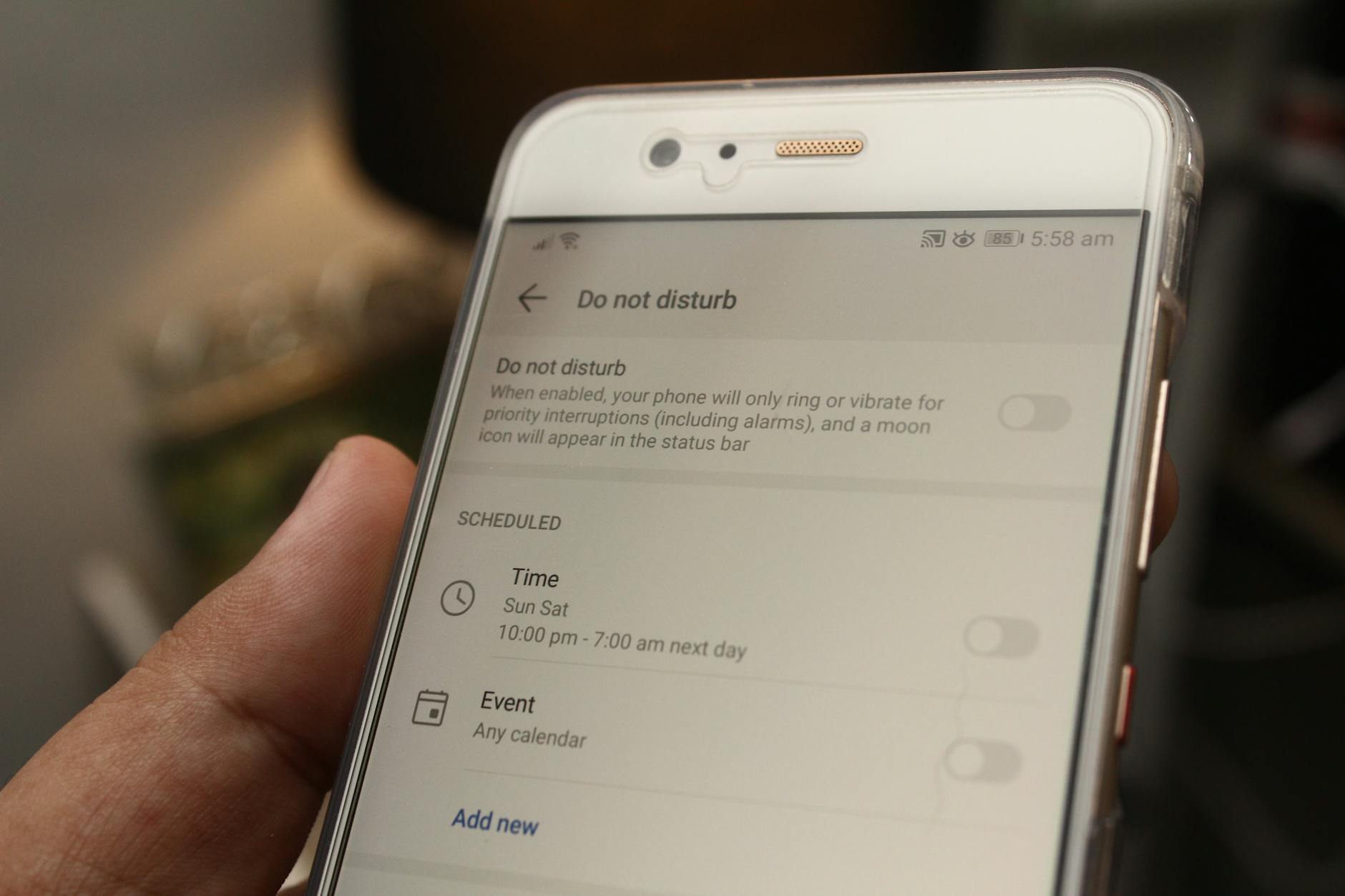 Photo by Daniel Moises Magulado
For deeper reading on how to manage notifications and sleep, explore these practical resources:
- Set up a sleep schedule in Health on iPhone: https://support.apple.com/guide/iphone/set-up-a-sleep-schedule-iphaf56dceb4/ios
- Limit interruptions with Modes & Do Not Disturb on Android: https://support.google.com/android/answer/9069335?hl=en
Review Alerts Weekly for Peace
A weekly review acts like a reset button for your digital life. It helps you reclaim time, prune the noise, and ensure your devices serve you rather than the other way around. Set aside a dedicated 20 to 30 minutes each Sunday to audit alerts, prune unused apps, and adjust settings for the week ahead.
- Do a quick audit: Look at the three or four apps that push the most notifications. Are these alerts essential during your typical week, or could they be muted or limited?
- Delete or disable unused apps that send noise: Apps you rarely open often send tests of notifications you don’t need. Removing them reduces background activity and keeps your focus sharper.
- Reassign important alerts: Prioritize messages from family, close friends, or key work contacts. Move less urgent signals to your DND windows or quieter hours.
- Reassess every few weeks: Your routines change, and so do notification patterns. If something induces stress or sleep disruption, adjust it.
A practical routine to adopt:
- Sunday morning: open Settings > Notifications and review the top five apps that sent alerts over the past week. Disable non essential alerts or set silent modes for certain apps.
- Clean up: uninstall apps you no longer use or disable push notifications for those you keep.
- Rebalance: check your battery and screen time dashboards to ensure your changes actually reduce interruptions and don’t hamper important communication.
If you want extra guidance on keeping notifications under control, reputable sources discuss strategies for mindful online use and the impact of social apps on mood and sleep. For example, UC Davis Health provides practical tips on managing mental health while online, while the National Library of Medicine offers accessible reviews on how social platforms relate to wellbeing.
- Audit your top three most-used apps this week. Note how you feel after each session and record a one sentence takeaway.
- Set limits during work hours: Use built-in time limits or third party apps to mute non essential categories while you focus.
- Create a calm home screen: Move entertainment apps away from the main home screen and keep a dedicated folder for tools that support mood and calm.
Images and further reading can cement these habits. If you want visual inspiration for adjusting DND settings, a close look at the gear in your phone’s notification controls can help you see what to tweak first. And if you’re seeking a broader view, the articles linked above provide useful ideas on calming routines and healthier digital use.
Photo by Daniel Moises Magulado
Balance Phone Time with Real-Life Moments
Living in a connected world means your phone can be a great ally for real life moments if you set boundaries. This section helps you plan offline wins each day and track how well you balance screen time with the world around you. The idea is simple: small, intentional choices compound into better mood, calmer sleep, and sharper focus. Let’s dive into two practical subsections you can adopt starting today.
Plan Offline Wins Each Day
Offline wins are tiny, repeatable actions that pull you away from the screen and toward real life. They feel effortless, but they add up by evening. Here are easy, doable options you can weave into your daily routine.
- 20 minute walk without your phone: Let your feet do the talking while your mind processes the day. If you must bring a device, use it only for a timestamp or a quick note to capture a moment, not for scrolling.
- Meet a friend for coffee or a quick chat: A short in-person connection boosts mood more than a dozen online interactions. Choose a time when you’d typically reach for your screen and replace it with human connection.
- Eat one device-free meal: Pause notifications and focus on savoring your food. A mindful meal resets appetite and digestion, and it reduces post-meal energy dips caused by screen content.
- Use a simple ritual to signal transition times: For example, after a workout or end of work, put your phone in a designated spot and switch to a non-screen activity for 15 minutes.
- Create a weekly offline anchor: Plan a recurring activity that happens every weekend without screens—like a visit to a park, a board game night, or a beginner’s sketch session. Consistency matters more than intensity.
Why these moves work: they reintroduce tactile, sensory experiences that smartphones often mute. The brain resets when it experiences real world cues—sound, texture, scent, and the presence of others. Over days, your baseline mood shifts toward steadier energy and calmer evenings. If you want a quick read on why offline time supports mental health, reputable sources highlight how reducing screen time can improve sleep and mood. For practical inspiration, scenes like a simple 20 minute walk or a coffee with a friend offer reliable payoff without adding friction to your day. You can find additional ideas that fit a busy schedule in digital detox guides and wellness discussions from trusted health sources.
Simple starter plan for today:
- Pick one offline win you’ll do tomorrow morning.
- Schedule it in your calendar with a clear start time.
- Keep the plan visible in your environment as a constant reminder.
If you want a deeper look at offline activities that fit modern life, you can explore ideas like digital detox strategies and screen-free alternatives in reputable wellness resources. These approaches provide evidence and structure for making offline time a natural habit rather than an exception.
- Example starter: a 20 minute phone-free walk after lunch, followed by a quick 5 minute reflection note on how you feel.
- Optional extension: replace one scrolling session with a short offline hobby, such as journaling, sketching, or a quick stretch routine.
External resources you may find helpful:
- A practical digital detox guide with a simple schedule and nightly routine
- A beginner-friendly list of screen-free activities that fit a busy day
Track Your Balance for Lasting Calm
A simple log helps you see how screen time relates to mood, focus, and sleep. Tracking creates awareness, which is the first step to change. You don’t need fancy tools—just a quick, consistent habit that you can sustain.
What to track:
- Screen time vs real-life time: Note the hours you spend scrolling or using apps versus the time you spend with people, on hobbies, or outdoors.
- Mood after key activities: Record a one-sentence mood note after meals, after social apps, and after offline moments.
- Sleep onset and quality: Jot down when you fall asleep and how rested you feel in the morning.
A simple method to start:
- At the end of each day, write a one-line balance summary: “Today I spent X minutes on screens and Y minutes offline. Mood: Z. Sleep: A.”
- Review once a week: Identify patterns where screen-heavy days end with lower mood or poorer sleep, then adjust.
Using a basic log helps you tailor tomorrow’s plan. If you want more structure, many apps track screen time and mood changes over time. Some people prefer a dedicated habit journal or a minimalist notes app to keep things lightweight and portable. The key is consistency, not perfection. A weekly reflection solidifies the connection between choices and outcomes.
For readers who want science-backed context, researchers have highlighted how reducing screen time correlates with improvements in sleep and mood over multi-week periods. If you’re after practical tips, several reputable guides explain how to interpret your logs and translate them into concrete steps. Start with a simple three-column log: activity, minutes, mood note. Then ask yourself if the next day’s plan nudges you toward more offline moments or keeps you in the same loop.
How to implement now:
- Tonight, set a 15-minute window to review your day and note how much time you spent on screens versus offline activities.
- Tomorrow, adjust one aspect: either increase offline time by 10 minutes or reduce nonessential screen time by 10 minutes.
- End of week check-in: ask whether the changes made you feel calmer, slept better, or woke with more energy.
If you’d like additional guidance on tracking for mental health, reputable sources offer practical advice on interpreting usage data and mood patterns. You can explore options that fit your lifestyle, from simple journals to digital wellbeing dashboards. The goal is to identify a reliable rhythm that supports calm without sacrificing connection.
- Quick-start log template:
- Date:
- Screen time (minutes):
- Offline time (minutes):
- Mood note (one sentence):
- Sleep quality (1–5):
- Weekly reflection prompts:
- What stood out this week regarding balance?
- Which offline activity brought the most calm?
- What one change will you make next week?
Throughout this process, keep your use of the word smartphone in context. In casual writing, it’s natural to refer to your device as needed; in guides and formal reviews, you might vary terminology to keep readers engaged. If you want to deepen your understanding of tracking benefits, consider consulting credible research and wellness summaries that connect screen time with mood and sleep outcomes.
External links for further reading and tools:
- Mindful Screen Time: Apps that Promote Mental Well-Being
- Android Digital Wellbeing and Focus Tools: Features to help you regulate use
- Simplified screen time tracking guidance and mood journaling tips
In this section, the aim is clear: plan offline wins each day and measure how your balance affects calm, mood, and sleep. Small, repeatable steps keep you in control, helping you feel steadier and more present as you move through your day.
Conclusion
Smart, purposeful phone use protects mood, sleep, and calm. Four habits stand out, each backed by emerging research that shows real benefits when we act with intention. First, start with a wind down that creates a clear boundary between day and night. A simple cutoff time and a small ritual help your brain shift toward rest, improving sleep onset and morning mood. Second, silence non essential notifications and set daily windows for checking in. Fewer pings mean less reactivity, better focus, and steadier energy from dawn to dusk. Third, swap endless scrolling for mood supporting apps and offline connections. Music, short guided breathing, or a quick chat with a friend can lift mood without draining energy. Fourth, plan offline moments each day and track how they affect you. Real world activities strengthen mood, attention, and resilience.
Research from 2025 reinforces this approach. Intentional use improves sleep quality, lowers stress, and increases a sense of control over time. Cutting back on social media and blocking constant access can lift mood and clarity while keeping the benefits of staying connected. The pattern is simple: you control the device, not the other way around. Small changes, applied consistently, lead to noticeable improvements in how you feel.
If you start today, choose one change to begin with—a 30 minute wind down, a DND schedule, or a 20 minute offline win—and stick to it this week. A weekly mood check will reveal a lift you can build on. You’ll likely notice calmer evenings, more focused days, and better sleep sooner than you expect.
I’d love to hear which habit you’ll try first. Share your plan or a quick update in the comments.