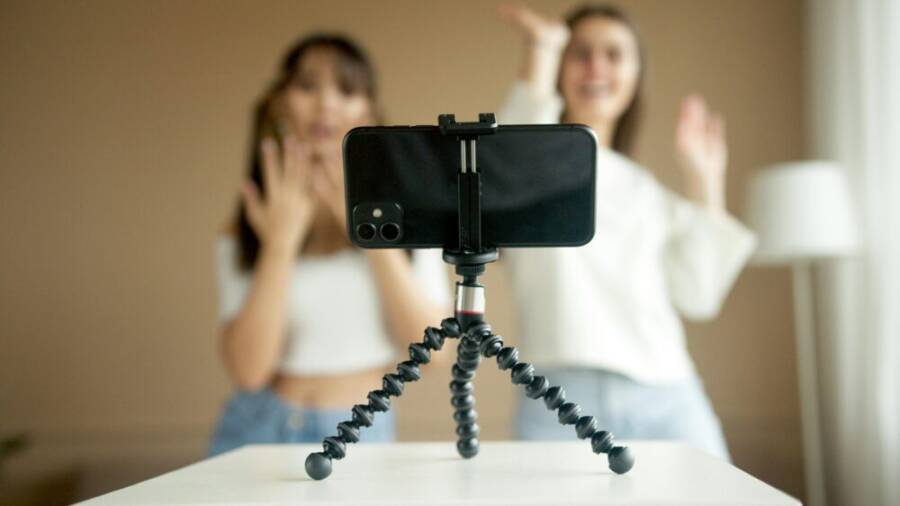
Can your smartphone keep up with fast TikTok dances and smooth Reels? A solid phone tripod makes all the difference, delivering stable, hands free shots you can edit and share with confidence.
This guide explains why stability matters, what features to look for, and which tripod picks work best for dancing content. You’ll learn how quick setup, easy rotation, and secure mounts help you capture dynamic movements without wobble.
Whether you film indoors or outdoors, on a desk or on the go, a reliable phone tripod helps you stay in frame and stay creative. By the end, you’ll know how to choose a tripod that fits your style, space, and smartphone.
Choosing the Right Phone Tripod for TikTok Dances and Reels
A solid phone tripod is more than a stand. It’s the foundation of smooth, professional looking dance videos and reels. The right tripod helps you stay in frame during rapid moves, supports quick angle changes, and keeps your clip clean from wobble and shake. Below, you’ll find practical guidance on stability, adjustability, and portability to help you pick a tripod that fits your dance style and shooting space.

Photo by Artem Podrez
Stability that keeps your moves smooth
Stability matters as soon as the beat drops. A tripod with a broad, weighted base reduces wobble when you strike fast transitions or lean into a punchline pose. Look for a design with a low center of gravity and a wide footprint. If you dance indoors on slick floors, a base with rubber feet or a small spread plate can prevent creep during sudden sidesteps.
- Weight distribution matters. Heavier legs and a well balanced head mean less sway when you reach for a dynamic pose or snap a rapid turn.
- Vibration dampening helps. Some tripods incorporate rubber gaskets, dampening collars, or gel pads that absorb minor vibrations when you tap your foot or snap to a beat drop.
- Solid base for uneven surfaces matters too. If you shoot on carpet, a tripod with retractable legs or adjustable feet adapts to small irregularities. For outdoor shoots, consider a mid-height tripod with stake inserts or a small tripod with optional sandbag attachments to stabilize the setup.
Why this matters for fast dance moves: your audience wants a crisp frame through every spin, jump, and glide. Even a tiny wobble can disrupt the rhythm and make cuts look jagged. In practice, a stable base means you can perform bold moves without worrying about the camera tilting or bouncing. When you pair stability with steady framing, your edits stay clean and the dancer’s timing stays intact.
If you’re starting out, prioritize a tripod with a broad base and a stable head. Later, you can add a weight or a ballast plate to further reduce movement on slick surfaces.
For more on stability focused options, see expert picks and tests from established creators who compare stability per ounce and weigh base configurations to determine the best value for your setup. You can explore trustworthy cues here: The Best Tripod For iPhones and Smartphones of 2025.
Adjustability for dynamic angles
Creative dances demand more than a fixed shot. You’ll want quick, reliable adjustments so you can capture eye level, low angle, and midair action without breaking your flow.
- Height range should cover from eye level to overhead. A good tripod lets you raise or lower smoothly so you can frame a fierce pose or an elegant spin without reconfiguring the setup.
- Tilt and swivel are essential. A responsive tilt mechanism lets you lock in a precise angle for a dramatic forward lunge or a high-contrast side shot.
- Rotation between portrait and landscape matters. TikTok and Reels both favor vertical formats, but you’ll often want landscape for future repurposing or cross posts. A quick 360-degree rotation capability saves time during a shoot.
- Eye level to low angles offer punchy visuals. Shooting from slightly below the subject can intensify a powerful stomp or a sudden knee slide, while eye-level framing keeps the face expressive and connection strong with viewers.
Practical tip: test a few angles during a dry run before recording. Move through a short choreography and note any frame drift. A tripod with easy, positive-locking clamps makes these checks fast and repeatable.
If you’d like to compare angle performance side by side, you can review guides that measure angle range against weight and height. For a broader perspective on stability and angle versatility, check this resource: TikTok & Reels Tripods: Stability Per Ounce Tested | AltiPod.
Portability and phone fit
A travel-ready tripod should disappear into your bag between gigs while still delivering solid performance. When you’re transporting gear to a friend’s apartment or a rooftop shoot, portability becomes as important as stability.
- Fold size matters. A compact folded footprint makes it easy to stash in a backpack without snagging on zippers or straps.
- Overall weight should be light enough to carry, but sturdy enough to hold a phone with a case plus a small light accessory. A good balance typically sits in the 1 to 2.5 pound range, depending on material and build.
- Clamp compatibility with different phone sizes and cases is key. Look for a clamp that accommodates larger devices and adds padding to protect the phone from scratches. Some clamps offer rubberized grips that grip securely without scratching the frame.
- Quick release features speed setup. A strong release plate or a simple clamp-release mechanism means you can move rapidly between shots, especially when you’re chasing a tight dance sequence.
If you shoot both indoors and outdoors, you’ll want a tripod that can be quickly detached from a base or a portable stand. This makes it easier to move with the dancer or to switch from a desk setup to a room corner shot without losing momentum.
When you’re evaluating portability, also consider whether the tripod supports optional add-ons like phone mounts, mini ring lights, or mic booms. Compatibility with accessories can save you from buying multiple rigs.
For a sense of how different setups compare on portability and fit, you can review practical recommendations from trusted sources like comprehensive buyer guides and real-world tests. See this overview for context: Best Phone Tripods For Content Creators And Vloggers.
Images and hands-on visuals can help you gauge how a tripod looks in action and how easy it is to adjust during a fast dance sequence. If you’re exploring your first purchase, start with a model that offers a short fold, a moderate weight, and a clamp that fits your phone with a case on. You can always upgrade later once you confirm your preferred form factor and shooting style.
Final quick check: before you buy, test the tripod with your phone in your everyday case. Make sure the clamp holds firmly and the legs extend smoothly. If you can, test a few tilt angles and a quick rotation to confirm you’ll be comfortable changing shots on the fly.
External resources to help you compare models and read real-world testing notes:
- 7 Phone Tripods TikTok Creators Live for
- Magnetic Phone Stand vs Tripod Mount: Which setup is actually better for TikToks and Reels
- TikTok & Reels Tripods: Stability Per Ounce Tested
- The Best Tripod for iPhones and Other Smartphones of 2025
- Best Phone Tripods For Content Creators And Vloggers
As you continue, keep your filming space in mind. A stable base that travels well can be the difference between chasing the beat and losing it. The right tripod not only holds your phone steady but frees you to focus on the choreography and emotion you want to convey.
Top Picks for TikTok and Reels (Best Phone Tripods)
A great tripod sets the stage for smooth, professional looking TikTok dances and Reels. You want quick setup, reliable stability, and flexible angles that keep you in frame as you move. Below are five standout options that cover everything from compact table tops to taller, multi-angle rigs. Each pick includes practical why it shines for dancing content and how to use it most effectively in fast-paced shoots.
Photo by Artem Podrez
Craft Geek JustTap Tripod
Best for quick setups and hands free dancing. The JustTap tripod is all about speed and simplicity. Tap to open the legs, and you’re ready to shoot in seconds. The strong magnetic grip keeps your phone secure even when you break into a fast spin or a dramatic pose. Its compact size makes it ideal for travel or quick room setups, so you can move from desk to floor without missing a beat. An included remote adds a layer of convenience for starting and stopping your playback without fumbling for the phone.
- Fast setup in one hand: Tap to open legs, lock the head, and start filming.
- Secure hold: Magnetic grip minimizes risk of phone slippage during lively dances.
- Portable and lightweight: Easy to tuck into a bag for on-the-go shoots.
- Remote included: Control recording without touching the phone, keeping your flow uninterrupted.
For a quick reality check on real-world use, see a detailed review that highlights the strengths of quick setup and magnetic grip. If you’re exploring options beyond this model, you’ll find thoughtful comparisons and user notes here: Craft Geek JustTap Tripod review.
Joby GripTight Pro Telepod
Best for height and versatility. The GripTight Pro Telepod blends a sturdy tripod foundation with a telescoping leg system. If you frequently shoot taller scenes, overhead angles, or group shots, this one shines. It doubles as a selfie stick, so you can capture elevated action without changing rigs. The solid base offers stability for a range of angles, making it a reliable choice when you want to switch from a waist-high pose to a high-angle shot mid dance.
- Telescoping legs: Reach higher framing for dynamic overhead or long-limb poses.
- Selfie mode potential: Use as a monopod to capture your own moves from unique angles.
- Stable base: A dependable platform for varied angles and even small group clips.
Trustworthy reviews emphasize its build quality and adaptability for on-the-go creators. To see how it stacks up against other compact tripods, check trusted hands-on assessments here: Joby GripTight Pro Telepod review.
Benro Tablepod Flex Kit
Best for flexible shooting in tight spaces. The Benro Tablepod Flex Kit is built with bendable legs and a lightweight profile that fits perfectly on a crowded desk, coffee table, or shelf. The built-in phone clamp is a nice touch for quick changes, and the strong hold works with larger smartphones, even when you’re juggling a mic or a small light. This flexibility is a big win when you want to film close-up dance details or low-angle shots without crowding your shooting space.
- Bendable legs: Shape the tripod to fit odd corners or tight corners on a coffee table.
- Lightweight and compact: Easy to carry and set up in small rooms.
- Integrated phone clamp: Fast mounting and removal without extra parts.
- Solid hold for larger phones: Confidence to use with cases and a small accessory setup.
For users who value control in tight spots, this kit offers a strong balance between portability and capability. If you want a broader comparison of flexible mini rigs, see this overview: Best Phone Tripods For Content Creators And Vloggers.
SmallRig Vlog Tripod Kit VK-50
Best for vlogging and professional looking Reels. The VK-50 earns its keep with a rugged build and multiple leg positions, which
How to Set Up for Dancing: Tips for Stable and Fun Videos
When you film dances with a phone, setup matters as much as the moves themselves. A stable platform, clean lighting, and smart camera choices keep your footage from looking basic and help your choreography shine. Below you’ll find practical steps to get you steady, expressive results with minimal fuss. Each subsection covers a core area—lighting and framing, remotes and camera choices, and angles that flatter your moves—so you can tailor your setup to your space and style.
Lighting and framing that pops
Good lighting is the backbone of clear, engaging dance videos. Start with a simple three-point lighting setup if you’re indoors: a key light in front of you at about a 45-degree angle, a fill light to soften shadows on the opposite side, and a back light to separate you from the background. If you don’t have studio lights, natural light works beautifully on a bright day. Position yourself near a window but avoid direct sun that can blow out highlights on fast movements.
To frame a dancer so movements stay crisp, place the phone at about eye level or slightly above. This height keeps facial expressions readable while giving room for dynamic arm and leg work. For mid to full body shots, a straight-on orientation helps preserve proportions during quick spins and kicks. If your space is narrow, a slightly wider frame can keep you from stepping out of the shot mid routine.
Watch for shadows and blown-out highlights as you test the setup. A bright window directly behind you will wash out details and create a silhouette that hides your moves. Soft, even light is usually best, so consider diffusers or a white wall as a natural reflector. If you’re using a ring light or panel lights, aim to fill evenly from the sides to avoid harsh shadows under the eyes or chin.
Tip: run a quick 10-second test clip of a routine segment and review the footage. Look for harsh reflections on any shiny surface, stacked shadows, or a frame that narrows during fast transitions. If you see hotspots, tweak lighting angle or brightness until you get a balanced look.
For practical references on lighting and framing, see expert guidance that explains common setups for motion-heavy video content. You can explore a reliable overview here: How to Have The Best Lighting in Videos.
In addition to lighting, framing matters for maintaining energy in the edit. Center your subject in the frame, keep movements within a generous margin, and avoid placing key action at the edge where it might be cropped during post. A little extra space around the dancer allows you to crop cleanly if you need to reframe in post.
If you want to see real-world examples of lighting that elevates dancing content, these resources provide solid ideas and visual inspiration: TikTok Lighting Techniques for Dance Video and Tiktok lighting: What TikTokers use and how to set it up.
Remotes, timers, and using the back camera
Minimize shake with a simple remote or timer. A Bluetooth shutter remote lets you start and stop recording without touching the phone, which is a big help when you’re mid routine. If you shoot with a timer, set a short countdown so you have a moment to settle into position after pressing record.
Whenever possible, use the back camera for better quality. The rear sensor typically produces sharper detail and better dynamic range than the front camera, which helps when you’re analyzing fast footwork or sharp arm lines during a routine. If you’re recording with the front camera out of necessity, try to keep lighting steady and within a similar exposure range to avoid post-processing exposure shifts.
Quick test shoots are a lifesaver before a full take. Do a 3–5 second rehearsal clip, then review what you captured. Check for frame drift, lighting consistency, and how well you stay in frame while you move. If you notice wobble, tighten the tripod grip or adjust the head and re-test. Small refinements here save you from chasing issues in editing.
A Bluetooth remote or a timer works well for solo shoots and keeps your hands free for choreography. When you add a remote, you can start recording and hit stop without touching the phone, which maintains your flow.
For readers who want a quick comparison of remote options and how they fit into a dance shoot, this guide offers practical insights: Bluetooth Remote for Record.
If you’re evaluating setups that mix a compact tripod and a small light, think about how you’ll test angles and transitions. A short dry run with a couple of moves helps you confirm you’ll capture the entire sequence without re-runs. A reliable remote, a back camera, and a quick test are your best friends here.
External sources and hands-on reviews can help you choose the right accessories. See: Best Phone Tripods For Content Creators And Vloggers for broader guidance on compatibility and ease of use.
Choosing angles that flatter your moves
Angles shape how your dance reads on screen. Start with a few reliable setups you can rotate between during a session. A mid-height angle works well for most routines, but you’ll want at least one higher and one lower angle to add drama without losing track of footwork.
- Camera height: Aim for eye level or just above for most moves. A higher angle can accentuate leaps or spins, while a lower angle adds emphasis to strong leg lines and footwork.
- Tilt and swivel: A smooth tilt lets you lock in a dramatic forward lunge or a sweeping side move. A quick swivel helps you catch a full range of motion in the same clip.
- Portrait vs landscape: TikTok and Reels favor vertical formats, yet landscape can be useful for cross-posting. If you plan to reuse footage elsewhere, ensure your headroom works in both orientations or use a head that rotates easily.
- Framing for dynamic sequences: When moves accelerate, keep the dancer within the central area of the frame. You don’t want a jump to push the frame edge, which complicates edits and cuts.
For fast-paced dances, you’ll benefit from planning a few anchor shots and then weaving in mid-shot adjustments. Practice a couple of choreography sections in front of the camera with a dry run. Note where the frame tends to drift and fine-tune the head or tripod height accordingly.
If you want a deeper dive into angle performance and how it affects stability, you can review this resource: TikTok & Reels Tripods: Stability Per Ounce Tested.
Practical tip: before you shoot, map out a few go-to angles on a whiteboard or a note. This keeps you moving with purpose and reduces downtime between takes. A flexible rig that rotates quickly will feel natural as you shift from a high overhead grab to a ground-level spin.
To see hands-on guidance on camera angles for dance, check out this practical guide: Best Angles to Record Yourself Dancing.
Portability and phone fit
If you shoot in different rooms or on the go, portability becomes a major factor. A compact, travel-friendly rig saves time and keeps you focused on the routine rather than gear management.
- Folded size and weight: Look for a footprint that fits in a carry bag or a briefcase. A light frame helps you carry more gear without fatigue.
- Phone clamp compatibility: Ensure the clamp supports phones with cases and provides soft padding to protect the device. Rubberized grips that hold securely without scratching are a big plus.
- Quick release: A fast, reliable release mechanism makes it easy to switch between shots or move the setup for a new angle without losing momentum.
- Add-ons: Optional lights, mic booms, or phone mounts can expand your setup without adding bulk. Check compatibility with the tripod you choose.
If you shoot both indoors and outdoors, you’ll want something that detaches easily from a base or supports quick repositioning. This makes it easier to follow a dancer moving through a room or stepping outside for a quick balcony shot.
When evaluating portability, consider how the setup stores and whether it can accommodate larger phones with rugged cases. A model that holds up a phone with a case and a small light will save you from upgrading too soon.
To compare portability and fit across models, you can review practical recommendations here: Best Phone Tripods For Content Creators And Vloggers.
Final quick check: test the setup with your phone in its everyday case. Confirm the clamp is firm, the legs extend smoothly, and the head holds steady through a few tilt and rotation cycles. If you can, run through a short sequence at full tempo to confirm the rig won’t shift during a fast beat.
External resources to help you compare models and read real-world testing notes:
- 7 Phone Tripods TikTok Creators Live for
- Magnetic Phone Stand vs Tripod Mount: Which setup is actually better for TikToks and Reels
- TikTok & Reels Tripods: Stability Per Ounce Tested
- The Best Tripod for iPhones and Other Smartphones of 2025
- [Best Phone Tripods For Content Creators And
Buying Guide: What to Check Before You Buy
A phone tripod is a simple tool, but choosing the right one makes a big difference. Before you commit, run through a practical checklist that covers stability, adaptability, fit for your device, and the extras that can save you time on set. This section breaks down the core criteria in plain terms, so you can buy with confidence and hit record ready to dance.
Stability you can rely on
Stability is the first line of defense against wobble and uneven footage. A solid base with a low center of gravity reduces shake during rapid moves. Look for tripods with wide feet, rubberized bottoms, or a ballast option to keep the setup planted on slick floors.
- Base design: A heavier, well-balanced head minimizes sway as you shift weight during a routine.
- Vibration dampening: Features like rubber gaskets or dampening pads help absorb micro-movements when you tap or pivot.
- Surface versatility: If you film on carpet or uneven ground, adjustable feet or a leg design that distributes weight more evenly matters.
When you test stability, run through a quick sequence of spins, pauses, and foot taps. If the frame wobbles at any point, rule out that model. A stable foundation makes your cuts cleaner and your edits simpler.
For additional insight on stability per ounce and how base design affects performance, see trusted tests and expert commentary here: TikTok & Reels Tripods: Stability Per Ounce Tested.
Adjustability for dynamic shooting
Dance content thrives on quick angle changes. A tripod that can move with you eliminates the need to stop and recalibrate mid routine.
- Height range: A good model should go from eye level to overhead with smooth, controlled motion.
- Tilt and swivel: A responsive tilt mechanism helps you lock in dramatic angles for punches, kicks, or expressive poses.
- Rotation between portrait and landscape: Vertical shots are king for TikTok and Reels, but a quick 360 rotation is a big time saver when you want to repurpose footage.
- Quick clamps and locks: Positive-locking clamps keep angles stable once you’ve set them.
Practice a dry run before filming. Move through a short choreography and note any frame drift or hesitation in the head. A model with reliable clamps makes these checks fast and repeatable.
If you want to compare angle performance across products, you can review dedicated guides like the one from AltiPod that tests stability against angle range. It’s a helpful reference when you’re balancing height, weight, and versatility: TikTok & Reels Tripods: Stability Per Ounce Tested.
Compatibility and fit for your phone
A misfit clamp or a tight fit can ruin a shoot. Ensure the tripod is compatible with your device size, case thickness, and any extras you plan to use like a light or mic.
- Phone clamp: Look for a clamp that accommodates larger phones with cases on and offers padding to protect the frame.
- Case clearance: Measure total thickness including your case to be sure the clamp can grip securely without slipping.
- Padding and grip: Rubberized or cushioned grips protect the phone from scratches while maintaining a firm hold.
- Quick release: A dependable release mechanism saves time when you switch from one angle to another during a routine.
If you’re evaluating options, pay special attention to compatibility notes from credible guides and maker pages. For broader guidance on compatibility considerations, check a comprehensive buying guide like this one: How to Choose the Best Phone Tripod: A Complete Buying Guide.
Accessories that add up
Extras can dramatically improve your workflow without adding much weight. Think about what fits your style and space.
- Mounts and rails: Some setups support micro accessories like a small LED light, a compact microphone, or a phone mount with multiple joints.
- Remote control: A Bluetooth shutter or a timed start helps you stay in rhythm during a fast routine.
- Lighting compatibility: If you film in mixed lighting, a tripod that accommodates a clip-on light or ring light is handy.
- Portability adds value: A model that folds compactly and uses a simple release mechanism travels easily and saves setup time.
Before buying, map out your typical shoots. If you often shoot from a desk, a tabletop setup with a flexible head might be perfect. If you frequently shoot overhead or from a higher angle, prioritize a taller, more stable model.
For broader, creator-focused guidance on a range of models and what fits different shooting spaces, see trusted roundups like this one: Best Phone Tripods For Content Creators And Vloggers.
Budget and value: what you really get
Price often reflects build quality, materials, and the head’s responsiveness more than anything else. A slightly higher upfront cost can pay off in longer life, easier setup, and more reliable shots.
- Build quality: Metal legs and a solid head typically mean better durability and steadier performance.
- Weight versus stability: Heavier rigs aren’t always better for travel, but they usually feel steadier on busy shoots.
- Warranty and support: A solid warranty reduces long-term risk if clamps loosen or feet wear out.
- Aftermarket add-ons: If you plan to grow your setup, consider whether the tripod supports future upgrades without a full replacement.
Set a realistic budget based on how often you shoot and where you shoot. If you’re new to dancing content, you might start with a compact model and upgrade as you gain confidence and a clearer sense of your needs.
For additional perspective on value and model variety, explore well-regarded guides like The New York Times Wirecutter’s look at top tripods for smartphones: The Best Tripod for iPhones and Other Smartphones.
Quick pre-purchase checklist
Before you pull the trigger, run through a short, practical checklist to confirm the model meets your needs.
- Test the clamp with your phone in its everyday case.
- Extend the legs and confirm smooth movement through the full height range.
- Check a few tilt angles and a quick rotation to ensure stability during transitions.
- Verify compatibility with any planned accessories (light, mic, or mount).
- Consider your shooting environment and choose a base that handles indoor and outdoor settings.
If you’d like a quick reference to model comparisons and real-world testing notes, these sources offer concise insights into practical performance: Best Phone Tripods For Content Creators And Vloggers and a dedicated stability test from AltiPod: TikTok & Reels Tripods: Stability Per Ounce Tested.
Practical takeaways to guide your decision
- Start with stability first. A broad base and solid head reduce frame drift during fast moves.
- Prioritize adjustable height and angle control for versatile shooting.
- Ensure the clamp fits your phone with cases on and provides protection.
- Look for add-ons that match your workflow, not just your current needs.
- Balance budget with expected use. A mid-range model often covers most beginner to intermediate needs.
If you want to see how these criteria play out in real product reviews, explore creator-focused tests and buying guides to compare hands-on results. For a broader overview of model variety and practical testing notes, refer to the recommended sources above.
External resources to help you compare models and read real-world testing notes:
- 7 Phone Tripods TikTok Creators Live for
- The Ultimate Guide: Best Cell Phone Tripod Mounts(2024)
- Best phone tripod for iPhones and smartphones
- The Best Tripod for iPhones and Other Smartphones of 2025
- Best Phone Tripods For Content Creators And Vloggers
This buying guide section is designed to align with your article’s focus on stable smartphone shots for TikTok dances and Reels. It keeps the language accessible, emphasizes practical tests, and ties into credible resources to help readers choose with confidence.