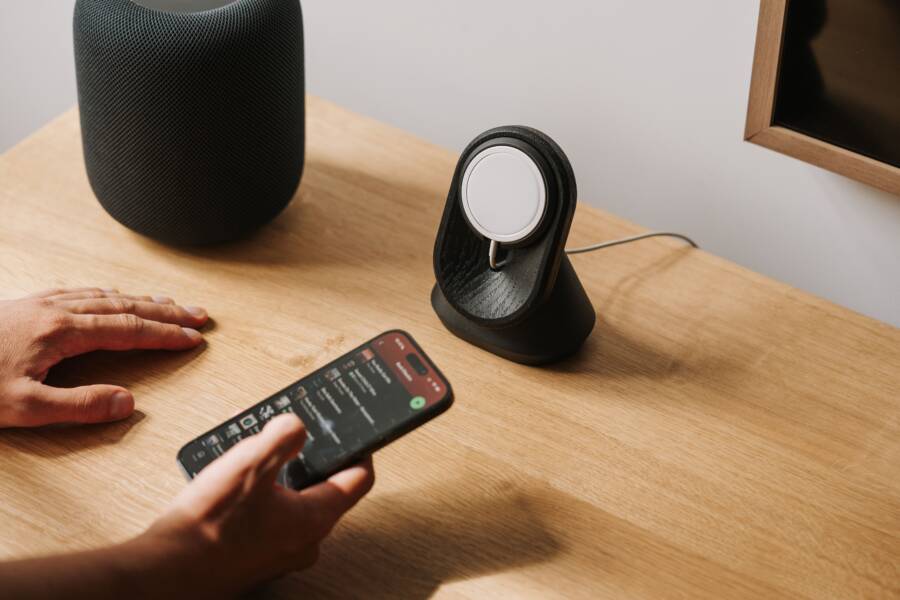
If your phone constantly stops charging or fails to connect when you place it on a wireless pad, the primary culprit is almost always poor coil alignment. Wireless charging relies on precise electromagnetic induction, meaning the internal coil in your charger must sit directly over the corresponding coil in your smartphone to maintain a steady current.
Even a slight shift of a few millimeters can break this connection, causing the charge to cycle on and off or fail to initiate entirely. This frustrating experience is usually the result of a case that is too thick, magnets that lack sufficient strength, or a slick surface that allows your device to slide out of position.
By addressing these physical barriers and improving the grip between your hardware and the charging base, you can restore a consistent power flow. The following steps outline how to fix these alignment issues and keep your battery topped up without constant monitoring.
Identifying the Real Cause of Wireless Charging Failure
Wireless charging seems simple, but it relies on a delicate balance of electromagnetic physics. When your smartphone fails to charge, you often blame the cable or the wall adapter first. However, the connection between the charging base and the device is usually the primary point of failure. Recognizing these physical obstacles helps you troubleshoot the problem without wasting time on software updates or hardware repairs.
Checking Your Case Thickness and Material
The induction process requires proximity between the charging coil in your charger and the receiver coil inside your phone. If there is too much physical space between these two components, the magnetic field weakens significantly. Manufacturers design most wireless chargers to work through standard plastic or silicone covers, but limits exist. A case that exceeds three or four millimeters in thickness often creates enough of a gap to stop the energy transfer entirely.
Materials play an even larger role than pure thickness. Rugged cases often contain thick layers of rubber, impact-resistant foam, or reinforced corners that push the device away from the base. More importantly, metal is the enemy of wireless charging. Because metal conducts electricity, it interferes with the magnetic field and can even generate dangerous heat. Avoid these common culprits:
Metal kickstands or rings attached to the back of the case.
Magnetic metal plates used for car mounts.
Cases with integrated metal heat sinks or decorative metallic accents.
If you use a case containing these materials, the charger often detects the metal as a foreign object. This triggers an automatic safety shutdown to prevent overheating. If you suspect your case is the issue, remove it and place your phone directly on the pad. If the charging initiates, you know the case is too thick or contains metal components that block the signal.
Troubleshooting Surface and Friction Problems
Placement accuracy is the most frequent cause of charging interruptions. If your smartphone is not centered perfectly on the pad, the electromagnetic coils cannot overlap enough to sustain power. A common problem arises when both the back of your phone and the charging surface feature glossy, slippery finishes. Over time, the subtle vibrations from phone notifications or just the weight of the device can cause it to slide, breaking the alignment.
You might notice your charger light turn on initially, only to stop after a few minutes. This typically happens because the device migrated just enough to lose the magnetic lock. Improving this friction is a simple way to maintain a steady charge.
Consider these practical solutions for slippery surfaces:
Apply a thin, non-slip adhesive grip to the center of your charging base.
Use a charging pad with a silicone or rubberized top texture instead of glass or hard plastic.
Add a small piece of textured tape to the back of your phone case if it is unusually slick.
If you find yourself constantly adjusting the phone to get the status light to blink, the lack of friction is the likely offender. Adding a grippy material provides the necessary resistance to keep your smartphone in the exact position required for a full charge. Small adjustments to the physical setup often resolve the most persistent charging failures.
Simple Ways to Fix Alignment Issues at Home
When your smartphone fails to maintain a charge, the culprit is often a simple lack of friction or poor spatial alignment. You do not need expensive repairs or complex technical knowledge to solve these problems. Minor physical modifications to your charging setup usually restore consistent performance immediately.
Adding Grip to Your Charging Station
Most wireless charging pads feature smooth surfaces that allow a smartphone to migrate away from the charging coil. Once the device shifts, the electromagnetic link breaks, and charging stops. You can counteract this sliding motion by increasing the surface friction of your charging base.
A thin, self-adhesive silicone pad or a small rubberized sticker provides the necessary resistance to lock your device in place. You can purchase these items in circular sheets or cut a custom shape from a larger roll. Clean the surface of your charger with a mild alcohol wipe before applying the material to ensure a strong bond. Once applied, the rubberized texture grips the back of your phone case firmly, preventing the tiny vibrations from notifications or minor bumps from disrupting the connection.
If you prefer a temporary solution, you can use a few small dots of clear silicone sealant or hot glue on the pad. Place them in a pattern that matches the footprint of your phone. Allow the material to cure completely before using the charger. This adds a subtle, non-slip barrier that keeps the internal coils aligned without interfering with the aesthetics of your desk or nightstand.
Using Magnetic Alignment Accessories
Magnetic alignment provides the most reliable way to force your phone and charging base into the correct position. If your device supports wireless charging but lacks built-in magnetic features, you can upgrade your setup using magnetic rings or specialized adapters. These accessories use powerful, localized magnets to snap your smartphone into the perfect charging spot every time.
These rings typically come with an adhesive backing designed to attach directly to the back of your phone or the exterior of your case. Once installed, they interact with compatible charging bases to pull your device toward the center of the induction field automatically. This magnetic lock ensures that the coils remain centered, even if you accidentally bump the table or pick up the phone during the night.
You should consider these benefits when choosing a magnetic solution:
Universal rings work with most smartphone models that have wireless charging capabilities.
These adapters maintain a strong hold through many thin cases, provided they do not contain thick metal plates.
Magnetic alignment removes the guesswork from placing your device on the charger, making it a true set-and-forget experience.
Before attaching a ring, verify that your charging base is compatible with magnetic accessories. Some older, third-party pads may struggle to recognize the added metal weight, though most modern hardware handles these modifications without issue. A properly placed magnetic ring effectively ends the frustration of waking up to a phone that failed to charge overnight.
Choosing the Right Hardware for Better Connectivity
Picking the right charging hardware often matters more than the phone itself when you face persistent connection drops. While many users focus on the internal components of their smartphone, the physical structure of the charging base plays a huge role in successful energy transfer. Choosing a design that naturally forces alignment prevents the common failures associated with flat, open-surface pads.
Why Vertical Stands Win for Alignment
Vertical charging stands offer a mechanical advantage that flat pads cannot match. When you place a smartphone on a flat pad, the device rests entirely on a horizontal surface. This leaves it vulnerable to small bumps or vibrations that cause the phone to slide away from the sweet spot. Once the internal induction coil of the phone moves past the center of the charger, the power link breaks.
Stands use gravity to keep the smartphone in a fixed, optimal position. By resting the base of the phone on a ledge, the device stays flush against the charging surface at all times. This orientation aligns the phone coil with the charger coil automatically every time you dock it.
You gain two main benefits from using a stand instead of a flat pad:
Constant pressure keeps the back of the phone securely against the charging surface, which reduces heat and prevents power cycling.
The fixed angle makes it much easier to confirm the device is charging at a glance without needing to pick it up or adjust its position.
If you find yourself constantly checking your phone to see if it is still charging, switching to a vertical stand often solves the problem instantly. It removes the need for precision placement, as the stand guides the phone into the correct orientation for you.
Evaluating Charger Wattage and Coil Count
Not all chargers manage the magnetic field with the same level of effectiveness. Older models often rely on a single charging coil located in the dead center of the pad. If your phone size does not line up perfectly with that one small area, the charger fails to initiate a link. Modern chargers fix this limitation by utilizing multiple coils that cover a broader surface area.
A multi-coil charger allows for more flexible placement, as the magnetic field spans across more of the base. This provides a larger window for success when you drop your phone onto the surface. You do not have to worry about finding that one exact millimeter of alignment to start the energy flow.
When you upgrade your hardware, consider these features:
Look for models labeled as multi-coil or extended-range chargers, as these provide a much higher tolerance for imperfect placement.
Check the wattage rating to ensure it matches the requirements of your specific smartphone model.
Avoid very cheap, off-brand chargers, as they frequently use low-quality coils that struggle to maintain a stable magnetic field even when the alignment is perfect.
Investing in a charger with high-quality, multi-coil architecture eliminates the common frustration of waking up to a low battery. These devices work with the physical realities of your smartphone rather than fighting against them, resulting in a more reliable and hands-off experience.
When to Replace Your Charging Gear
Wireless chargers seem like static, long-lasting hardware, but they possess components that degrade over time. If your smartphone consistently struggles to maintain a connection, the issue might not be the phone itself. Frequent power cycling, slow charging speeds, or excessive heat generation often signal that your charging hardware reached its operational limit.
Recognizing Signs of Hardware Degradation
Internal coils and the charging circuitry undergo significant thermal stress during daily use. If you notice your charging base generates heat even when a phone is not present, the internal capacitors are likely failing. This heat indicates the board is attempting to regulate a current that is no longer stable. Other signs that your charger is near the end of its life include intermittent charging lights that blink erratically or a complete lack of response despite correct placement.
You should inspect your gear for these physical warning signs:
The cable connection port feels loose or requires a specific angle to power the pad.
The surface material of the pad has warped or cracked from constant heat exposure.
Your smartphone displays charging errors or indicates that a slow charger is connected.
The base emits a high-pitched buzzing or whining sound while in use.
Evaluating Longevity and Performance Expectations
Most consumer-grade charging pads maintain peak efficiency for 18 to 24 months of daily use. While modern electronics are durable, the persistent cycle of heating and cooling eventually breaks down the insulation around the charging coil. Once this insulation thins, the charger becomes less effective at creating the necessary magnetic field for your smartphone.
Budget-friendly hardware often uses lower-quality components that succumb to these stressors faster than premium alternatives. If your charger was an inexpensive impulse buy, it likely lacks the internal safety sensors found in more robust models. These advanced models monitor internal temperatures and power delivery to prevent damage to your smartphone battery. If you decide to replace your hardware, prioritize chargers that have independent certifications, as these options offer better power management and longevity.
Conclusion
Reliable wireless charging depends on the precise alignment of electromagnetic coils. You can maintain this connection by keeping the charging surface clean, using thin cases, and opting for vertical stands or magnetic adapters to lock your smartphone in place.
Consistent power flow reduces heat and protects the longevity of your smartphone battery. Regularly checking your hardware for signs of wear will help you avoid the frustration of waking up to a device that failed to charge.