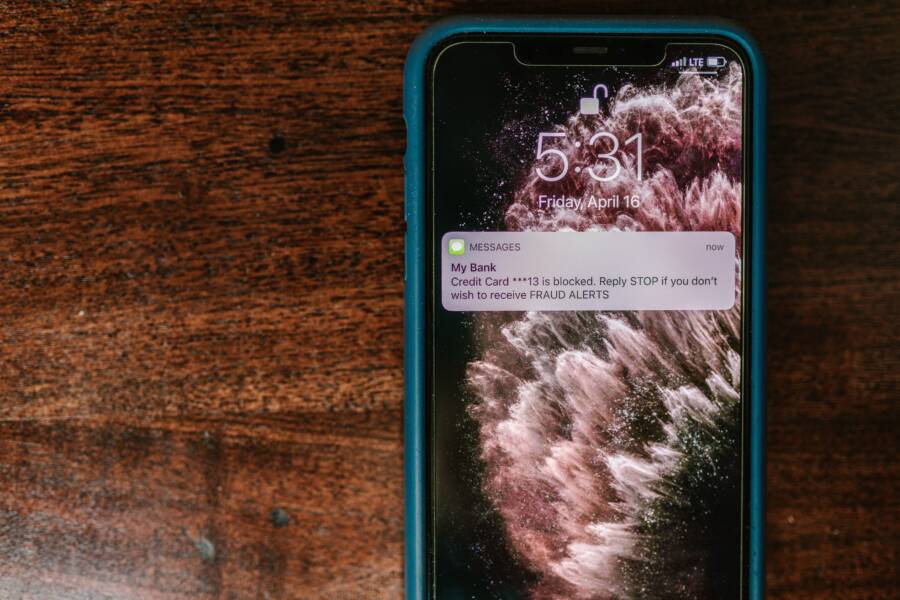
Enabling transaction alerts is the most effective way to prevent fraud and manage your personal budget. Most banking apps allow you to turn on these push notifications in less than five minutes using your smartphone.
You can stop worrying about unauthorized charges by receiving instant updates for every purchase. These alerts keep you in control of your account activity at all times.
Setting up these notifications provides peace of mind while helping you track your daily spending habits. Follow this guide to activate alerts on your device today.
Why You Should Enable Real Time Bank Alerts Today
Turning on instant notifications for your bank account is a simple way to gain better control over your finances. Most modern banking apps include this feature, yet many people leave it inactive. By enabling these updates, you change your account from a static record into an active monitoring system. Every transaction triggers a message to your smartphone, providing a clear window into your spending behavior.
Immediate Fraud Protection
Receiving an alert the moment a transaction occurs is your primary defense against unauthorized activity. Criminals often test stolen card information with small charges before attempting larger purchases. If you notice a suspicious notification on your smartphone within seconds of a swipe, you can call your bank to lock the card before further damage happens.
This rapid feedback loop also helps you catch merchant errors without waiting for your monthly statement. If a retailer accidentally double charges your account, you see the duplicate notification immediately. You then have the chance to address the mistake with the cashier while you are still at the register. Stopping a fraudulent or incorrect charge early saves you from the long process of filing a formal dispute later.
Keeping Your Daily Budget on Track
Seeing a notification for every purchase acts as a constant, gentle reminder of your financial goals. When you buy something, your smartphone pings with the exact amount spent. This quick nudge creates a psychological moment of reflection, forcing you to acknowledge the impact of each transaction on your total balance. It helps curb impulsive spending because you receive a prompt record of the expense immediately after handing over your card.
This system effectively removes the mystery from your checking account balance. Instead of guessing how much money remains in your account, you get an updated view after every purchase. You can adjust your spending behavior during the day if you see that your discretionary funds are running low. Consistent awareness makes it easier to stay within your personal budget without feeling the stress of checking your app manually multiple times a day.
Simple Steps to Configure Your Banking App Notifications
Setting up your bank alerts is a straightforward process that takes only a few minutes. Once you open the application on your smartphone, you are just a few taps away from better financial visibility. These controls reside within your account dashboard, allowing you to tailor the frequency and type of updates you receive.
Locating the Alerts Menu in Your Banking App
Most financial institutions group their notification settings in a similar way. After logging in, look for a tab labeled Profile, Settings, or Menu. These are often represented by a gear icon or your initials in the corner of the screen.
Once you open the settings menu, scan the list for terms like Alerts, Notifications, or Manage Alerts. Banks frequently hide these settings under a sub-menu labeled Security or Privacy. If you have trouble finding the specific page, use the search bar within the app. Typing the word alert usually brings you directly to the correct destination on your smartphone.
Choosing Which Transactions to Track
Deciding which transactions trigger a notification depends on your personal financial goals. You can typically choose between two main alert styles: a catch-all notification or a targeted threshold system.
- Every transaction: You get a push notification for every single purchase, withdrawal, or pending payment. This is ideal if you want a complete audit of your daily habits.
- Threshold alerts: You only receive a notification if a transaction exceeds a specific dollar amount you set. This setup is better for monitoring large expenses while ignoring small daily coffee runs.
Most users find a balance by enabling alerts for all debit card purchases while using threshold settings for online bill payments. This keeps your lock screen tidy while still providing security for significant money moves. You can adjust these limits at any time as your spending patterns change.
Verifying Your Push Notification Settings
Even if your bank app shows that alerts are active, your smartphone might block them from appearing on your screen. You must verify that the operating system gives the app permission to send push notifications.
To check this, open the main Settings menu on your device. Navigate to the Notifications section and scroll until you find your banking app in the list. Ensure the toggle for Allow Notifications is turned on. You should also verify that banners or badges are enabled if you want to see the alerts when your phone is locked. Confirming these system-level permissions ensures that your banking app communicates with you as soon as a transaction happens.
Customizing Your Alerts for Maximum Effectiveness
You gain total control over your financial awareness when you tailor notification rules to match your specific habits. Generic alerts often create digital noise that forces you to ignore your phone screen. By defining exactly what triggers a notification on your smartphone, you ensure that every alert you receive carries real importance. This personalized approach turns your device into a precise tool for monitoring your money rather than a source of constant interruption.
Setting Custom Dollar Thresholds
Setting a minimum amount for your transaction alerts prevents you from receiving a notification for every cup of coffee or snack. A 50 dollar threshold serves as a helpful filter for most budgets. This specific limit ensures that you stay informed about significant expenses while your phone stays quiet during minor daily purchases. Large, unusual charges often appear as sudden spikes in your account, and this method helps you spot them instantly.
When you configure this threshold in your banking app, consider your average daily spending. If your typical grocery trip costs 80 dollars, setting your alert limit to 100 dollars helps you monitor major budget changes without clutter. You still maintain a clear view of your account balance when you open your app intentionally. This selective notification style provides a balance between staying informed and avoiding unnecessary distractions on your smartphone.
Managing Notifications for Different Account Types
Tracking your money becomes much clearer when you separate rules for your checking and savings accounts. Your checking account deals with daily activity, so it often requires more granular monitoring for small and large items alike. In contrast, your savings account likely sees fewer transactions, so you might prefer an alert for every single withdrawal or transfer. This strategy keeps your notification feed logical and distinct based on how you use each account.
You should consider these different strategies for your specific needs:
- Checking accounts often benefit from higher dollar thresholds to limit the number of notifications you see during a busy workday.
- Savings accounts work best with alerts for every movement because these transactions usually involve larger sums of money or important transfers.
- Credit card accounts require their own set of rules, often focused on upcoming payment due dates or instances where your balance approaches a limit.
Logical organization helps you identify the source of a notification before you even unlock your screen. You will know exactly what a message represents by the account type it concerns. This separation provides a layer of clarity that simplifies your financial management on your smartphone every single day.
What to Do When You Receive a Suspicious Alert
Receiving an unexpected transaction notification is jarring, but quick action prevents financial loss. When your smartphone displays an alert for a purchase you did not make, you must address the situation immediately. Taking specific steps keeps your account safe and helps your bank reverse unauthorized charges.
Verify the Transaction Details
First, check if the alert refers to a purchase you forgot or an automatic subscription. Merchants sometimes use different billing names that look strange on a bank statement. If the amount matches a service you use, you might have identified a legitimate charge.
However, you should look for specific red flags if you do not recognize the merchant:
- The amount is a round number or an unusually small value, which indicates a test charge.
- The transaction location is in a city or country where you have not traveled.
- The date and time of the charge occurred while you were asleep or away from your smartphone.
If these signs point to fraud, do not ignore the notification. Contacting your bank is the most effective way to protect your balance.
Freeze Your Account or Card
Most banking apps allow you to lock your card directly from the smartphone interface. Find the manage cards section in your app to trigger this feature instantly. A frozen card prevents further fraudulent charges while you investigate the specific transaction.
This step buys you time to speak with a representative without the risk of additional theft. You can usually unlock the card later if you discover the charge was actually legitimate. Keeping this control at your fingertips is a primary benefit of using a mobile banking app.
Contact Your Bank Directly
Call the number on the back of your physical debit or credit card to report the suspicious activity. Avoid clicking links or calling phone numbers provided within emails or text messages, as these are often phishing attempts. Use the official contact information found on your bank’s website or the back of your card.
A representative will ask you to confirm which transactions are unauthorized. They will then cancel your current card and issue a new one to your home address. Reporting the fraud quickly often shifts the liability away from you, which prevents you from paying for the theft.
Update Your Security Information
Criminals gain access to accounts through compromised passwords or security questions. After reporting the fraud, update your banking login credentials to stop further unauthorized access. Use a unique, complex password that you do not use on other websites.
Enable multi-factor authentication if your bank offers this setting. This adds a second layer of protection, requiring a code from your smartphone every time someone logs into your account from a new device. Maintaining these security habits makes your account a much harder target for future attacks.
Your Financial Safety Starts with Simple Habits
Tracking your spending with your smartphone is more than a way to monitor your budget. It is a fundamental practice that protects your money and keeps you informed about your financial health. By using these tools, you transform your device into a personal monitor that works for you at every hour of the day.
Build Consistency into Your Routine
Most financial mistakes happen when people lose touch with their daily transactions. A simple habit of checking your notifications during your morning coffee or evening commute keeps you connected to your balance. You do not need to spend hours analyzing spreadsheets to see the results of this focus. Regularly viewing these alerts helps you notice trends in your spending that you might otherwise miss.
- Set aside two minutes each morning to clear your notification feed.
- Review your transactions against your planned weekly budget.
- Adjust your upcoming expenses if you notice your spending is trending higher than expected.
Use Technology to Prevent Financial Stress
When you rely on your memory to track purchases, you often face surprises when you finally check your bank balance. Real-time alerts remove this uncertainty by providing a digital paper trail for every swipe. This constant flow of information encourages you to make better choices without added pressure. When you manage your alerts on your smartphone, you stay in the driver seat regarding your financial life.
Maintain Your Account Security
Fraudsters rely on the fact that many people rarely check their transaction history. Enabling push notifications creates an immediate feedback loop that alerts you to unauthorized activity before it escalates. If you receive an alert for a purchase you did not authorize, you can act immediately. This speed of response remains your most effective tool for preventing long-term damage to your credit or savings.
Financial safety is not a one-time setup process. It is the result of keeping your settings updated and staying aware of your own spending activity. A few minutes of configuration on your phone now will pay off with months of peace of mind. Use these tools to keep your accounts secure and your budget on target every single day.