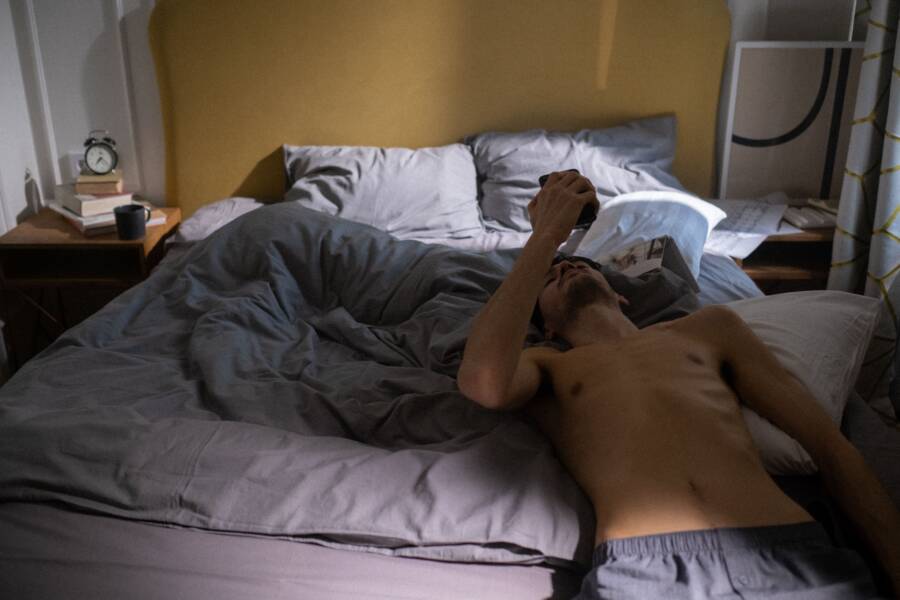
Using a smartphone right before bed keeps your brain alert and ruins your sleep quality. You stay awake because the blue light and constant notifications trick your mind into thinking it is still daytime.
The most effective way to sleep better is to set firm digital boundaries that separate your leisure time from your rest time. This system is simple, requires zero cost, and leads to immediate improvements in how rested you feel each morning.
Follow these steps to build your own routine and regain control of your evenings.
How Light from Your Smartphone Impacts Your Biological Clock
Your smartphone affects your sleep patterns primarily through the light it emits. Modern displays rely on short-wavelength light, commonly known as blue light, to provide clarity and brightness. This specific spectrum of light tricks your brain into perceiving daytime conditions. When you view your screen late at night, your internal biological clock struggles to initiate the transition toward sleep.
The Science of Melatonin Suppression
Your brain produces a hormone called melatonin to signal that it is time for rest. This process is sensitive to your surrounding light environment. Under natural conditions, the fading sunlight of the evening triggers a rise in melatonin levels. However, artificial light from a smartphone disrupts this natural sequence.
When your eyes detect high-intensity light at night, they send signals to the suprachiasmatic nucleus in your brain. This area acts as the primary controller for your circadian rhythm. It interprets the blue light as a cue to keep your body alert. Consequently, your brain suppresses melatonin production even if you feel physically tired. This suppression keeps your alertness levels high and makes it difficult to fall asleep on time.
Why Your Brain Struggles to Unwind at Night
Beyond the physiological effects of light, your smartphone creates significant psychological hurdles for sleep. Social media apps and email inboxes provide a constant feed of new information. Each notification or update forces your brain to remain in a state of high alert. You are constantly processing new social cues, demands, or messages that require your attention.
This engagement prevents your mind from entering the quiet state necessary for sleep. Your brain perceives the flow of data as a series of urgent tasks. Even after you turn off the screen, your mind continues to replay information it recently absorbed. You effectively prevent your nervous system from shifting into a relaxed state. Setting boundaries helps you avoid this cycle of mental stimulation before bed.
Creating Your Personal Phone Rules System
A structured plan is the most effective way to manage your technology usage before sleep. By setting specific boundaries, you remove the burden of constant decision-making and allow your body to prepare for rest. You can regain control of your evenings by following these three clear steps.
Step One: Establishing Your Digital Curfew
A digital curfew marks the specific moment each night when you stop using your smartphone. This boundary acts as a clear signal to your brain that the day is finished. Start by picking a time thirty minutes before you plan to sleep. This short buffer allows your mind to quiet down without the stimulation of new emails or social media updates.
Once you feel comfortable with a thirty-minute window, try to expand it to a full hour. Longer periods without a screen provide better results for your sleep quality. Consistency is more important than the exact duration. Stick to your chosen time every night to help your body recognize the pattern. Soon, you will find that your brain naturally starts to relax as your curfew approaches.
Step Two: Defining Physical Boundaries for Your Device
Your phone is designed to grab your attention. Even a phone sitting on your nightstand is a constant distraction that prompts you to check for alerts. To stop this behavior, you must change your environment. Move your smartphone to a charger located in another room or on a surface far from your bed.
Physical distance creates a necessary barrier between you and your device. If you cannot reach your phone while lying in bed, you are less likely to fall into the habit of late-night scrolling. Some people use a traditional alarm clock to replace their smartphone’s alarm function. This change allows you to keep the phone out of the bedroom entirely. Eliminating proximity is the simplest way to reduce the urge to check notifications during the night.
Step Three: Replacing Screen Time with Sleep Rituals
When you turn off your smartphone, you create a gap in your evening routine. This space is a perfect opportunity to introduce habits that encourage rest. You can replace passive scrolling with activities that help your brain transition into sleep mode.
Consider these habits to fill your final hour before bed:
- Reading a printed book or magazine helps your eyes adjust to softer light.
- Gentle stretching or yoga relaxes your muscles after a long day.
- Writing in a journal clears your mind of lingering tasks or concerns.
- Preparing your clothes or workspace for the next day reduces morning stress.
These rituals occupy your mind and body without the intensity of artificial blue light. Choose one or two activities that you find truly relaxing. By repeating these tasks each night, you build a positive association between these actions and falling asleep. Your brain will learn to treat these rituals as clear cues that it is time to rest.
Practical Ways to Maintain Consistency Without Stress
Sticking to a routine feels hard when you rely solely on willpower. Fatigue often makes it easy to skip your rules after a long day. You can remove this friction by using your device to handle the heavy lifting. Automated tools act as a guardrail that keeps your phone habits on track without constant mental effort.
Using Automation to Remove Willpower
Modern smartphone operating systems provide built-in tools that restrict app access automatically. You should configure these features to match your chosen digital curfew. This setup removes the temptation to check messages or social feeds when you should be preparing for sleep.
Most devices include features such as “Downtime” on iOS or “Bedtime Mode” on Android. Use these settings to block distracting apps during your pre-sleep window. When you open a restricted app, the system displays a clear notice that you have reached your time limit. This simple pop-up serves as a visual reminder of your goal.
Follow these steps to set up your automation:
- Open the settings menu on your smartphone.
- Locate the screen time or digital wellbeing section.
- Select the option to schedule a downtime or sleep mode.
- Set the start and end times to align with your personal curfew.
- Choose which essential apps, like phone calls or alarms, remain accessible.
These tools do not just hide notifications; they make it difficult to engage with time-consuming apps. By automating these limits, you stop relying on your mood or energy levels to make the right choice. The phone enforces your rules for you, which makes your new habit much easier to maintain.
Building a Support System for Success
Involving another person in your phone rules adds an layer of accountability that helps habits stick. You are less likely to break your own boundaries when someone else knows your plan. This social connection makes digital discipline feel like a shared goal instead of a lonely chore.
If you share a home with a partner or roommate, discuss your new routine with them. You might choose to set a mutual time for switching off your devices. This collective approach prevents one person from disturbing the other with screen light or late-night activity. You can support each other by checking in on progress or simply respecting the quiet time you both created.
External accountability also helps when you face an evening of high stress. When your willpower dips, your partner can remind you that it is time to put the phone away. This outside perspective is often enough to break the cycle of late-night scrolling. Even a simple agreement to leave devices in the kitchen before bed keeps both of you focused on better sleep. You will find that maintaining your rules is much simpler when you have a teammate.
Frequently Asked Questions About Sleep and Smartphone Habits
Many people struggle to disconnect from their devices before bed. You might wonder if specific settings or habits actually help you rest better. These common questions address how to manage your smartphone for improved sleep quality.
Can night mode features replace a strict digital curfew?
Night mode filters or blue light reducers lower the intensity of short-wavelength light. These settings make your screen feel warmer and easier on your eyes. They do not stop the psychological stimulation you get from social media or email. You remain mentally active even when the screen light is amber instead of blue. A digital curfew is more effective because it removes the temptation to engage with content entirely. Treat light filters as a secondary tool rather than a replacement for physical distance from your device.
Does keeping my smartphone on silent help me sleep better?
Silent mode prevents audible pings and buzzes from waking you up. It does not stop the urge to pick up the device and check for updates. You might still reach for the phone out of habit when you wake up during the night. A silent phone still functions as a visual cue for your brain to engage with apps. Moving the device to another room remains the most reliable way to avoid late-night usage. Silence is helpful, but distance is much better for your sleep cycle.
What should I do if I need my smartphone for an alarm?
Many people rely on their devices to wake up in the morning. If this is necessary for you, place the phone far enough away that you must stand up to turn off the alarm. This action gets you out of bed immediately. Keep the phone on a dresser or across the room instead of on your nightstand. You gain the benefit of a wake-up call without the proximity that encourages browsing while you lie in bed. You can also purchase a dedicated alarm clock to remove the need for your phone in the bedroom entirely.
How long does it take for my sleep to improve after changing my habits?
Most people notice improvements within a few days of starting a strict digital curfew. You will likely feel more alert during the day as your brain regulates its sleep schedule. Consistency helps your body create a new pattern for winding down. If you break your rules occasionally, your progress does not vanish. Resume your routine the next night to keep your body on track. Persistence leads to better long-term rest and more energy throughout your day.
The key takeaway is that physical separation provides better results than software tweaks. Prioritize putting the device away to signal to your brain that the day is over.
Conclusion
Better sleep depends on setting firm time-based limits and physical barriers for your smartphone. You regain control by creating a digital curfew and removing your device from the bedroom before you rest.
Start small by moving your charger to another room tonight. You will soon notice improved focus, a more stable mood, and better long-term health as your body adjusts to a consistent, screen-free routine.