High-quality photos are the primary factor in selling a car quickly. Potential buyers judge a vehicle based on the images they see before they even consider the description or price. You do not need an expensive professional camera to capture these results. A modern smartphone is more than capable of producing professional-grade shots if you know how to use it correctly.
To sell your vehicle faster, focus on three simple areas. First, give the car a thorough cleaning to ensure it looks its best. Second, choose lighting that highlights the exterior without creating harsh glare. Finally, select simple, eye-level angles to give buyers an honest look at the condition of the car.
Follow these steps to improve your photography and attract more interest from serious buyers.
Prepare Your Vehicle for the Perfect Shot
Your car must look its best before you start taking photos. A messy interior or a dusty exterior will show up clearly in high-resolution images from your smartphone. Potential buyers will notice every smudge, water spot, and stray piece of trash. A clean vehicle signals that you cared for the machine, which helps build trust with interested parties.
The Importance of a Deep Clean
Start with a thorough exterior wash to remove dirt, mud, and road grime. Use a microfiber towel to dry the car completely after washing to prevent unsightly water spots. If you let it air dry, the minerals in the water often leave streaks on the paint. Pay extra attention to the windows and wheels, as these areas draw immediate focus from potential buyers.
Inside the cabin, you should remove all personal belongings. This includes phone chargers, sunglasses, water bottles, and gym bags. Your goal is to show the car as an empty, neutral space where the buyer can picture themselves. After emptying the interior, vacuum the carpets and wipe down the dashboard with a non-greasy cleaner. Modern cameras capture fine details like dust or pet hair on seats, so take your time to ensure everything is spotless.
Staging Your Car in a Neutral Location
The background of your photo determines whether the car stands out or blends into the scenery. You should avoid busy parking lots or areas with heavy pedestrian traffic. These backgrounds pull the eye away from the vehicle and make your listing look disorganized. Choose an open, flat area like an empty parking garage roof or a quiet suburban street instead.
A neutral, simple setting ensures the buyer looks only at the car. A plain wall or a grassy field creates a professional look without requiring expensive equipment. Check the area for clutter like trash bins, construction cones, or other vehicles before you begin. If you use your smartphone in a clean, quiet space, the images will look much sharper and more intentional. Position the car in the center of the frame, giving it enough breathing room on all sides to stand out clearly.
Mastering Light for Smartphone Car Photography
Light determines the quality of your images more than any other factor. Poor lighting hides details, creates distracting spots on the paint, and makes the car appear flat or unappealing. You achieve the best results by choosing times of day when the sunlight is soft and predictable. When you use your smartphone correctly, you turn basic natural light into a tool that highlights the curves and character of the vehicle.
Avoid Harsh Reflections and Glare
Direct midday sun is the enemy of car photography. Bright light bouncing off curved metal creates harsh, blown-out white spots that hide the true color of the paint. You want to avoid shooting during the peak hours between 10 AM and 2 PM whenever possible. Instead, look for windows of time when the light is softer and more manageable.
Early morning or late afternoon provides the most flattering light for your vehicle. During these golden hours, the sun sits low on the horizon. This angle casts long, soft shadows that define the shape of the car without overwhelming the camera sensor. If you cannot shoot during these times, choose an overcast day. Clouds act as a giant diffuser for the sun, wrapping the vehicle in even, shadowless light that eliminates harsh glares.
If you must shoot in bright, direct sun, find a shaded area. A large tree or the side of a building works well to block direct rays. Placing the car in open shade prevents the high-contrast lighting that confuses modern smartphone cameras. Consistent light allows the sensor to capture the deep colors of the paint rather than washing them out with bright reflections.
Using Exposure Controls on Your Smartphone
Even with perfect natural lighting, your phone may occasionally overexpose the image. Bright paint reflects a lot of light, which often tricks the camera into making the entire photo look too dark or too bright. You regain control of these settings with just a few simple taps on your screen.
Before you snap a photo, tap the area of the car that looks best on your screen. This action tells the smartphone to focus on that specific spot and set the exposure based on those colors. You will see a small sun icon or a brightness slider appear next to the focus box. Use this slider to adjust the exposure manually. Slide your finger down to darken the image until the paint looks rich and accurate.
If the image looks too washed out, drag the slider downward until the texture and color of the car become clear. Check the highlights on the hood and roof to ensure they retain detail. If you lose all detail in the brightest spots, the image is overexposed. A quick manual adjustment prevents your photos from looking like amateur snapshots and helps you present the vehicle with professional clarity.
Essential Angles to Show Off Every Detail
The right angle transforms a standard snapshot into a compelling visual that captures a buyer’s attention. Your smartphone lens offers flexibility, but positioning remains the most significant factor for quality results. Use specific perspectives to highlight the physical condition of the car and build confidence in your listing.
The Best Exterior Angles for Listings
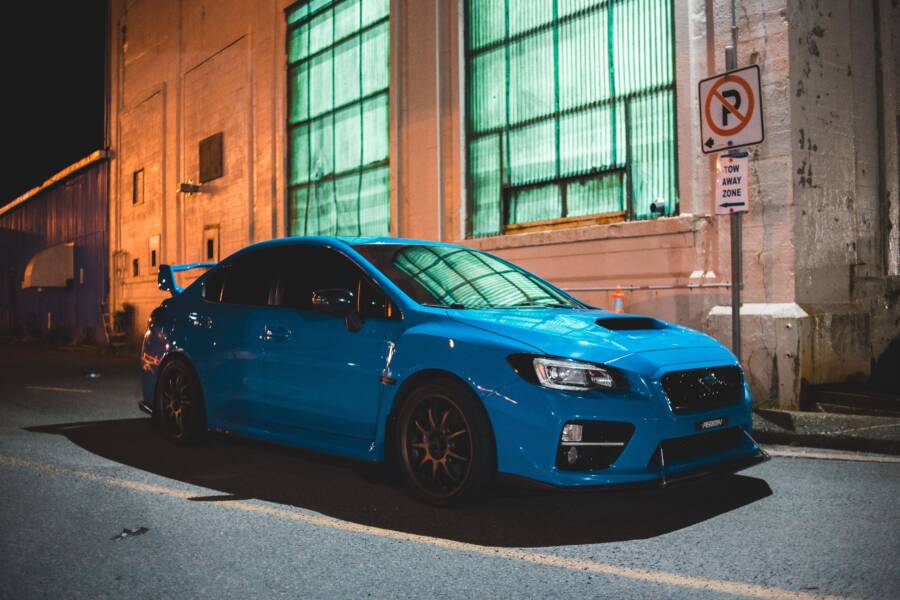
The three-quarter view is the most effective way to present your vehicle. Position yourself at one of the front corners of the car so the front and one side are both visible in the frame. This angle provides the most depth and helps viewers understand the proportions of the body. It allows the buyer to see the front fascia and the full length of the profile simultaneously.
You should also crouch down to the eye level of the car headlights. Standing tall and pointing your smartphone downward makes the vehicle look distorted and smaller than its actual size. Dropping to a lower position creates a more powerful, grounded stance that makes the car look impressive and well-maintained. This perspective mimics how a person sees the car when walking toward it in a driveway.
Capture these specific shots to give a complete exterior overview:
- A front three-quarter view showing the grille and driver side.
- A rear three-quarter shot to show the trunk and passenger side.
- A direct side profile to demonstrate the condition of the doors and rocker panels.
Highlighting Interior Features and Condition
Potential buyers want to see the condition of the cabin as clearly as the exterior paint. High-resolution photos taken with your smartphone reveal stains, tears, or excessive wear on the seats. Open all the doors to let in natural light before you begin. If the sun creates harsh shadows inside, place the car in a shaded area so the light remains even across the dashboard and upholstery.
Shoot from the perspective of a passenger sitting in the back seat to capture the entire dashboard and steering wheel. This angle gives the viewer a sense of the layout and space. Use your smartphone to get close-up shots of high-wear areas like the driver seat bolster and the center console buttons.
Follow these tips to get better interior results:
- Ensure the steering wheel is straight so the front tires look aligned in exterior shots.
- Turn on the infotainment screen if it displays a clean logo or simple navigation map.
- Check that the floor mats are positioned correctly to hide any carpet wear beneath them.
- Use the wide-angle setting on your phone to capture tight spaces like the back seat.
A clear photo of the upholstery proves you kept the vehicle in good condition. If the seats are leather, look for a slight reflection of light to show they are clean and conditioned. Avoid using the camera flash, as it creates unnatural highlights on plastic trim and makes the interior look lower in quality. Use natural light to keep the textures of the fabric or leather looking authentic and clean.
Simple Editing Hacks for Professional Results
You do not need expensive software to polish your car photos. Most modern mobile devices include powerful built-in tools that correct common mistakes in seconds. Simple adjustments to alignment and brightness help your vehicle stand out to potential buyers. These small changes transform casual snapshots into clear, professional images.
When to Use Built-in Photo Editing Tools
Use your phone’s native editor to fix minor flaws before you post your listing. You can access these tools directly through your gallery app without downloading third-party software. Open your photo, select the edit option, and look for the crop or adjustment icons.
Straighten crooked horizons to make the image look level and professional. If the background fence or the road looks tilted, the entire photo feels off-balance. Use the crop tool to rotate the frame until the horizon sits perfectly flat. Most interfaces show a grid overlay while you rotate, so use this to align the car tires with the bottom edge of the screen.
Adjust the brightness if the car looks too dim or loses detail in dark areas. A slight increase in exposure brings out the texture of the paint and makes the wheels visible. Avoid pushing these settings to the extreme. You only need to make the image match what your eyes see in person. If you brighten a photo too much, the sky may turn white and lose all detail. Keep the adjustments subtle to maintain a realistic look.
Avoiding Over-Editing and Misrepresentation
Serious buyers want an honest look at the condition of the car. Excessive filtering or color manipulation makes a vehicle look suspicious. A buyer might assume you are hiding flaws if the paint color looks unnatural or the lighting seems impossible. Stick to standard adjustments like brightness and contrast rather than using stylized filters.
Never attempt to remove dents, scratches, or stains using healing tools or retouching apps. While it is tempting to clean up a small blemish, this practice is dishonest. A buyer will notice the missing detail the moment they see the car in person. This creates a loss of trust that often kills the sale immediately.
Present the vehicle as it is to attract the right person. If the car has a scratch, include a clear photo of that specific area. This shows transparency and confirms you are a serious seller. A clean, well-lit photo of a slightly imperfect car is much better than a heavily edited image that masks reality. Use your smartphone to highlight the true character of your vehicle. Clear, authentic photos build confidence and help you move the car faster.
Conclusion
High-quality images are the most effective tool you have for selling a car. By cleaning the vehicle, using soft natural light, and choosing honest angles, your smartphone becomes a powerful asset for your listing. These small, deliberate choices help you build trust with potential buyers and generate interest.
Consistency and clarity are the primary drivers of a fast sale. Review your photos on the screen before you hit the publish button to ensure every shot meets these standards. A clear, well-staged gallery allows the car to speak for itself, so take the time to present it right.