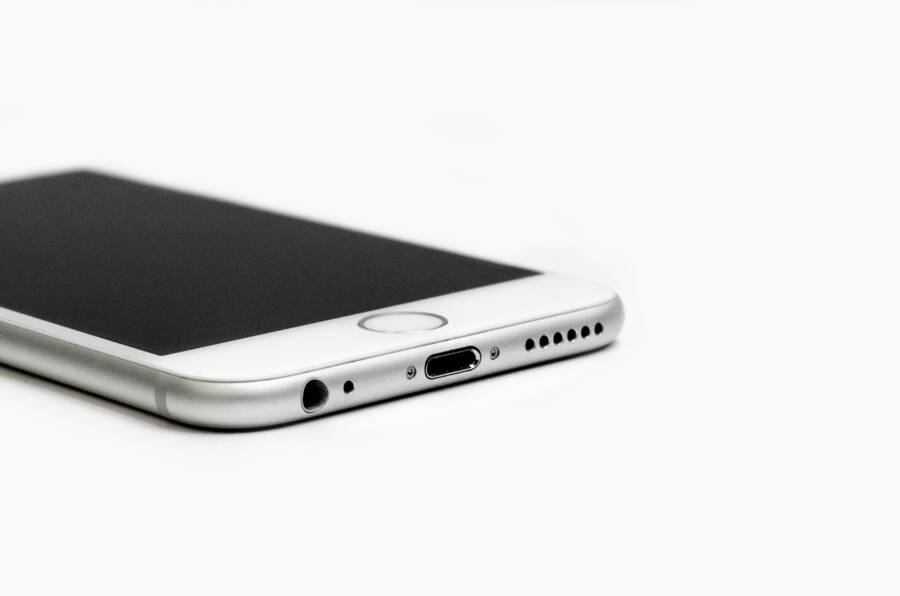
A dirty charging port is a common issue for every smartphone owner. You might find that your device stops charging or shows persistent error messages because lint and pocket debris prevent a solid connection.
The core solution is to clean the port gently using non-conductive tools. This approach resolves frustrating “moisture detected” or “debris detected” errors without damaging the sensitive internal pins.
This guide will help you restore the functionality of your smartphone charging port safely and effectively. You can follow these steps to keep your device powered and reliable.
Why Your Smartphone Charging Port Keeps Detecting Debris
Your charging port acts like a small, open tunnel at the base of your smartphone. Because it sits flush with the bottom of the device, it naturally collects lint, fabric fibers, and dust every time you slide your phone into your pocket or bag. Over time, these materials pack into the bottom of the port, creating a physical barrier between your charging cable and the internal pins.
When these particles accumulate, they prevent the cable from seating fully into the connector. This loose connection interrupts the flow of electricity, which is why your phone may fluctuate between charging and not charging. Even worse, if you use a cable with a metal housing, you might accidentally press this debris harder against the electronic contacts. This constant friction can cause permanent damage to the delicate charging assembly inside your smartphone.
Common Sources of Port Contamination
Most debris finds its way into your phone through daily habits that seem harmless. Identifying the primary culprits helps you understand why your port feels like a magnet for unwanted particles.
Fabric fibers from denim or wool pockets frequently detach and settle deep inside the port.
Pet hair often migrates into charging ports when you place your device on soft surfaces.
Fine sand or grit from outdoor activities can work its way into the connector and cause abrasive damage.
Paper particles from storage inside a bag or briefcase break down into fine dust that settles into the bottom of the port.
The Role of Moisture and Debris Sensors
Modern smartphones include sensitive hardware designed to protect your battery and charging circuitry. If the device detects a physical obstruction or a conductive material inside the port, it triggers a software warning. This alert appears because the phone senses resistance or an electrical short across the charging pins.
When your screen displays a message about debris, it is doing you a favor by preventing a potential electrical short. Ignoring this warning often forces the port to work harder, which generates heat. If this heat becomes excessive, it can damage the internal components of the smartphone or even degrade the charging port assembly entirely. Addressing the debris immediately is the only way to clear these warnings and restore the original charging speed of your device.
Safe Ways to Clean Your Smartphone Charging Port
Cleaning a smartphone charging port requires a careful touch to prevent permanent damage to the delicate internal pins. Because these components are small and often fragile, using the wrong items or too much force can easily bend the contact points or trigger an internal short circuit. You can restore your charging function by following a few simple, non-invasive maintenance practices.
Selecting the Right Tools for the Job
Your choice of tools determines whether the process is safe or hazardous for your device. Always prioritize non-conductive, soft materials that will not scratch or bridge the electrical connections.
Wooden toothpicks are the best choice because they are soft, non-conductive, and thin enough to fit into the narrow space.
Anti-static brushes offer a way to loosen fine dust and fibers without applying mechanical pressure to the pins.
Compressed air canisters help clear away loosened debris that you cannot reach with a tool.
Avoid metal tools at all costs. Paper clips, sewing needles, and safety pins are conductive, meaning they can easily cause a short circuit if they touch the positive and negative pins simultaneously. Even if you manage to avoid a short, the sharp metal edges are likely to scratch the thin gold plating on the internal contacts, which may cause connectivity issues in the future. If you must use a tool, keep it made of wood or specialized plastic designed for electronics maintenance.
Step-by-Step Cleaning Technique
Before you begin, turn off your smartphone completely. Powering down the device reduces the risk of an electrical short if your tool accidentally bridges two pins. Once the phone is off, follow these steps to remove the blockage.
Inspect the port under a bright light or use a flashlight to identify where the debris is packed.
Insert your wooden toothpick gently into the port, aiming for the sides rather than the center pins.
Use a slight scraping motion to loosen the packed lint, then carefully pull the debris outward.
Apply short, controlled bursts of compressed air to blow out any remaining dust particles.
Check the port again with your flashlight to confirm that no fibers remain.
Keep your movements slow and deliberate. You should never force the toothpick if you encounter resistance, as this could bend or snap the delicate pins inside the port. If the debris feels stuck, try angling the toothpick differently instead of pushing harder. After cleaning, wait a few minutes before plugging in your charging cable to confirm that the connection feels solid and the port is free of obstructions.
Preventing Future Charging Port Issues
Keeping your charging port clean is about adopting habits that stop debris from entering your device in the first place. You can significantly extend the lifespan of your charging assembly by changing how you store your smartphone and handle your accessories. A few small adjustments to your daily routine keep the port clear and maintain reliable power flow.
Store Your Phone Properly
Most debris enters a smartphone through the charging port when it sits unprotected in your pockets or bag. Your clothing pockets naturally contain loose fabric, lint, and thread that migrate into any open space. Storing your device with the charging port facing upward helps prevent particles from falling into the connector.
If you carry your phone in a bag or backpack, avoid placing it in a compartment filled with receipts, crumbs, or miscellaneous items. A dedicated, clean pocket in your bag protects the port from external contaminants. If you keep your smartphone in a case, choose a model with a built-in port cover. These covers provide a physical barrier that blocks dust and moisture while you are on the move.
Check Your Charging Cables
Damaged or dirty cables often carry debris directly into your device. Inspect the connector end of your charging cable before plugging it into your phone. If you see dark spots, corrosion, or sticky residue on the metal contacts, clean the cable first to avoid transferring dirt into the port.
You should also watch for frayed cables or damaged housings. A broken cable shell can snap off inside your charging port, creating a blockage that is difficult to remove. Replace any cable that shows signs of wear to keep both the accessory and your smartphone in good working condition.
Adopt Routine Maintenance
Periodic inspections keep your charging port free of buildup before it becomes a problem. Check the port once every few weeks using a bright light to ensure no fibers have gathered inside. You can prevent heavy accumulation by gently blowing into the port or using a clean, dry toothbrush to sweep away dust buildup on the surface.
Avoid using your phone in environments where fine dust or grit is common, such as beaches or construction sites. If you must use your smartphone in these areas, consider a waterproof or dust-resistant pouch. Keeping your device clean is far easier than removing packed debris after it causes a charging failure. Taking these steps keeps your connection strong and prevents the need for invasive cleaning in the future.
When to Seek Professional Repair
You should contact a professional repair shop if your DIY efforts fail to resolve the charging issue or if you detect signs of hardware damage. While home maintenance works for basic lint removal, some problems require specialized tools or internal component replacement. Attempting to force a fix on a damaged port often turns a minor issue into a costly mainboard repair.
Signs That DIY Cleaning Is No Longer Enough
If you have already cleared visible debris and your device still refuses to charge, the problem likely lies deeper than surface-level lint. You might notice physical symptoms that indicate internal component failure. For example, if the charging cable feels loose or wobbly even when fully inserted, the port housing itself has likely suffered mechanical fatigue.
Persistent software alerts also signal a deeper issue. If your smartphone continues to report moisture or debris after you have confirmed the port is clean, the sensor or the internal charging pins are likely compromised. Corrosion from exposure to humidity often leaves behind a residue that prevents electrical conductivity, even if no physical blockage remains.
Risks of Over-Cleaning a Charging Port
Excessive scraping or probing with non-professional tools creates risks for your device. You might accidentally bend the tiny contact pins located inside the port, which are often impossible to straighten at home. Once these pins lose their shape, they no longer make contact with your charging cable, rendering the port permanently non-functional.
Using the wrong cleaning solvents also causes significant harm. Liquids like water, harsh alcohol, or household cleaners often seep into the internal circuitry. This moisture causes oxidation on the delicate connectors, which spreads rapidly and destroys the charging port assembly. If your cleaning attempt involves anything other than dry, mechanical tools, you risk causing a short circuit that disables the entire motherboard.
When to Visit an Authorized Service Center
Take your device to an authorized repair provider if the port is physically cracked, missing internal plastic, or shows signs of burnt discoloration. These indicators suggest an electrical failure that a simple cleaning cannot fix. A technician has the equipment to test the voltage output of the port and determine if the underlying charging controller chip is functioning properly.
Warranty status also dictates your decision. If your smartphone is still covered by a manufacturer warranty or an extended protection plan, professional repair is usually free or significantly cheaper than an out-of-pocket fix. Trying to repair a damaged port at home might void your warranty entirely, so consult your device documentation or support app before taking any invasive steps. Using official service channels keeps your device within manufacturer specifications and ensures that all repairs use genuine, compatible parts.
Conclusion
Most charging port issues are simple to resolve at home if you approach the task with patience. A steady hand and a non-conductive tool typically clear away the blockage without causing further harm to your smartphone.
Always prioritize caution during the cleaning process. If you force an object into the port or use conductive materials, you risk permanent damage to the delicate internal pins.
Consistent care keeps your device hardware functional for years. Periodic inspections and proper storage habits maintain a reliable power flow, so you can avoid future service visits.